Background
The increasing popularity of Design Thinking, the Google Design Sprint, and other frameworks helped design gain more attention from companies worldwide. The collaborative nature of these frameworks increased the understanding that design could contribute to businesses in a meaningful and tangible way. Designers started to be seen as facilitators and specialists who can connect multiple stakeholders and end-users to solve a problem (Aronowitz, 2018). As design maturity grows, it permeates the company environment at all levels, including senior management, demonstrated by companies adopting design as a competitive strategy (Kuang and Fabricant, 2019), up to a point where designers also get appointed to executive-level positions. While this can take years to happen in a traditional company, many startups are founded with the design practice already integrated into their way of working and culture, pushing conventional boundaries to grow as fast as possible, especially regarding process maturity (Sutton, 2000). Methodologies such as Agile have been adopted from the beginning to keep ways of working fast and flexible.
This combination of design and development frameworks has numerous benefits for collaboration. Ferreira et al. (2007) identified that Agile methods could fundamentally change the way developers and designers communicate, reinforcing rituals and improving their relationships. But there are still gaps between the two areas, one of them being that these frameworks have no overlap (Fig. 1). The frameworks in the design space primarily focus on working in the discovery and problem spaces, while the Agile ones focus on delivering solutions as fast as possible (Gurusamy et al., 2016). The bigger this gap becomes, the less a product experience stays consistent over the whole user journey, and the less correctly a brand gets represented. A different approach is needed (Perez Cruz, 2019).
Large enterprises and startups have been exploring ways to bridge this gap. For years, solutions such as interface pattern libraries and brand style guides oriented designers and developers on implementing solutions. But considering the complex nature of modern software development, these solutions are not enough. As a result, companies such as Airbnb, Uber, and IBM have invested in a different solution: adopting what is known as a Design System (DS). According to Kholmatova (2017), a DS is “a set of interconnected patterns and shared practices coherently organised to serve the purpose of a digital product.” These patterns are the repeatable elements that, when combined, create a digital interface: buttons, text fields, icons, colour palettes and flows. The shared practices relate to how patterns are created, used and shared among teams.
Adopting a DS by itself is not a guarantee of success. It needs to be adapted and organised in a way that works for the company. This study focuses on the challenges of maturing a DS and further adapting it to the company context, specifically towards contribution models: an approach that can expand the system’s capabilities while maintaining its core objective of connecting designers and developers.
The thesis is presented in two main parts. The first is a literature review of the evolution of design patterns, from early concepts to the more modern approaches used by digital products today, including an explanation of the benefits of a DS and the ethical considerations around the approach. The second part presents a way of solving the problem in the author’s workplace: a new process is researched, iterated and validated, with the final objective of implementing a proof of concept, the first of its kind in the company.
A few terms are essential to understanding the context of DS and modern software development practices used throughout this report:
- Product Designer: A designer who uses user-centric methods and processes to create solutions, with responsibilities ranging from uncovering user problems to delivering ready-to-build designs.
- Developer: A professional responsible for building interfaces for software applications on platforms such as Apple iOS, Google Android and web browsers.
- Digital Product: Digital software products created to transform a user-specific need into a business opportunity, such as streaming movies or buying groceries online.
- Software as a Service (SaaS): A way of delivering digital products where the software is centrally hosted and distributed on a subscription basis, allowing for constant updates without a customer buying a new version.
- Design System (DS): A set of interconnected patterns and shared practices coherently organised to serve the purpose of a digital product: a combination of pattern libraries, style guides, principles, rules and guidelines that lets designers and developers spend more time on the right problem instead of how an interface will be built (Perez Cruz, 2019).
- Product Teams: A multi-practice team of design, technology and product management specialists, usually responsible for a section of a digital product and for delivering features and improvements into the user flow.
- Design System Team (DS Team): Similar to a product team, but instead of creating solutions directly for end-users, it creates and maintains an internal product that other teams use to standardise and accelerate their work.
Scope, research question, and objectives
This thesis is an activity for Hyper Island’s Digital Management Masters program. Its objective is to demonstrate a systemic and critical understanding of digital management while showing originality in applying professional and academic knowledge to solve a problem in the workspace. The research took place at the author’s workplace, Adevinta, and as standard company practice, its insights and learnings were implemented first as a proof of concept in one market before being scaled to the whole company. In this case, the DS implemented in the Benelux market, represented by its two products, Marktplaats and 2dehands.
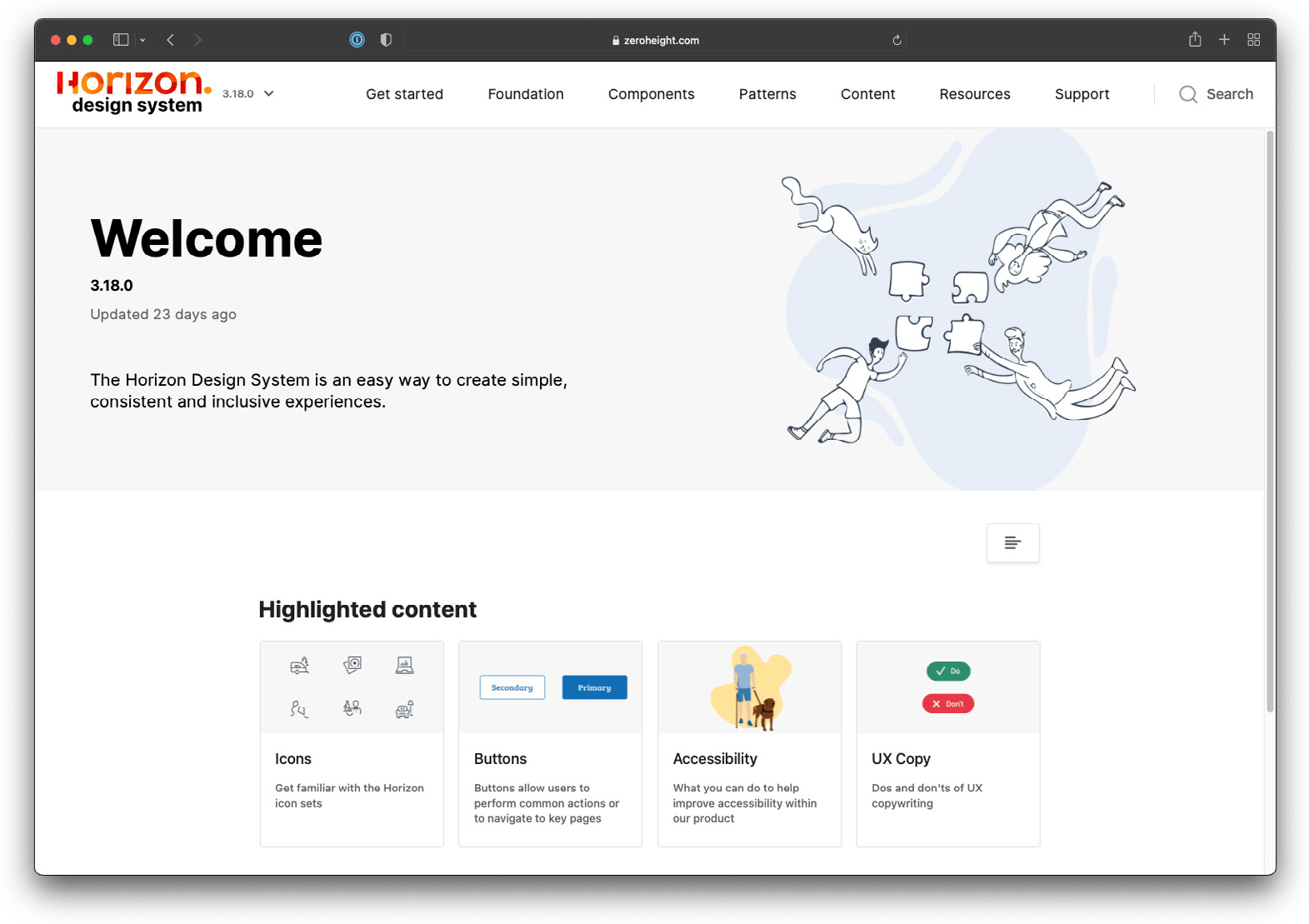
The outcome of this research is a new section of the existing Horizon Design System (HDS) documentation (Fig. 2), containing process diagrams and guidelines on how designers from product teams can contribute to the HDS, complemented by practical guidance for every branch of the process so teams can move forward autonomously.
Design and collaboration should go hand in hand. Frameworks such as Design Thinking thrive on contribution between stakeholders, but for a DS this is not usually the case: most DS teams control what changes can be made to a DS in a very centralised way. This mindset probably comes from Systems Thinking principles, where authors such as Meadows and Wright (2008) affirm that it can be quite challenging for outsiders to comprehend the interconnections of a system, making it difficult to anticipate the impact of a change on the whole system. While this is probably true, it should not prevent collaboration from happening.
This research examines the following question: how can a collaborative process be implemented where product teams are self-guided into creating tangible contributions to a DS? An answer pursued by mitigating the risks of decentralising a DS, and by exploring the motivations of these teams to contribute and what they would get in return for their collaboration.
Design as a practice has been evolving at an accelerated rhythm in recent years (Buley, 2019). This study aims to create new company knowledge on how to mature an internal DS and expand it as a product by exploring more modern and collaborative processes, part of a broader strategy that aims to elevate the company’s design maturity as a whole, an effort that started in 2017 when design leaders across the company traced a long-term design maturity plan after identifying a deficit compared to competitors (Buley, 2017). The new approach would give product teams more autonomy over contributions to the DS by decentralising its core and reducing dependency on the DS team, running for the defined period of one quarter (Q4 2021). If successful, the process would receive funding and scale to a global level.
The problem in the workplace
This study took place at Adevinta, a company that owns and operates an international group of local classifieds brands. As of June 2021, it merged with eBay Classifieds Group. The combination of these two portfolios created an expressive global portfolio of digital classifieds products in 16 countries, with an average of 1.5 billion visits and 250 million unique users each month (Adevinta, 2021). All these products serve the same purpose of connecting buyers and sellers in their markets. The author of this research is responsible for maintaining a local design system that supports two of the company’s products: Marktplaats and 2dehands (Fig. 3).
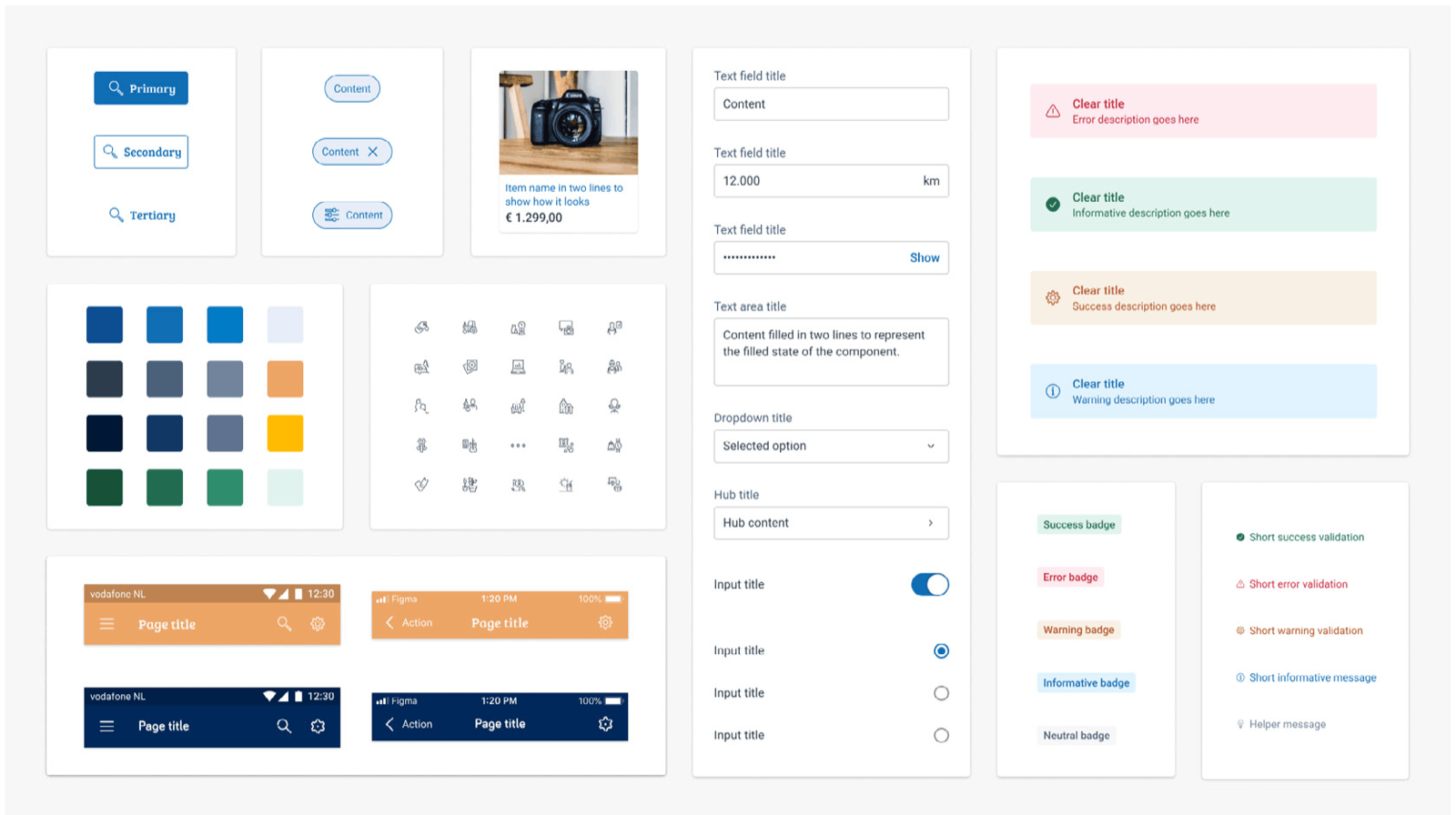
As a Lead Product Designer, the author led the effort to build the company’s first DS for the Benelux market, the Horizon Design System (HDS), with two main objectives: first, to create a scalable and manageable single source of truth for designers and developers; second, to anticipate potential development issues during the design phase. A single source of truth means the DS becomes the one place that contains all the definitions of how a design should look and behave, helping designers and developers align their communication by creating a shared common understanding (Fig. 4). Anticipating potential development issues while still in the design phase, such as a missing colour style or a translation that doesn’t fit the width of a button, helps save time and money, since the cost of fixing a bug during the design phase is multiple times cheaper than in production (Dawson et al., 2010).
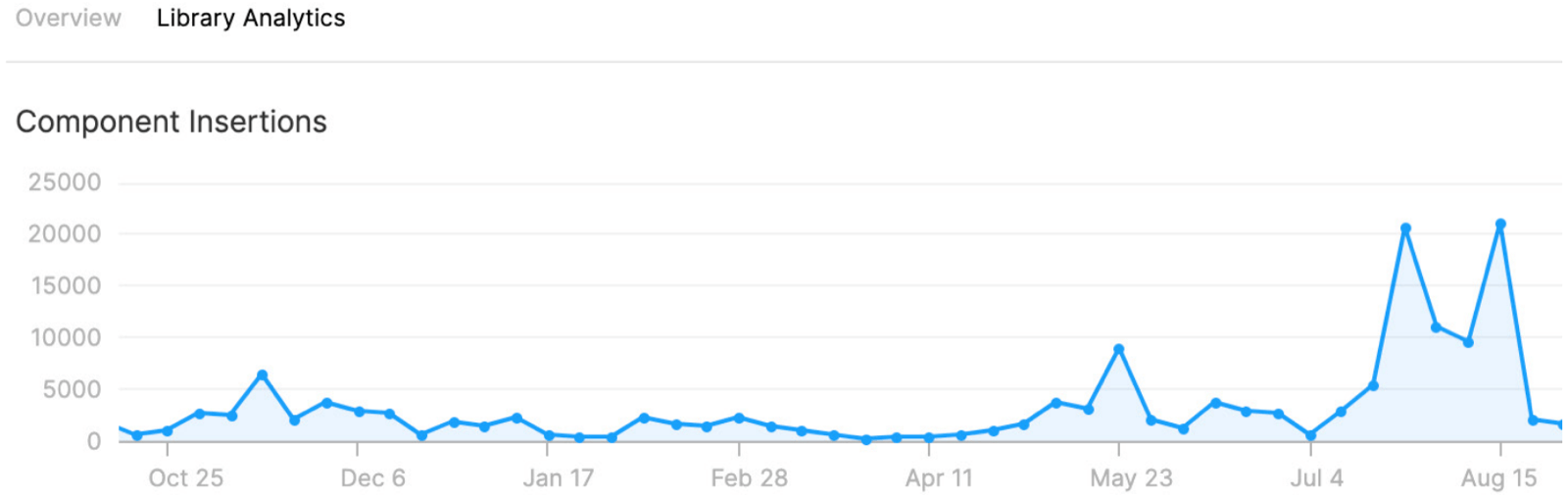
The HDS proved to be a success by overcoming the main challenges for this type of project, such as staffing difficulties, lack of executive championship and low adoption (Sparkbox, 2020). Then, an unforeseen event emerged: product teams using the HDS started dedicating time to exploring how they wanted the system to behave, expanding its features in ways that would best serve them and providing this as feedback. The DS team was able to handle these requests at first, but with the HDS’s increased adoption, it ended up becoming the bottleneck. This trend started in May and kept growing towards August (Fig. 5). The length of the period showed it was not an isolated spike in usage, but an actual increase in adoption by designers and developers. While this can look like a problem at first, it also indicates that the project is evolving and reaching new maturity levels.
The lack of a contribution process was intentional. From the beginning, the mindset was that only the DS team had enough knowledge to work on the HDS: product teams have different objectives, and they are responsible and accountable for maintaining other areas of the product, so they wouldn’t have the time or the remit for the HDS. But with increasing adoption, the DS team came to believe that without tangible contributions from other product teams, the HDS would fail and its adoption would decline. Exploring a process that allows tangible collaboration from product teams is therefore not only an opportunity to scale, but also a way of keeping it relevant. While the team did not intend to decentralise the project entirely, since the risks and effects of decentralising such a complex problem are still unknown.
This research is limited by its sample and market size, since for now it only considers the company’s Benelux market and the product teams responsible for the local brands. There is also a limitation regarding duration: based on previous process changes in the company, a new process would typically need to run for three to six months to be evaluated appropriately. Since that time was not available, this research focuses on the implementation of a new process, with its longer-term evaluation to occur at a different moment.
Literature review
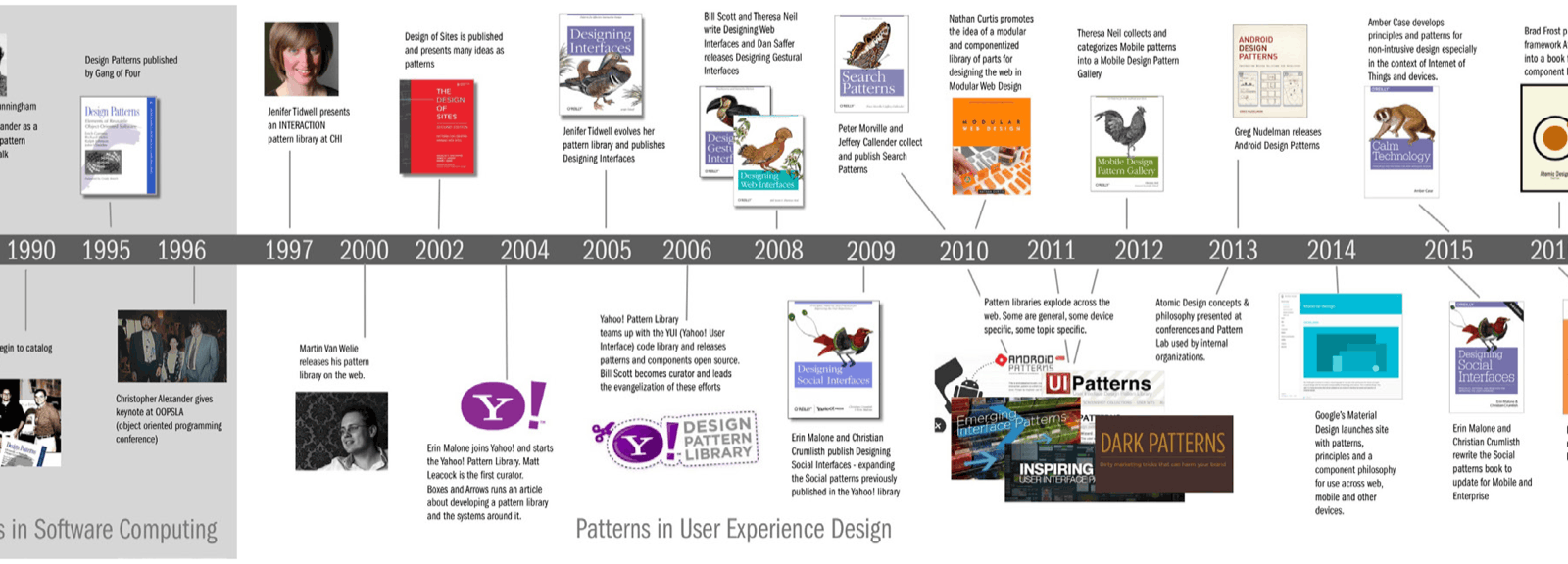
DS’s are becoming crucial to how digital products build their solutions. To understand how and why they became so important, it helps to go back to a series of events that preceded their existence, since their history starts well before today’s modern ways of designing and developing software. This section explores the evolution of design patterns, starting from the early days of personal computers, through the advent of web design, to the revolution of modern mobile app interfaces: an overview inspired by an article from Malone (2017) titled “A History of Patterns in User Experience Design” (Fig. 6), reflecting on her teaching experience at California College of the Arts and how the evolution of design patterns changed the way designers build interfaces.
The evolution of design patterns
Introduced in the mid-1960s, the command-line interface (CLI) is a type of operating system (OS) that supports a series of commands via a keyboard to perform different tasks. Its usage is limited to linear processing: to complete a task, a person would input a series of desired commands one by one until it was complete. A CLI requires a digital display and electronic peripherals to work, its interface usually a dark screen with light-tone typography and loading states, visual elements considered rudimentary by today’s standards. All of a sudden, this new type of machine could handle documents and calculations, making analogue typewriters a thing of the past, and for many, this was the first interaction with what would become known as the personal computer. By the 1980s, CLIs became even more popular, with the 1981 launch of the Microsoft Disk Operating System (MS-DOS), which democratised the use of personal computers and made Microsoft one of the biggest software companies in the world, a title it still holds.
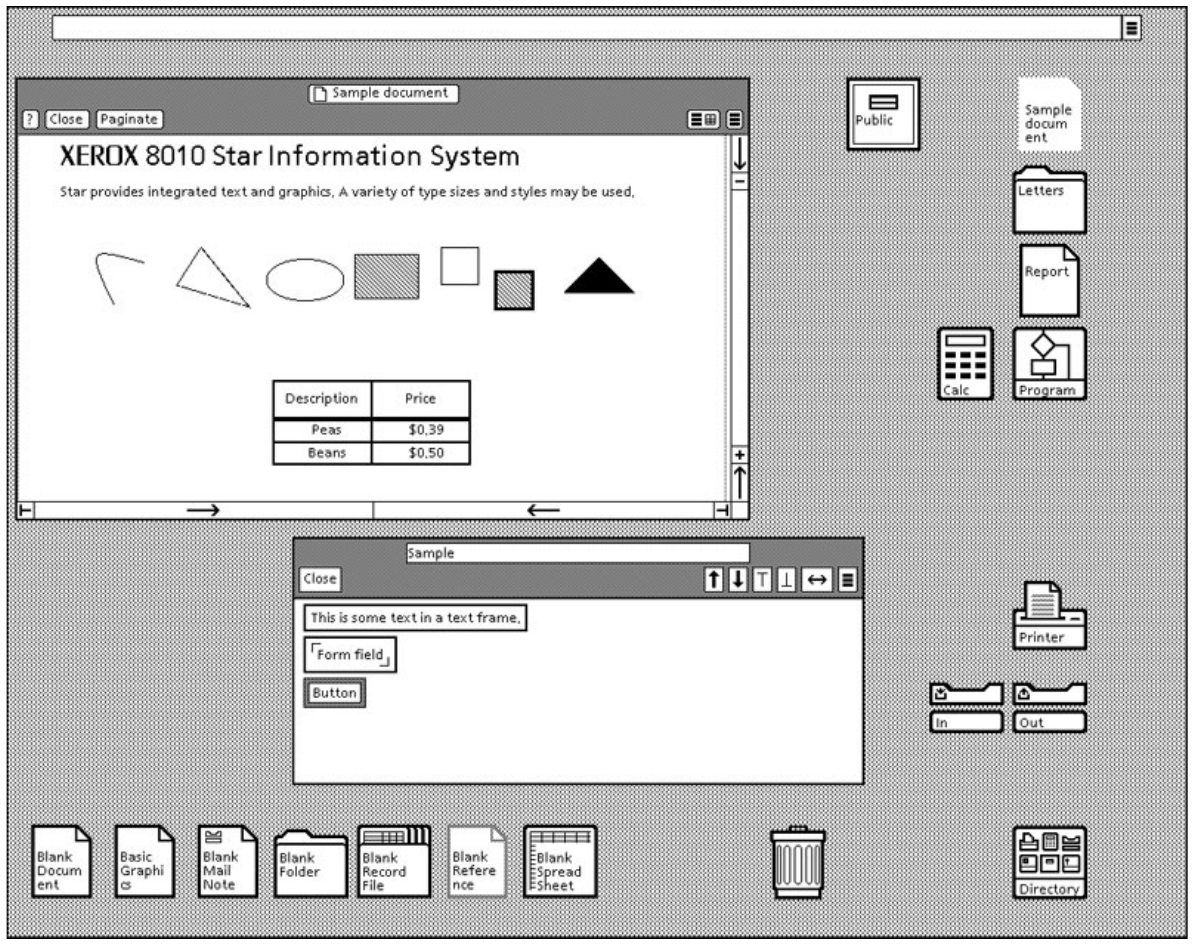
Almost simultaneously with the launch of MS-DOS, a team of researchers from the Xerox Palo Alto Research Center was about to revolutionise the way people interact with computers. Their research culminated in the creation of the Xerox Star (Fig. 7), which introduced the concept of the Graphic User Interface (GUI): an interface characterised by the use of visual analogies to represent actions, such as a trash can to indicate where to put files intended for deletion. Instead of only typing commands, users were also able to point and click with a mouse, a faster and more intuitive way of interacting with an OS. It quickly became evident that this could be a better way of interacting with computers, and the Xerox Star paved the path for a massive change across all OS’s launched afterwards. However, being a pioneer in this technology did not guarantee Xerox market leadership. Inspired by their product, more prominent companies such as Apple and Microsoft adopted the GUI as the default way of interacting with their OS versions. Many of the patterns introduced in this era, from dropdown menus to folders representing file structures, are still used today, demonstrating that design patterns can last a long life.
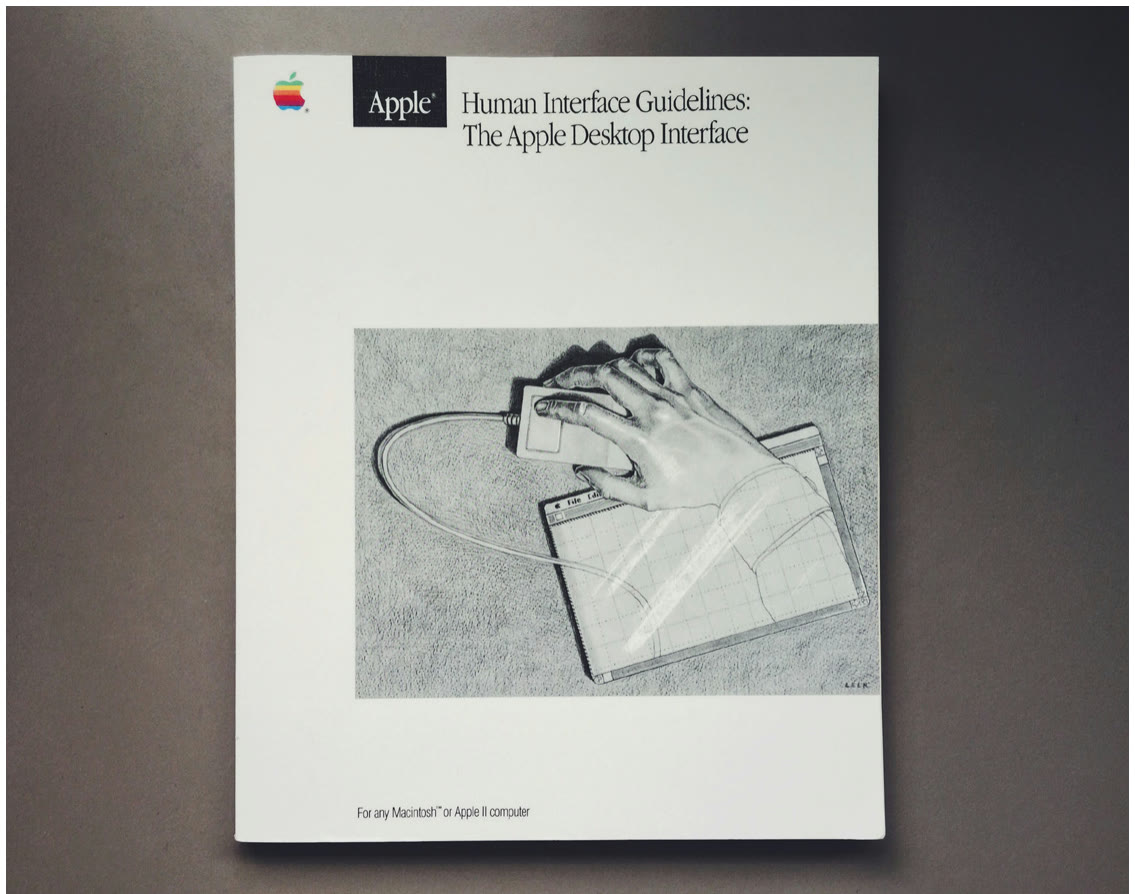
From the beginning, the creators of these OS’s understood the benefit of guidelines, style guides and reusable design patterns, elements that also underpin modern DS’s. This was not a lack of creativity or resources: the knowledge that it could help new and existing users interact with their software was already present. It was an intentional move towards standardisation, consistency and usability. Park et al. (2011) affirm that a digital product’s usability can benefit from predefined standards that help people easily identify patterns across the product. An early example of this knowledge is Apple’s Human Interface Guidelines, launched in 1987 and first published as a printed manual (Fig. 8), guiding developers on how to build software for Apple devices. Elements now used in DS’s were already present in these guidelines, such as solid design principles: the manual intended to help developers not just build any software, but something that would look and feel like part of the OS. In a contemporary reflection, Hodson (2017) affirms that many of the manual’s concepts still prevail today.
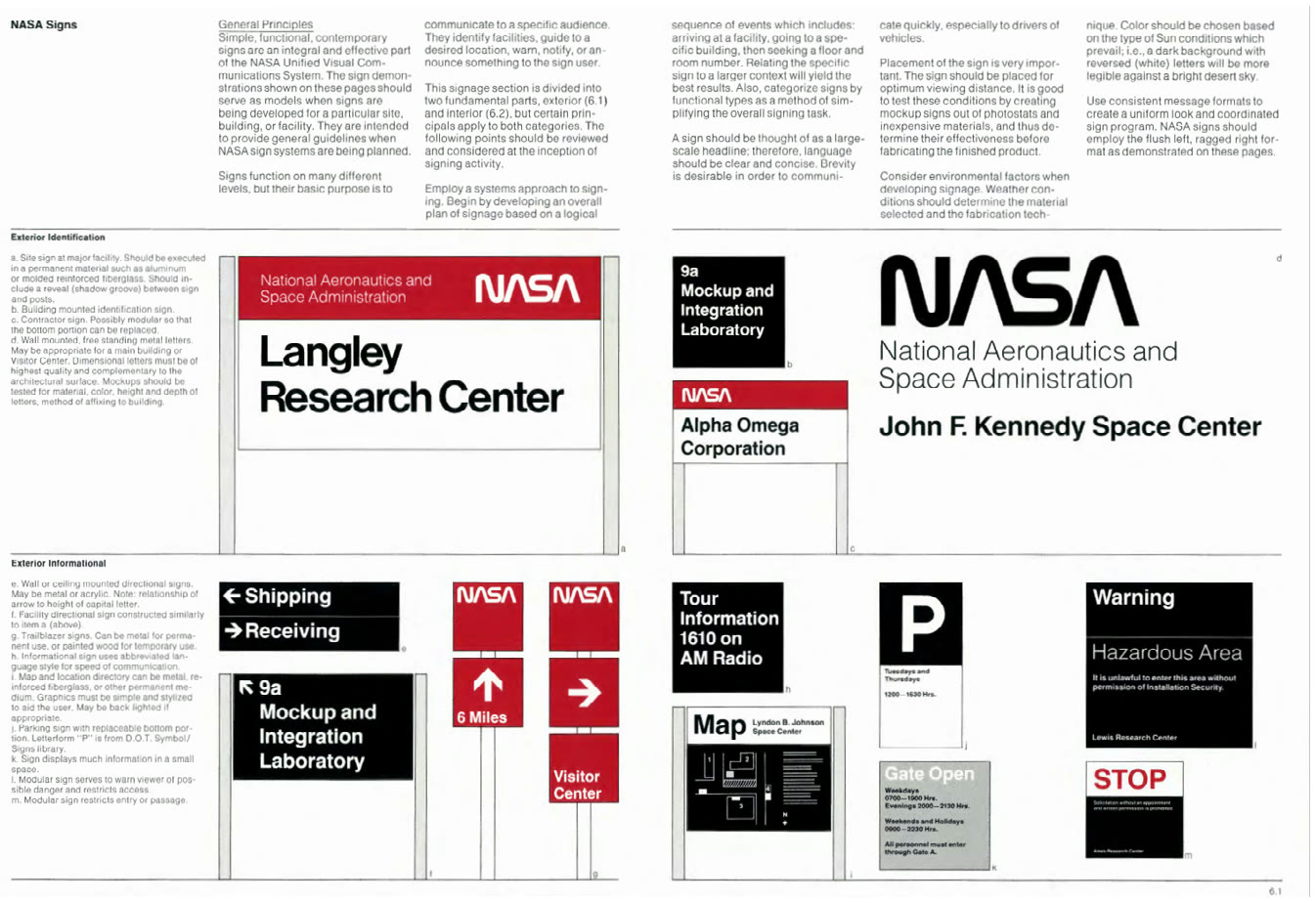
The migration from command lines to GUI made interacting with OS’s more intuitive and visual, but this was not yet part of the computer science curriculum, so those interested had to look for inspiration in other fields, such as graphic design. Designers were not new to visual systems: for years they had been building them for magazines, advertisements and brand style guides (Fig. 9). So the jump into doing the same kind of work in software felt like a natural and exciting path, and the GUI was just the beginning of this transformation for designers, moving from physical to digital mediums, and towards making solutions more interactable in ways not possible with print. In the early 90s, though, the opportunities were still niche and the need for software designers minimal. The real revolution for these professionals and their patterns came with the advent of the internet.
The first years of the World Wide Web were marked by exploration: inventive websites with no apparent standard started to appear everywhere, and technologies such as Macromedia Flash made rich media content available for the masses, meaning non-static content such as animation, audio and video could now be added to websites (Bedingfield, 2019). Once companies started to realise the business opportunities the internet offered, this scenario began to change. New professions such as web designer, interaction designer and information architect started appearing on job boards, most filled by people coming from graphic design jobs who saw the opportunity to digitalise their way of working, transforming visual patterns into interactive design patterns.
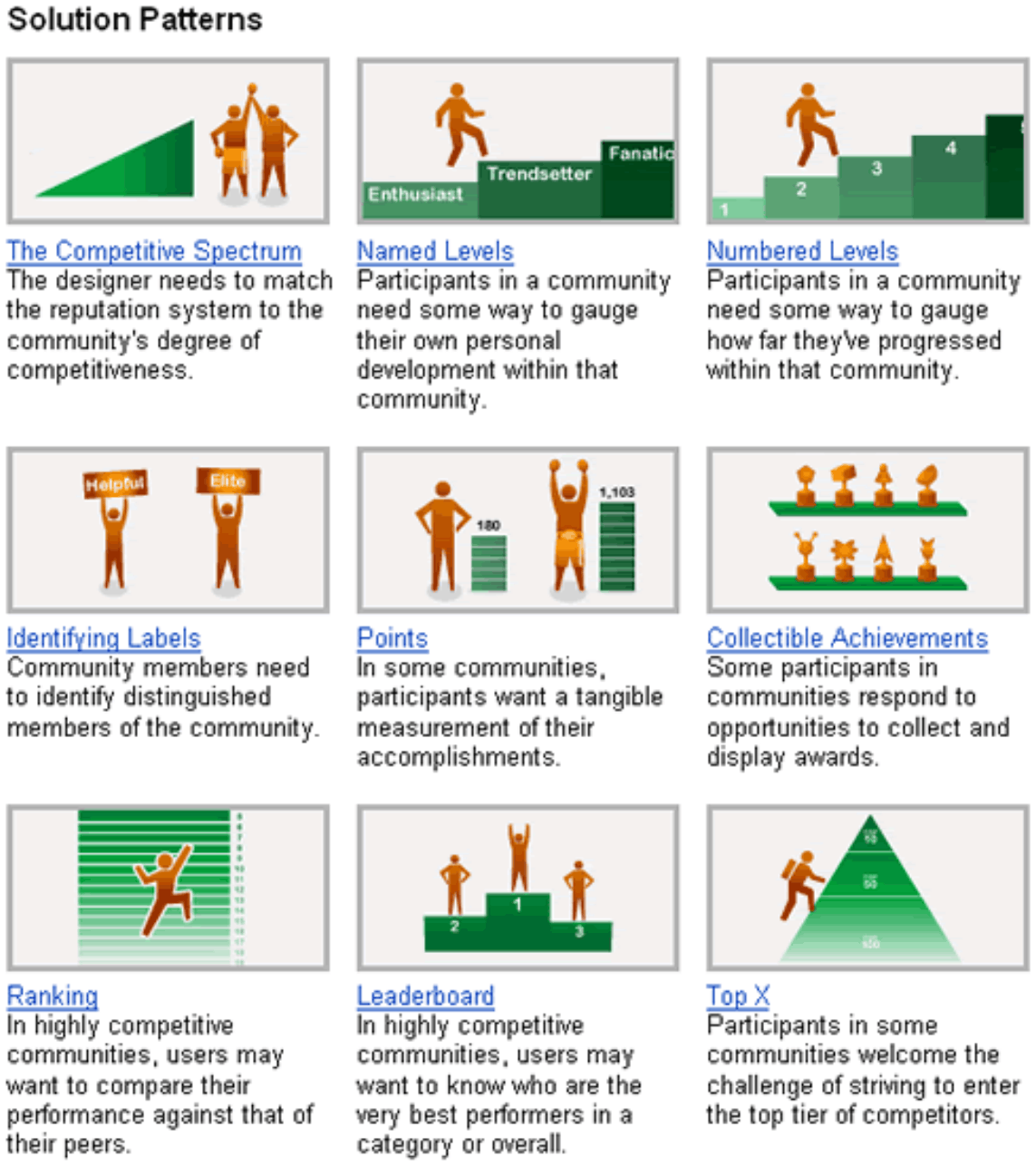
According to Malone (2017), the first digital design pattern libraries started to be theorised around 1997, with books and open projects published from 2000 onwards. Much of this content tackled the general concept of design patterns and their adaptation for the web; the idea of creating a set of design patterns for one specific company was not yet widespread. But in a move potentially ahead of its time, Yahoo! decided to create its own web standards for design patterns. Introduced in 2004, the Yahoo Design Patterns (Fig. 10) contained a series of guidelines for the company’s designers and developers, perhaps the first case of a large corporation using a DS for its digital products.
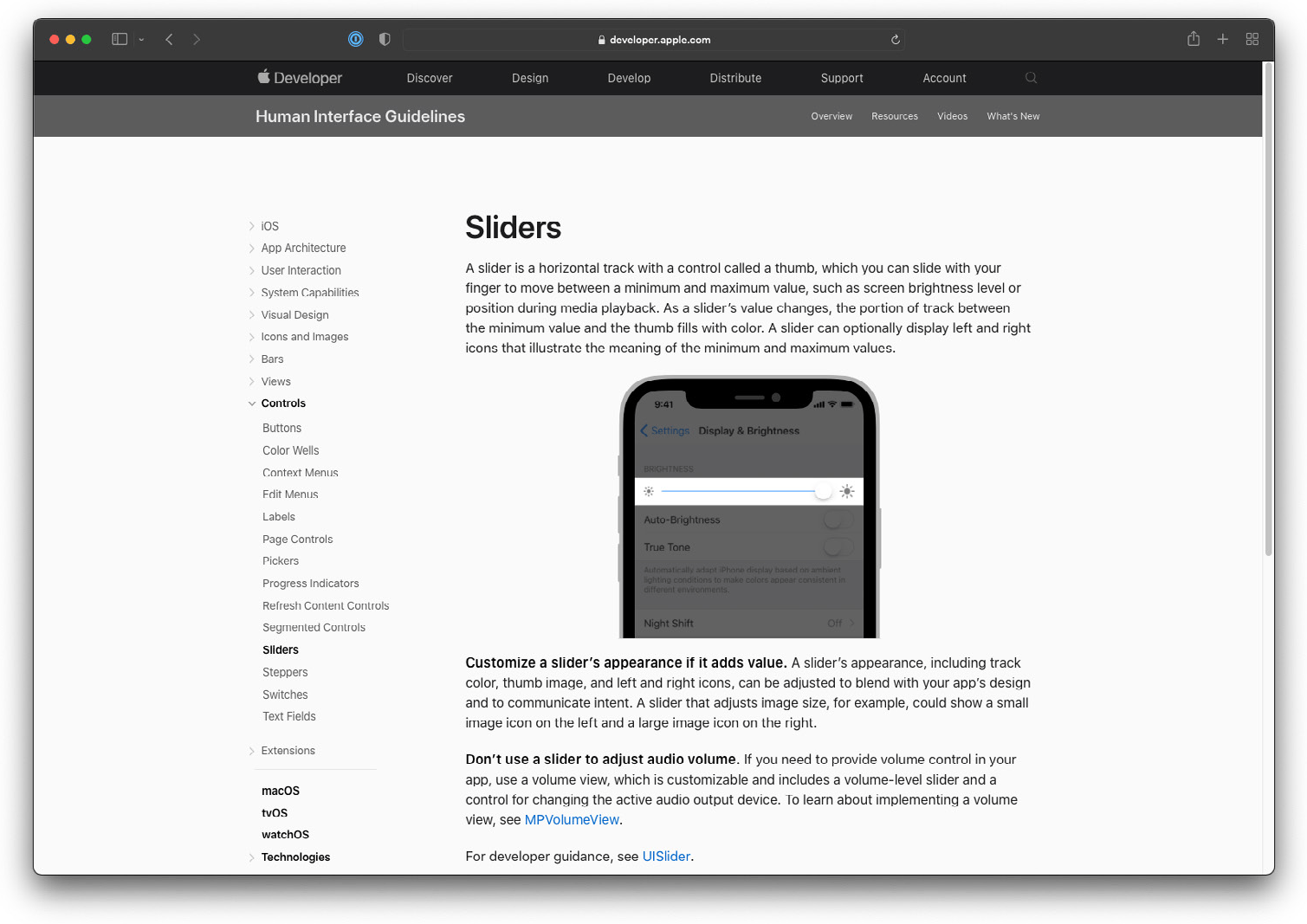
In the 2000s, web design continued to evolve and adapt to new mediums, such as the growing adoption of smartphones. A technology known as ‘Responsive web design’, a term coined by Ethan Marcotte in 2010, helped websites adapt to smartphones and tablets by automatically resizing content depending on screen size, potentially also responsible for the survival of websites once native mobile applications became available to these mobile users. When Apple launched its first iPhone in 2007, it completely changed the market, quickly becoming a sensation that led many companies to rush to adapt their products and services to the new device. Knowing that designers and developers would need guidance, Apple worked on a comprehensive update to its Human Interface Guidelines (Fig. 11), adapting the same underlying purpose to help its audience learn how their design principles and patterns should adapt to the new touch and mobile OS. Tidwell et al. (2020) explain this evolution and adaptability: interface design patterns, like everything else, change to keep up with the times, so as new mediums and ways of interacting with interfaces emerge, design patterns adapt to them.
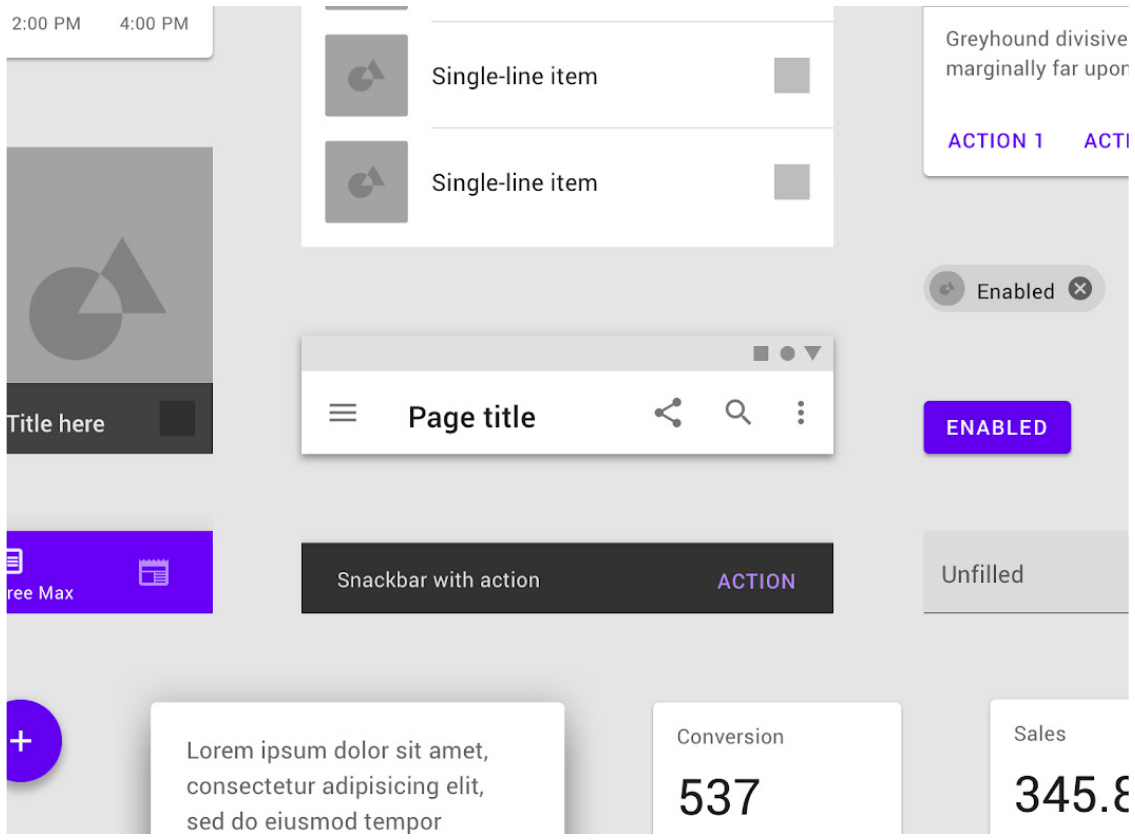
Mobile device usage continued to grow, and companies started to notice the need for cross-device experiences. In 2014, Google revamped how design was handled at the company, aligning its digital products to be visually and behaviourally consistent, an effort similar to what Apple did with its Human Interface Guidelines. The main difference is that this solution intended to align experiences cross-platform, so the company’s Android and iOS apps and website versions were treated as variants of the same digital product touchpoints. The solution was called Google Material Design (Fig. 12), nowadays one of the most famous and used DS’s and one of the first to introduce the concept of cross-platform design patterns.
This move was significant because how people interacted with digital devices was starting to change: companies like Google realised their users needed the same information and the same tasks available on both their phones and desktops, independent of device limitations, a trend that could only grow more complex as new devices appeared. Digital products that don’t adapt to different usage contexts are likely to fail to deliver a good user experience (Park et al., 2011), and Google not only predicted this shift but paved a new standard for cross-device experiences. Google also made its DS available for free, letting other companies enjoy the same benefits while focusing more on their own business, though a downside of adopting a third-party DS is that it can be challenging to customise, making it harder for companies to adequately express their own branding and design principles.
Tech companies and their digital products are becoming some of the biggest companies in the world (Murphy, 2021), and to continue scaling, they need an unprecedented change in the way they build products, though scaling for its own sake can create long-term issues. As products get more complex, adopting a third-party DS such as Google Material Design is no longer enough, so large software corporations such as Salesforce, Uber and Adobe (Fig. 13) started building their own customised in-company DS’s. These brands understood that a tailored mix of pattern libraries, style guides, principles, rules and guidelines could strengthen their brand while letting their product scale and provide a standardised end-user experience. Nowadays companies of all sizes have their own DS’s, and research suggests even smaller companies are realising the value of investing in the initiative earlier (Buley, 2019).
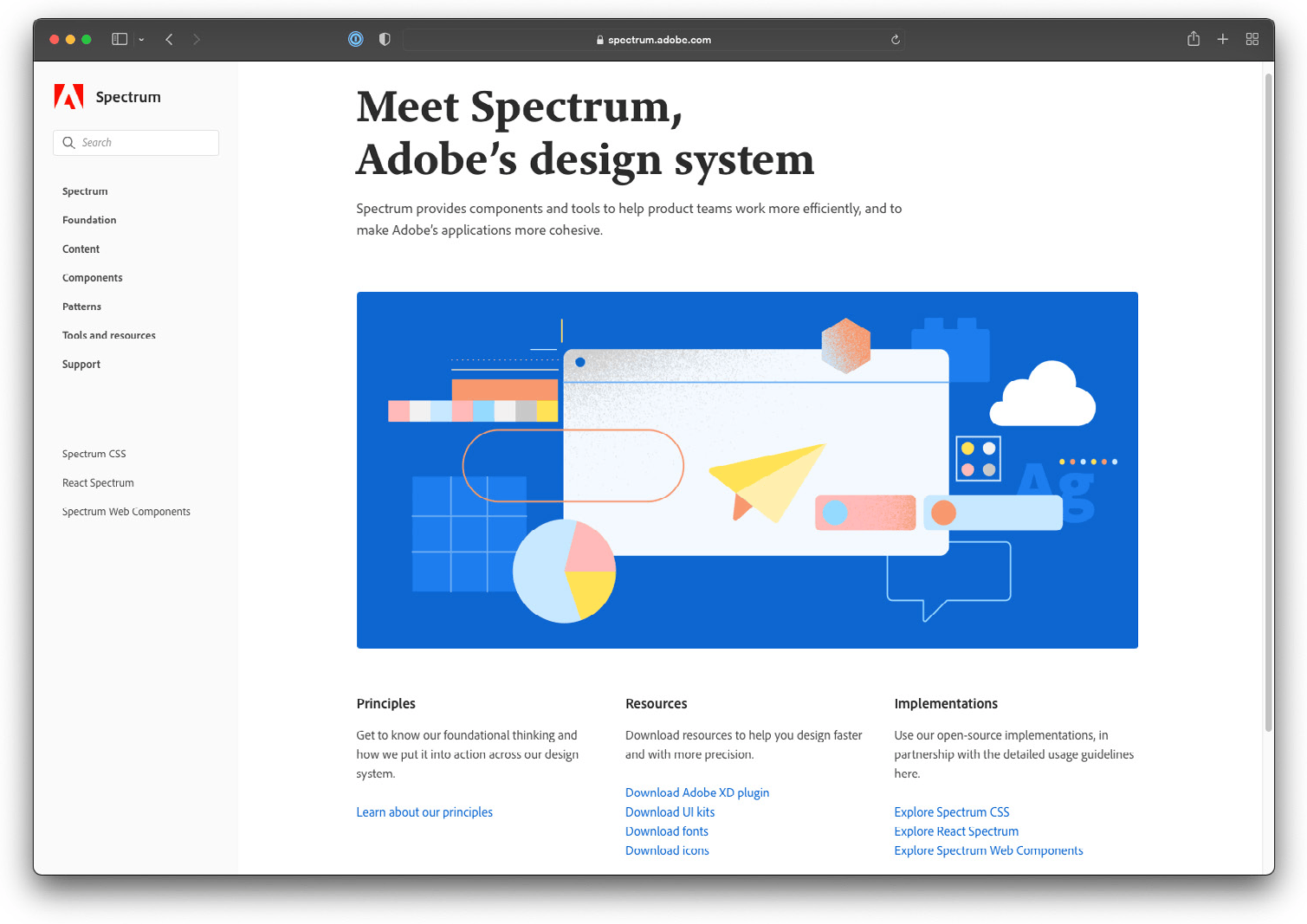
The search for better design patterns and adaptation to new mediums shows how adaptable and complex a digital interface can be. Examples such as the first Human Interface Guidelines show that the motivations for adopting a DS have not changed: from the beginning, these companies understood that standardising design patterns could offer more efficiency for digital products (Vesselov and Davis, 2019). What has changed over the years is the scale, and how these patterns adapt to new user needs. Encompassing all these concepts, DS has become an industry standard for expressing a company’s design maturity and its commitment to the quality of its user-centric solutions.
Design system parallels with architecture
Creative fields can have many parallels, and design and architecture are no exception, since both make clever use of patterns to improve their working methods and align communication with project stakeholders. Designers and architects are both responsible for guiding people through spaces and flows by creating environments that let people perform a series of desired tasks. Biswas (2019) explains that, for example, using a password to access personal information on a website is an analogy for using keys to enter a house, and the simple act of navigating between rooms with a specific purpose in a home can be related to navigating between screens in a mobile application (Fig. 14).
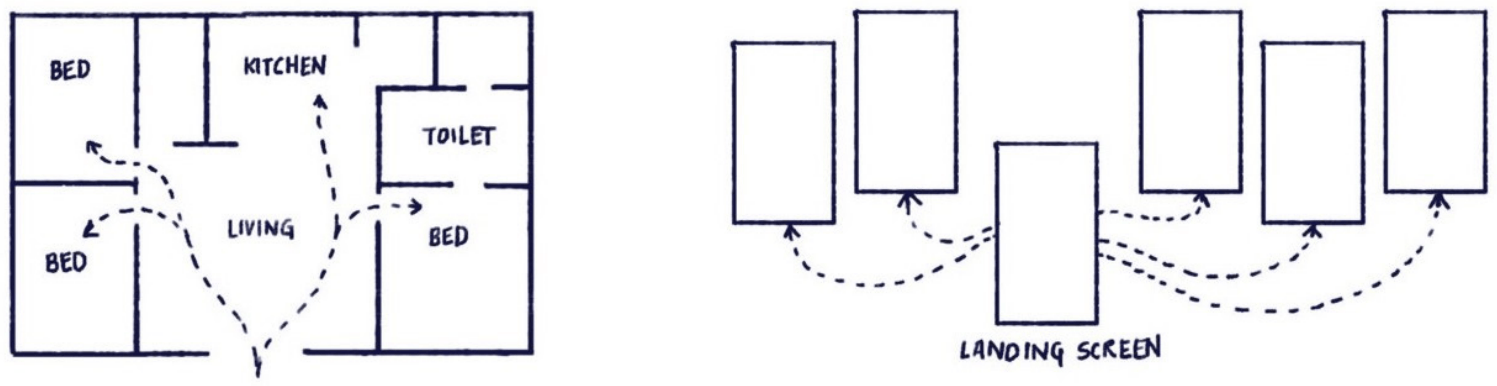
These similarities are also reflected in how patterns are conceived and represented. Alexander et al. (1977) affirm that patterns in architecture are ordered from the largest to the smallest, starting from regions and towns, down to buildings and rooms, and ending with construction details: a significant area can only exist as such if a combination of smaller connected patterns is in place to create the intended experience. To illustrate this, the authors use the example of creating an accessible green space, which first has to consider the neighbourhood it will sit in, then the plot and the addition of visual patterns such as green walls, community gardens and walkable paths, down to the types of trees and other plants used. This is no different from what a DS does for a digital product: indicating what needs to be used, based on a set of patterns and visual details, so the user flow can deliver the intended experience.
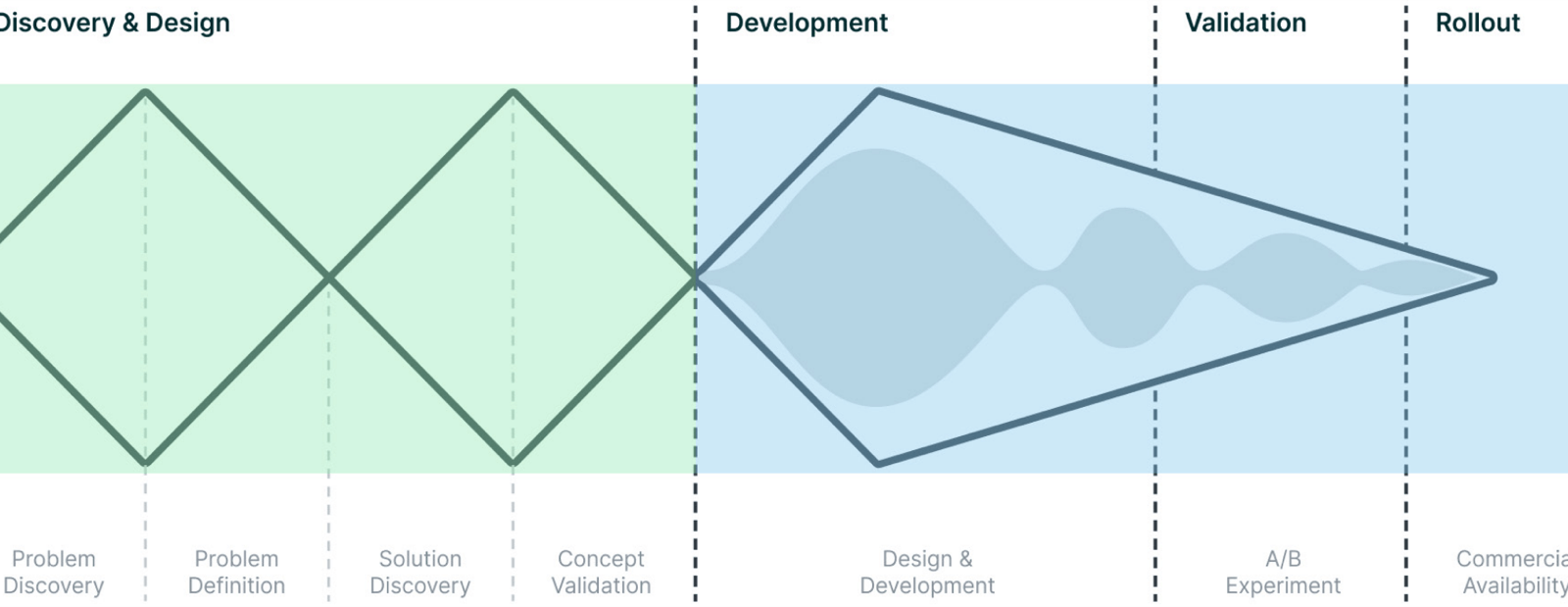
Both practices are responsible for creating the project for a solution, but they are often not the ones building the final product: for designers this is done by developers, for architects by builders. Design patterns in architecture, or a DS for product designers, help with this usually complex workflow. When executing such projects, communication becomes essential, since it tends to involve multiple stakeholders and constant, challenging decision-making. The challenges of executing a project from a product designer’s perspective can be seen in a variant of the Zendesk Triple Diamond (Fig. 15), which shows that once a solution moves into the development phase, many unknowns and variables are still present (Chen, 2020).
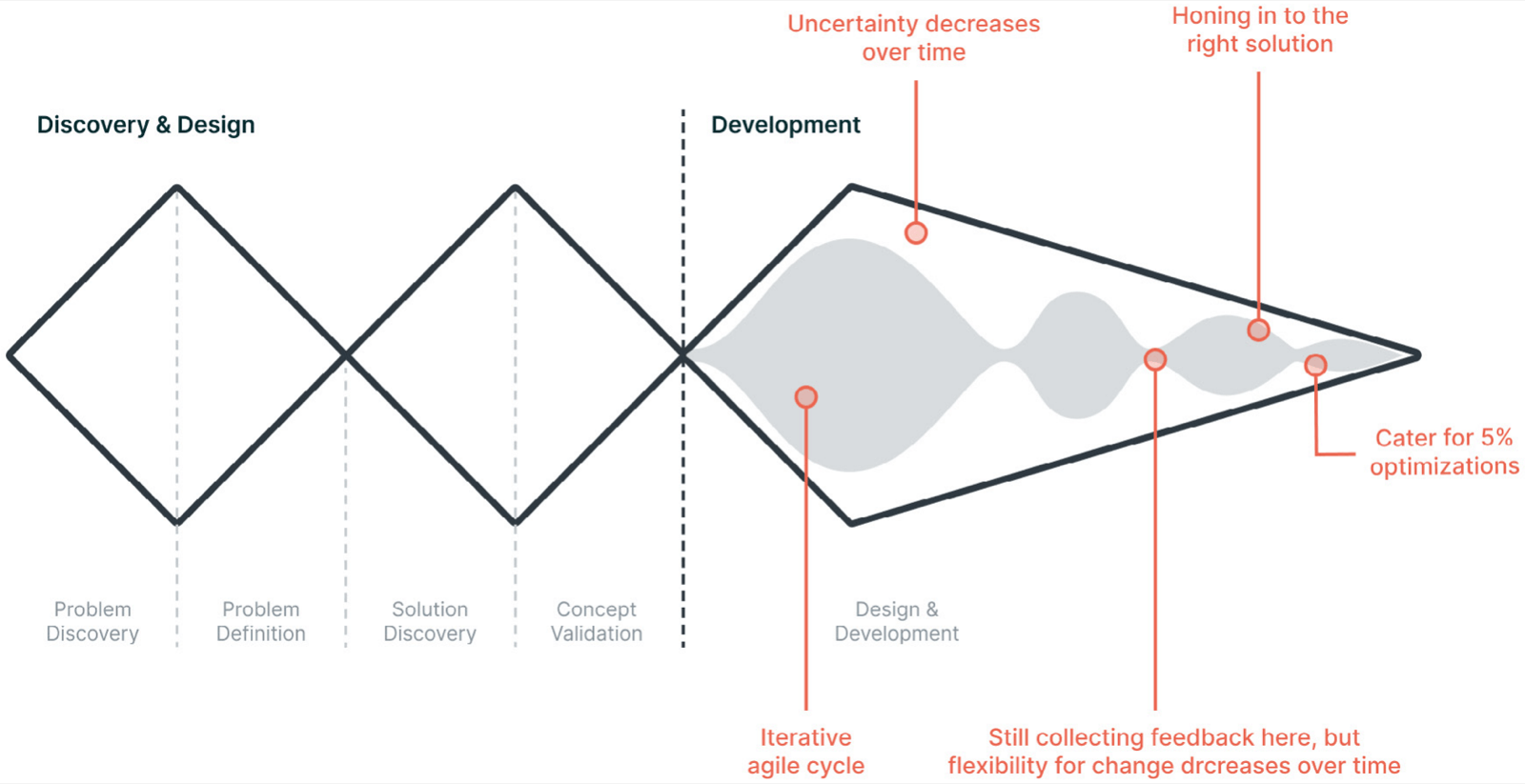
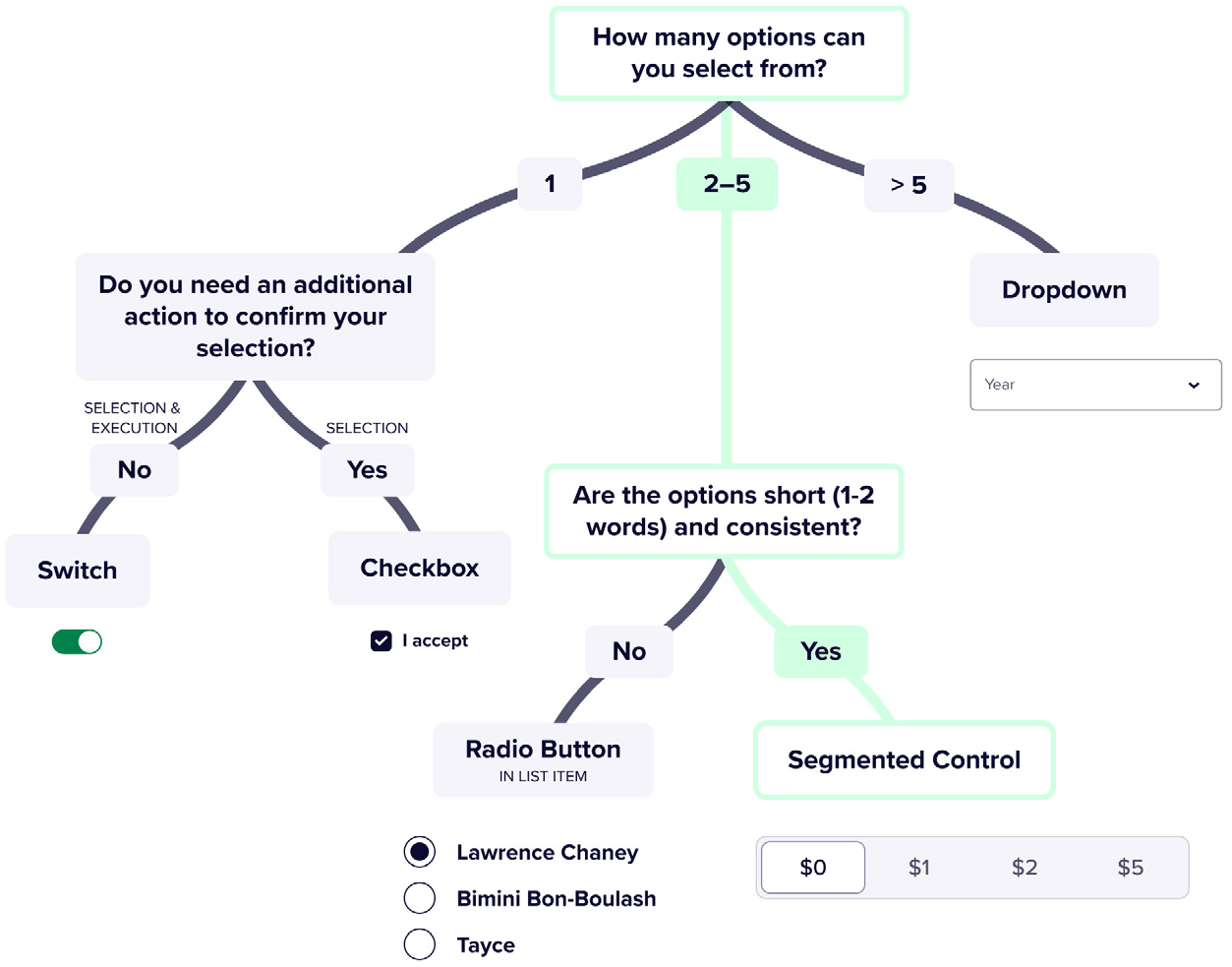
A set of patterns, or a DS, can simplify these communication challenges between project and execution in two ways. The first is by aligning language and naming conventions for elements, streamlining communication by creating a shared language carried from the beginning to the end of a project. The second is by helping decision-making when an unforeseen situation arises: documentation such as guidelines is helpful here, but one method stands out in particular. Process diagrams and decision trees are a quick and intuitive way of navigating the potentially complex world of patterns, providing guidance on which pattern to use depending on the situation.
Perez Cruz (2019) illustrates this with an architectural example: the New York City Transit Authority Graphics Standards Manual describes using a decision tree to guide station planners on how to sequence information for a subway rider, complemented by principles such as “the subway rider should be given only information at the point of decision. Never before. Never after.” In a parallel with modern DS’s, the same approach can be seen in an example from the American startup Lyft (Fig. 16), where designers are guided on how to design multiple-choice interactions for users of the company’s mobile application, also using decision trees (Goswami, 2021).
These examples from architecture show that some practices have been dealing with similar problems for years, and that digital products, and product designers in particular, can always benefit from seeking knowledge in other creative fields.
The importance and benefits of adopting a design system
A DS is not only a way of aligning design and development or offering a standard set of guidelines and patterns; it is also a way of supporting a brand’s experience consistency. In recent years, being user-friendly or customer-centric has become a way for companies to differentiate from competitors (Berkun, 2020), and a well-made DS lets these companies genuinely provide a scalable, standard, user-centric experience. This evolution has accelerated in large software companies, especially those that commercialise their solutions as a Software as a Service (SaaS), such as Netflix and Uber (Saad et al., 2021), a distribution method that lets companies constantly update their products and features via seamless updates (Benlian et al., 2011). This lets companies validate and ship multiple ideas quickly, without customers needing to buy a new version of the product.
One of the things that supports such speed is a DS, since this kind of visual system lets its interconnected patterns be quickly reused and rearranged without building things from scratch, an analogy for this being playing with LEGO kits, where a set of principles can be rearranged in different ways while still respecting the system’s rules. The caveat is that, unlike LEGO, new “pieces” can be created to support new objectives (Tanrim, 2021). The patterns in a design system are divided into groups, and as in architecture, combining them creates more specific intent. For example, a webpage can be built by combining tokens, components and nested components, resulting in a page aimed at the specific intent of browsing a feed (Fig. 17).
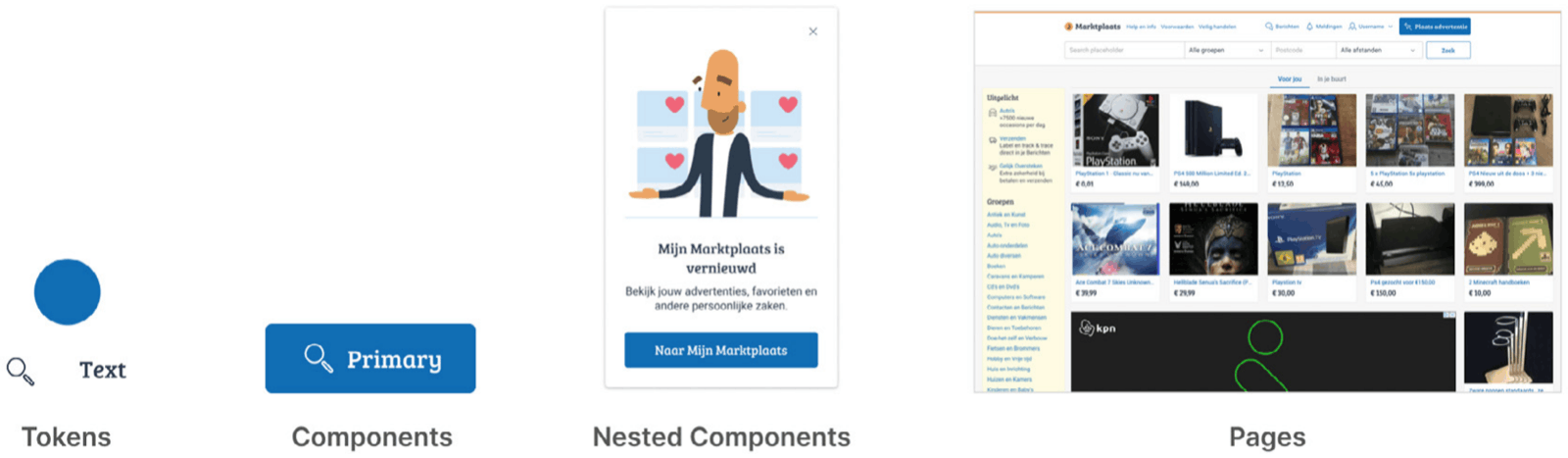
The number of pattern layers depends on the complexity of a product, with most specialists agreeing that four or five layers are most common (Frost, 2016). The author’s workplace DS is composed of four layers, each with its own characteristics (Fig. 17):
- Tokens: The smallest design patterns in a DS, usually composed of icons, colours, typography and spacing. They are used as the base to build more complex patterns, and their style represents a brand’s visual characteristics.
- Components: The combination of tokens creates patterns with distinct functions that can still be used anywhere in the product with little customisation, such as buttons, text fields and dialogs.
- Nested Components: Groups of components combined to create a more complex pattern usable in multiple parts of the product, such as a modal announcing a new feature or a login form.
- Pages: The combination of all previous elements results in modular pages that, while having a specific intent, also allow for easy manipulation of the design thanks to the DS’s modular benefits.
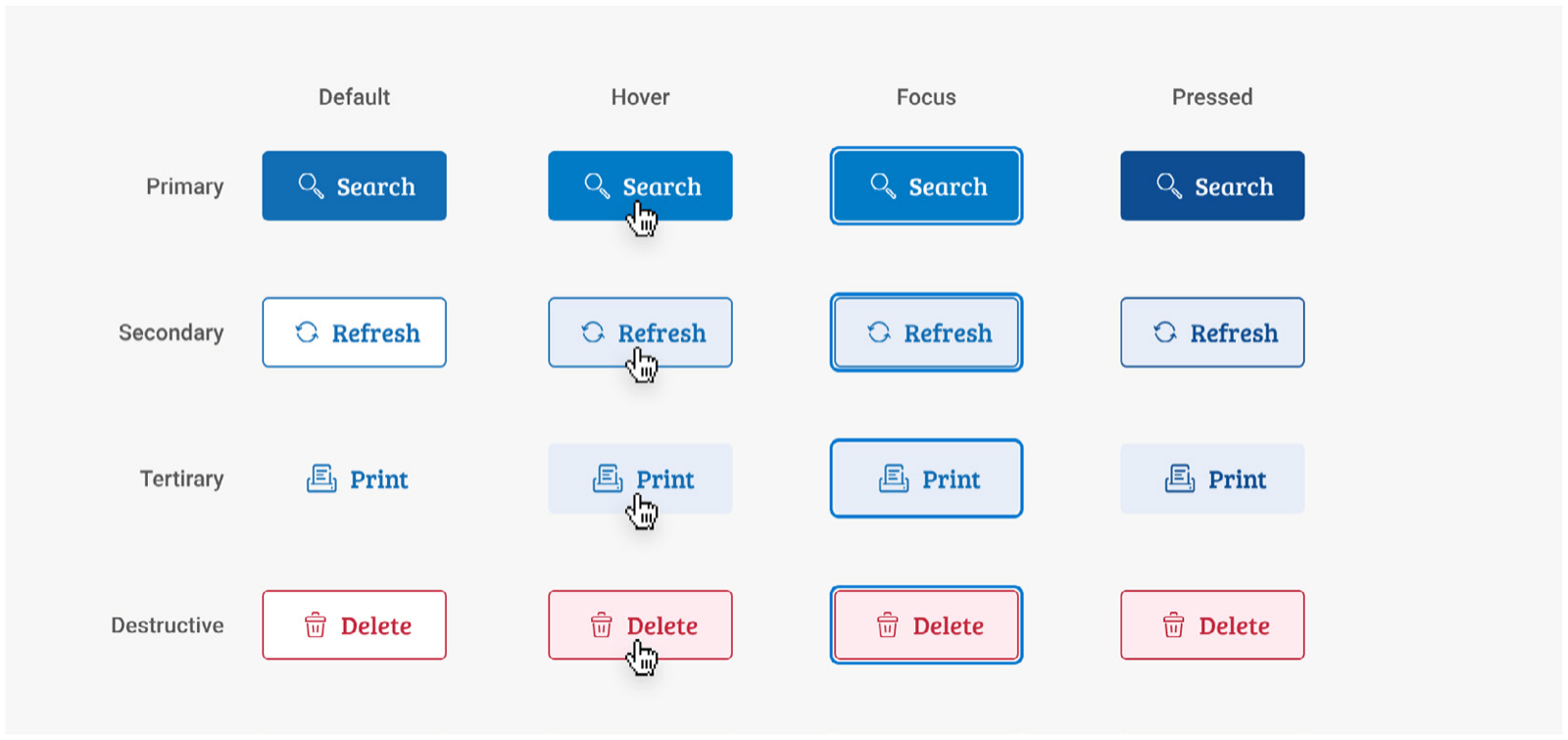
A DS does not only provide “LEGO pieces” for designers. These components are usually embedded with multiple states and extra features. From usability to accessibility, all the recommended visual characteristics for a successful user experience are present (Garrett, 2011): when a designer uses a button in a design, they don’t have to rethink how it should look and behave, such as its hover and pressed states (Fig. 18), because these components are centralised in the DS and other product teams only have to use them. It also means that once a component receives changes and improvements, every place it’s used gets automatically updated to the new version.
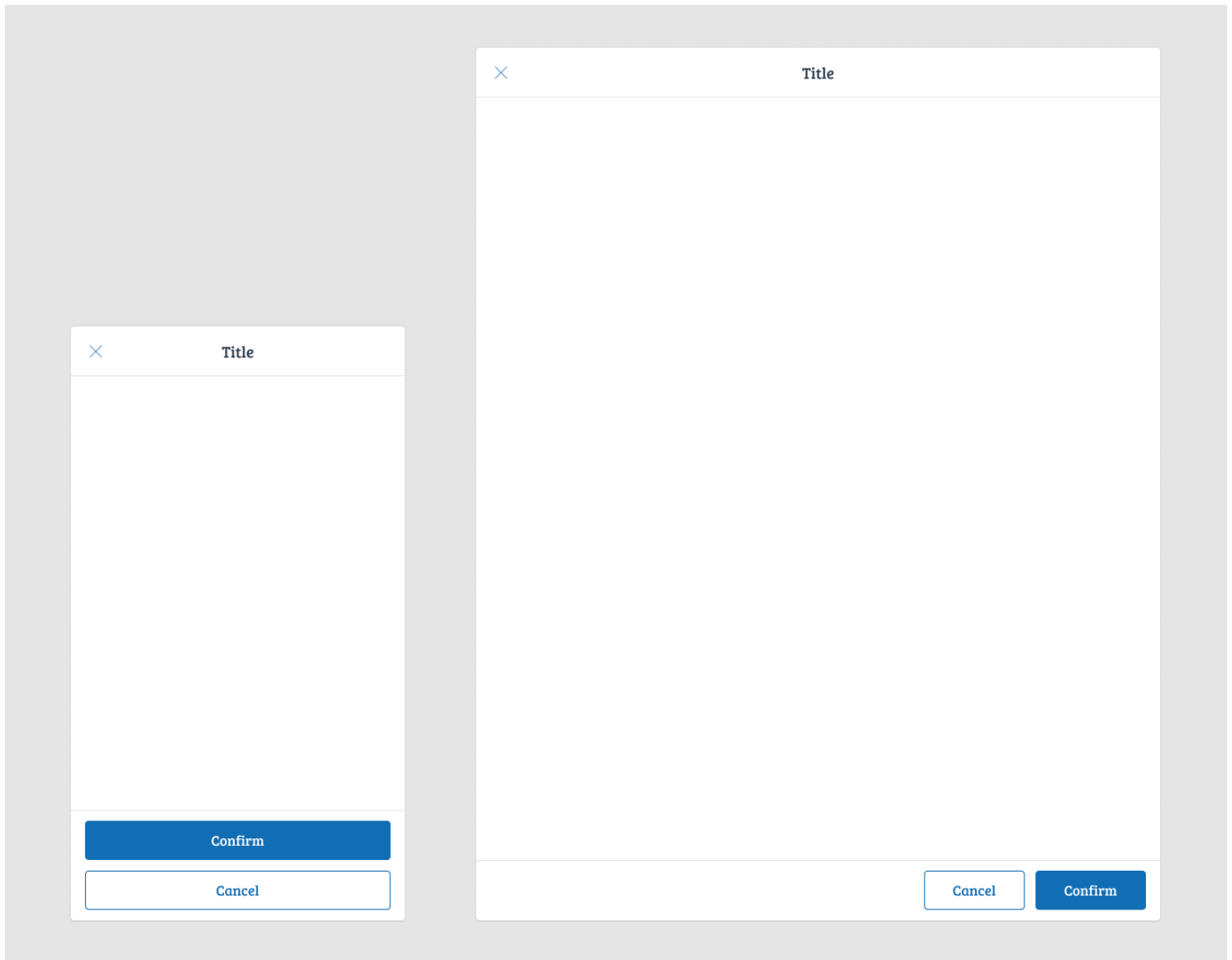
These embedded rules are especially useful in cross-platform scenarios: a Netflix user, for example, can start watching an episode on a train and finish it on their TV at home. This cross-platform usage has been an increasing phenomenon in recent years, and the differences between devices, platforms or brands multiply the complexity and introduce overhead in decision-making, design and development, to a point where product teams end up battling the complexity of a product to get something built, instead of dedicating time to researching and validating problems and solutions. A DS can handle this complexity on their behalf by embedding the necessary guidelines within its elements (Kholmatova, 2017). For example, besides providing a button component, a DS can also control how it behaves on different devices, automatically stacking and taking the full width on smartphones, while aligning to the right on tablets to allow for right-hand touch affordance (Fig. 19).
According to Perez Cruz (2019), a DS intends, among other things, to create a unified design language. Otherwise, digital products will drift towards inconsistency: this doesn’t happen by choice, but as a product scales, so does its complexity. As a startup grows, new people and teams join to deal with new challenges and opportunities, and under pressure for results, individual teams may develop their own styles and standards, the beginning of a product inconsistency that may end up as brand inconsistency. The lack of a design vision can also affect how users perceive a brand: the author cites an example from Pinterest, a successful visual-search product, which published an article explaining that inconsistency created by newly added features caused the product’s core experience to get lost, for lack of a proper vision of how new features would impact the current experience. The issue is not only visual: it also exposes a lack of alignment and communication between teams, weakening the brand and leaving users with a disconnected experience. A digital product has far fewer chances of falling into this trap when it has a DS in place.
Learnings from system thinking
Corporations are constantly looking for strategies to make their business more successful, and for some years Systems Thinking had its moment. Collopy (2019) affirms the methodology was seen as a powerful guide for management dealing with complex phenomena more holistically, but over the years, due to its evolving complexity, it became a niche framework. According to the author, Design Thinking was a more successful approach, and its fame could have been enjoyed by Systems Thinking too, since both methodologies share foundational elements such as collaboration between stakeholders, the ability to map problems, and the possibility of working in iterations.
With the growth of DS adoption, however, there has been a resurgence of interest in the topic. While still niche, its concepts are helping shape a new, system-based way of designing. To avoid a DS suffering the same fate as Systems Thinking, its practitioners need to make the process more welcoming, and as intended in this research, the simple act of allowing external contribution into a system can be a first step towards using the learnings from this powerful concept to help a DS reach new levels of maturity.
Ethical considerations: design systems as an accessibility enabler
According to Kalbag (2017), any decision made by a team affects a product’s accessibility, so anything from content to interaction design to web performance needs to be considered for its accessibility impact. A DS has a crucial role here: having a DS that considers accessibility at its core comes at no extra cost for product teams to use it, since best practices and standards can be embedded into the library of visual components.
It’s estimated that around 1.8 billion people live with some kind of disability globally (Donovan, 2020), approximately 24% of the world’s population. A product that doesn’t consider accessibility in how it creates solutions will, by default, fail to reach the largest minority group in the world. To improve the situation of these people, governments worldwide have been putting more emphasis on making sure they have access to more accessible digital products: in 2019 the European Accessibility Act (EAA) became law (European Commission, 2019), aiming to align differences across EU countries in how products and services, including e-commerce sites, comply with accessibility best practices, with all EAA requirements becoming mandatory by 2025, backed by financial penalties for non-compliance.
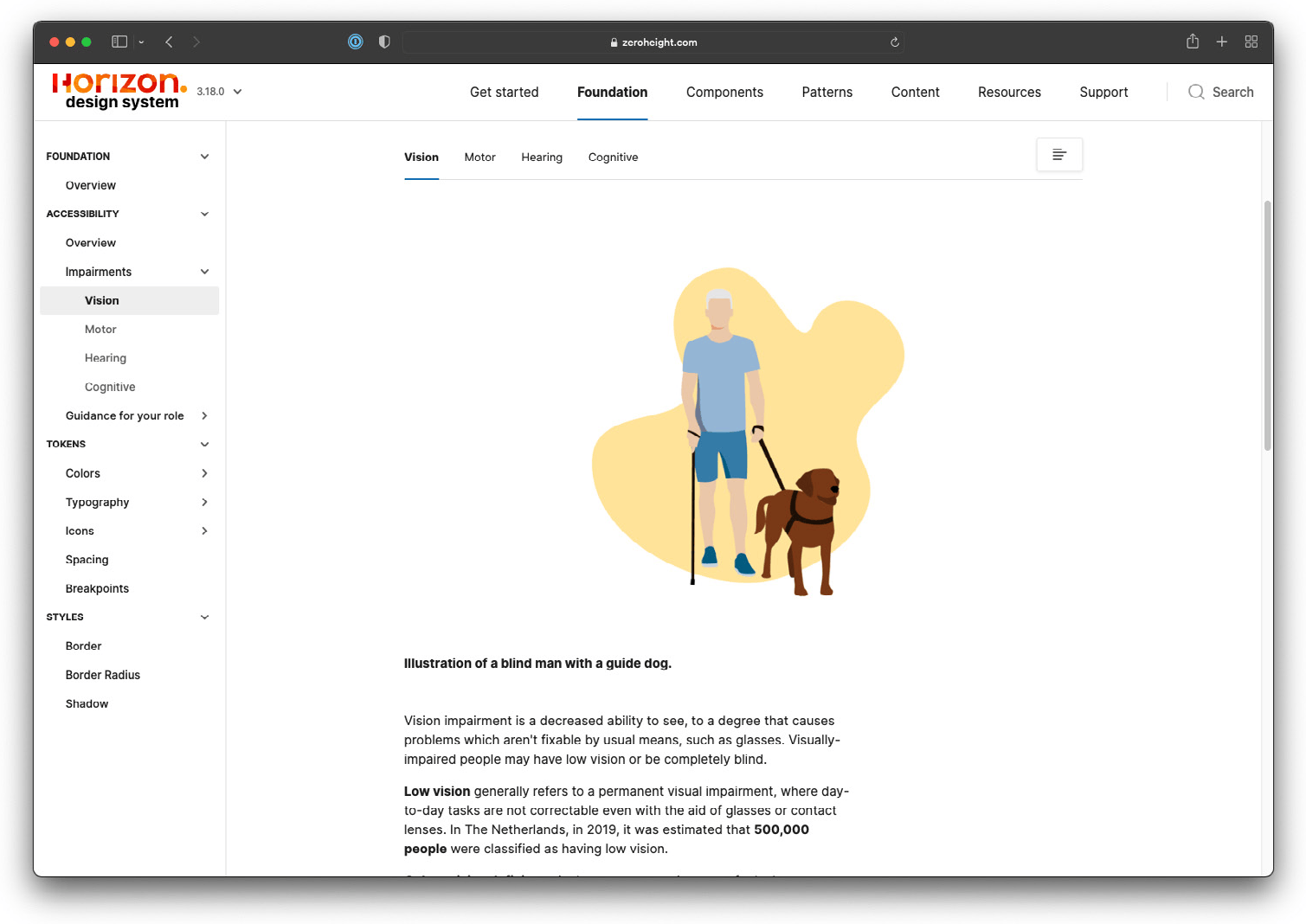
Unfortunately, a DS considering accessibility is not enough on its own to guarantee an accessible user experience. Adopting a DS plays a significant role in ethical considerations around customer-centricity, but without proper guidance for product teams on how to use it, this benefit won’t have its intended impact. Product teams need to be constantly educated on the importance of building accessible solutions via the DS, a practice that has gained prominence in the author’s workplace, where a whole section of the DS documentation was created to explain common disabilities and how the work of different areas affects these people (Fig. 20).
Collaborative design methods for tangible contributions
According to Curtis (2015), a DS cannot thrive and scale if it depends only on its DS team: reliance on decisions, design and code needs to be shared. For starters, a centralised team can be an easier way to get things started, but as a DS matures, a federated instead of centralised model can be a better way of scaling. The author presents three possible team models for dealing with DS scaling issues, each with its own moment, pros and cons:
- Solitary team model: A team makes a DS available based on its own rules and guidelines. This gives it complete control over the content, but does not allow other teams to provide feedback or receive usage support.
- Centralized team model: One team is dedicated to building and maintaining a DS for other teams to use. This intermediary model solves basic standardisation needs, but lacks the power to support active collaboration.
- Federated team model (Fig. 21): A selected group of people from different teams become a committee for the DS. Work is split and delegated, and decisions are made collectively and communicated to other users via communication channels and living documentation.
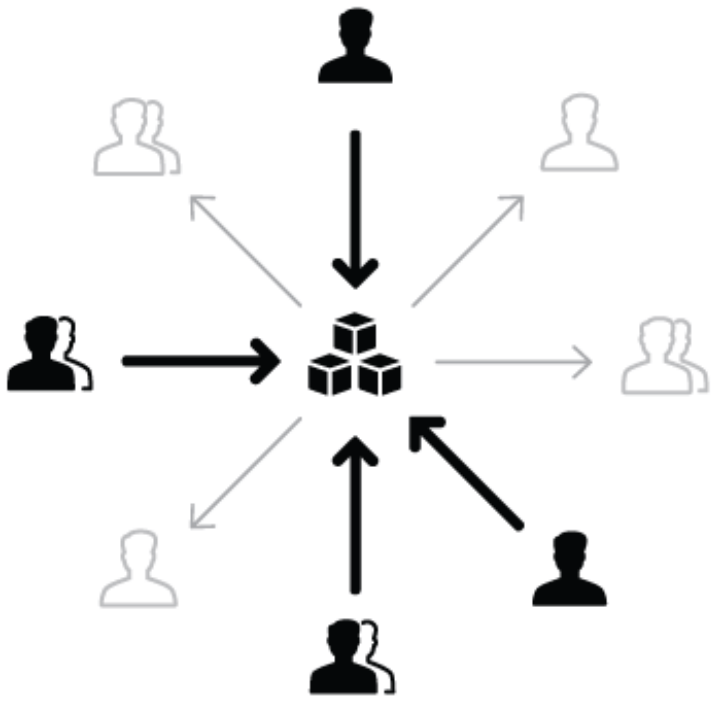
A federated approach can help broaden the relevance of cross-platform concerns, limit bias, and ease the spread of a DS across teams by enabling more evangelists instead of a single person. But for a federated model to work, a solid foundation of processes needs to be established, and for these processes to succeed, they need to be created collaboratively, in partnership with future contributors, so their concerns and challenges are accounted for. Otherwise, adoption won’t be as expected, and the initiative may fail.
Foundation, communication and alignment are common sense for successful teams, but a federated team can quickly become ineffective, since its members also carry responsibilities on other teams. According to Lencioni (2002), a team needs to embrace trust as a base to succeed, independent of the challenges it faces: if trust is present, people have more constructive conflicts, leading to high commitment, accountability, and ultimately shared goals achieved. Without trust, teams may lose the sense of a shared objective, replaced by stagnation and personal goals and, in the worst case, by people leaving the team.
DS’s depend on feedback to evolve, especially when issues or opportunities need to be incorporated quickly. Recommended principles for giving it well include: feedback needs to be shared constantly and in context, it needs to aim at a specific outcome, it needs to be a two-way conversation, and, most importantly, it needs to show respect for the recipient (Harvard Business Review, 2014). Otherwise, a DS team can easily spend a fair amount of time dealing with non-useful or out-of-context feedback.
Communication is vital to help team members not just align, but also trust each other. Using a DS means a significant part of the process relies on people reading documentation, so guidelines and rules such as dos and don’ts need to be explained clearly. Large software companies tend to have multicultural environments, so as recommended by Meyer (2014), communication within a company, especially across multicultural teams, should adopt a low-context style: a mostly Western style used by Anglo-Saxon cultures, characterised by being clear and direct, often followed by a repetition of what was said to make sure the recipient received the message correctly. For example, a meeting closing with a list of decisions and the people responsible for each remaining task. The United States is the lowest-context culture in the world, as shown in the diagram of dominant communication styles per country (Fig. 22).
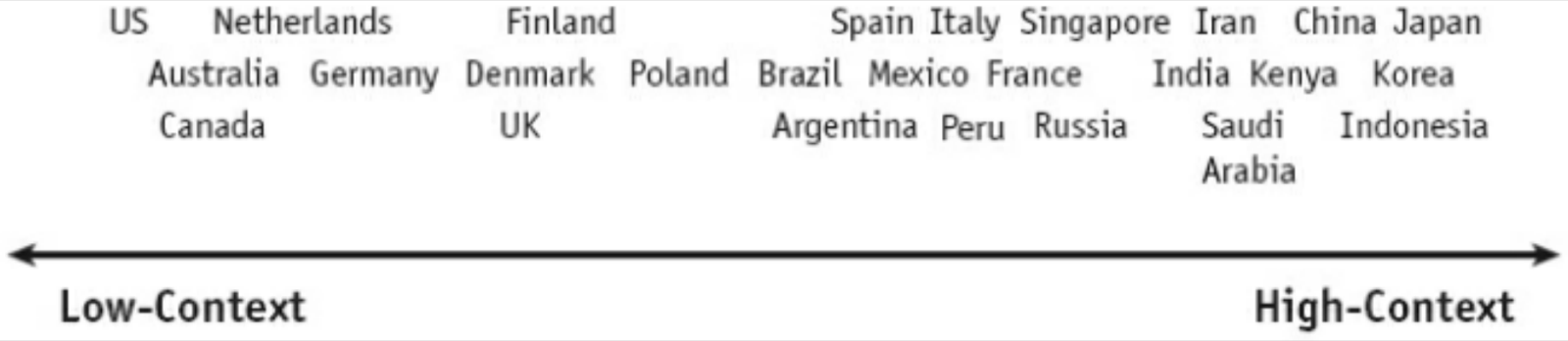
So any artefact created for a DS that requires communicating with its internal users should be done in a low-context way, leaving no room for misinterpretation. Otherwise, misreading a guideline could result in a solution built in a way that doesn’t fit the intended objectives of the brand and product.
The future of design systems
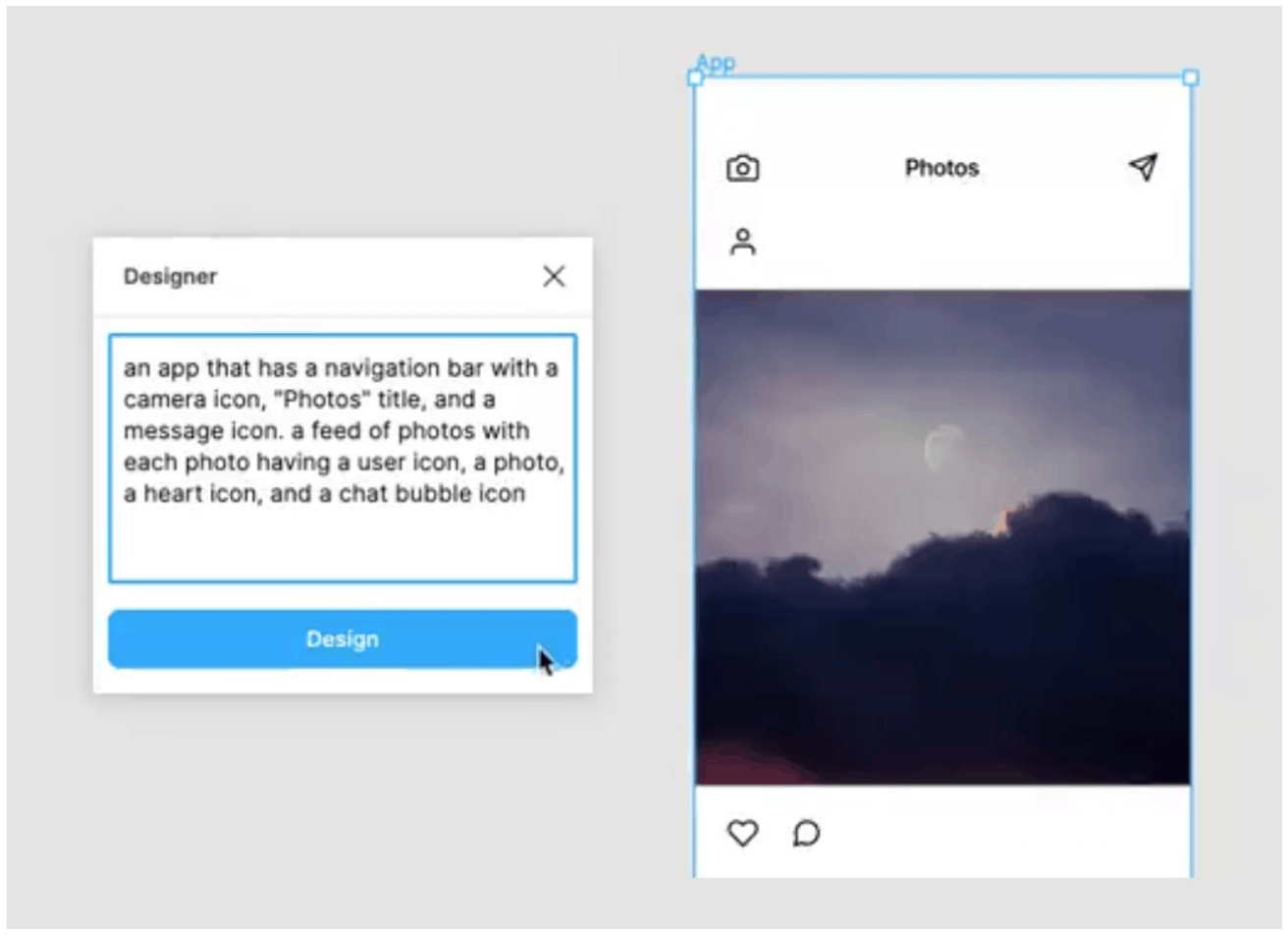
The future seems to hold numerous opportunities for how DS’s can evolve. The most prominent is that the guidelines and rules of a DS can become the base for a revolution in design automation. Currently, designers and developers consume this content passively, usually by reading documentation, but the same set of rules and guidelines could become the base for AI-powered tools that proactively design solutions for a defined problem. A powerful existing example comes from an experiment using the GPT-3 generative language model (Fig. 23), where a developer built a plugin for the design tool Figma that can interpret text and generate an interface based on what was described in the input, to a certain point, replacing the work a designer currently does manually. According to Lee (2020), this shouldn’t be seen as a genuine replacement or something unfavourable for designers; on the contrary, it can be an opportunity for designers to spend more time validating their explorations, leaving the heavy lifting of generating solutions to the AI.
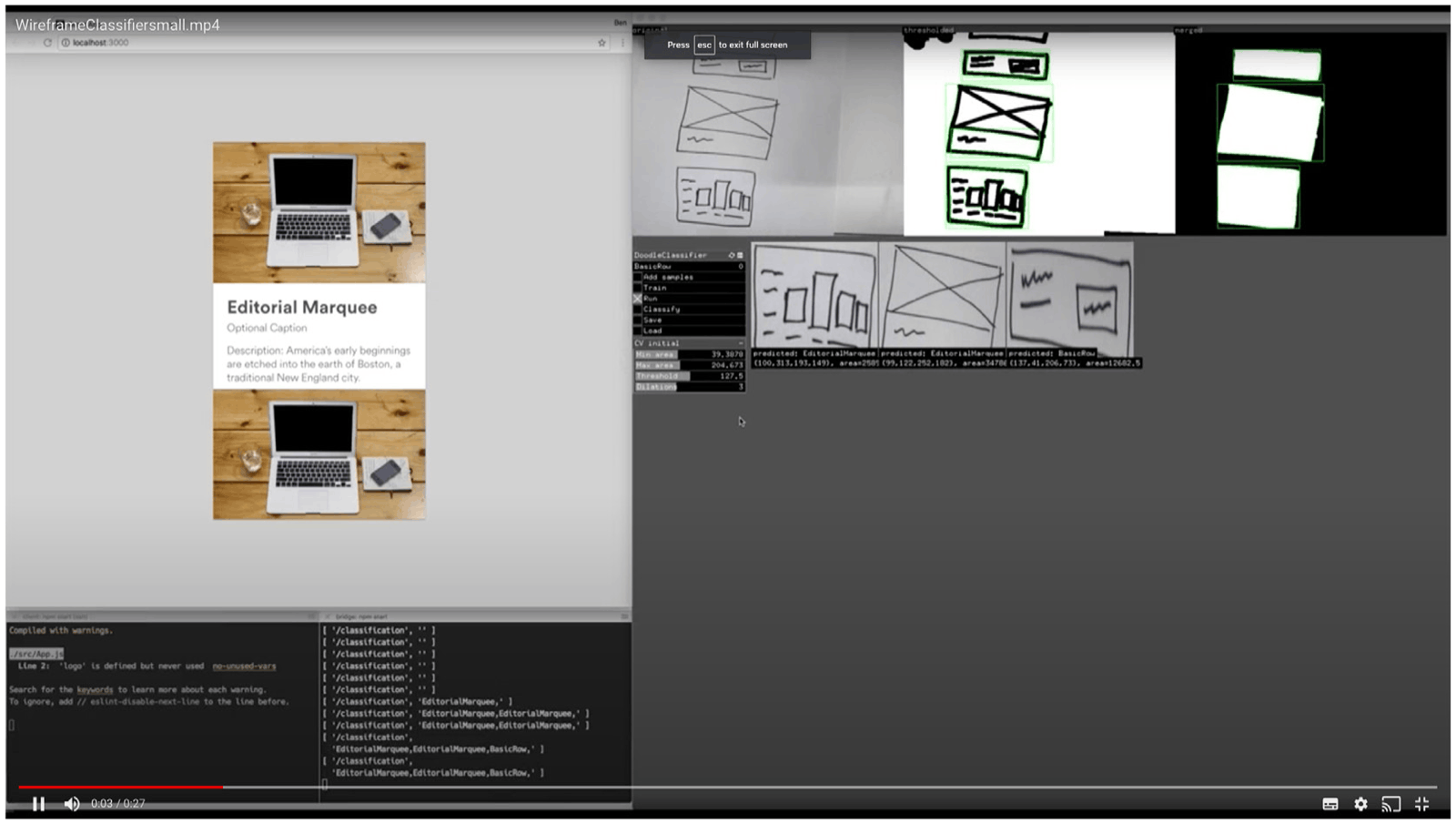
These new technologies can also help bring ideas to life faster, and Airbnb has been exploring this kind of solution for years (Wilkins, 2017), building a team responsible for internal tools, including their DS, capable of creating solutions that can transform sketches on paper into a working prototype (Fig. 24) by identifying the design patterns drawn on the page and finding their equivalents in the company’s DS. According to Wilkins (2017), the primary motivation for building this tool was to validate ideas as quickly as possible, helping product teams validate hypotheses far faster than with traditional methods.
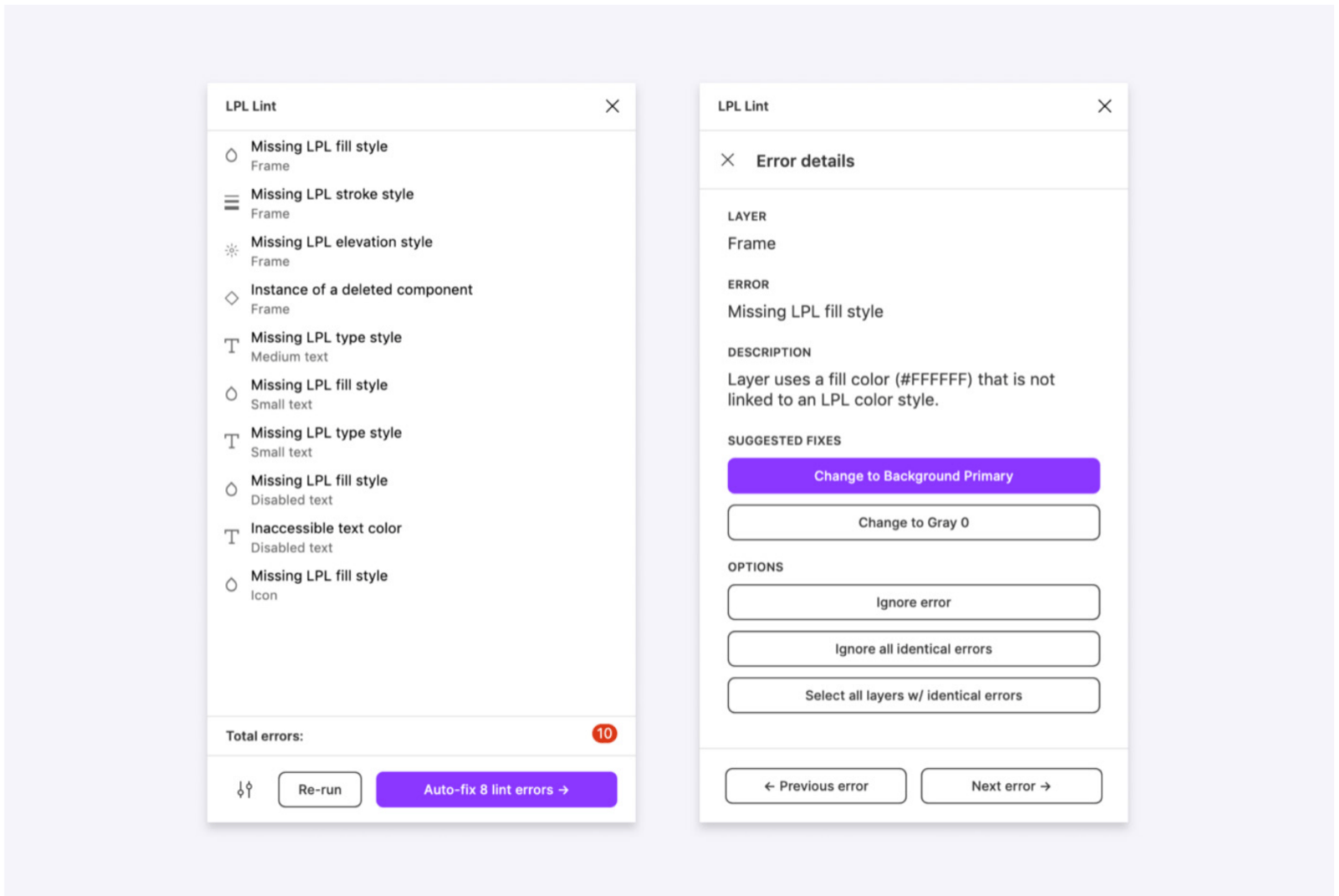
While most of these tools are still explorations, some have already made their way into designers’ workflows. In another example from Lyft, the company created a set of tools that automate the design check (Fig. 25), a stage before work is handed to developers, letting designers validate whether they are using the correct styles and patterns according to the company DS, and promptly suggesting alternatives in the case of nonconformity. According to Gold (2020), this is an exciting moment for design tools: they are becoming more connected and extensible, moving from needing very manual input to being intelligent and automated.
Insights
The literature review gave an essential and insightful overview of the topic of DS. Some of the findings were crucial to shaping the next section of this research, in particular:
- Design patterns have kept adapting to the evolution of technologies and device types. This flexibility has not diminished their importance, and they remain essential to projecting consistent, intuitive solutions. But a DS is not only about the interface and design patterns. It is also a scalable way of portraying a brand.
- The parallels with other creative fields show that these areas have numerous synergies, such as the processes and methods adapted into product design from architecture. The act of looking to other fields for similarities can positively impact an emerging field.
- The influence of a DS goes beyond the design practice. Companies are constantly looking for ways to work not only faster but better, and DS’s can support that objective while guaranteeing usability, accessibility and brand standards with minimum effort.
- There are ethical considerations in using a DS. By creating one, companies can double down on their accessibility impact, and the approach allows for easier and faster implementation of required regulations on the topic.
- As DS maturity increases, the way companies handle it also needs to adapt. From a solo contributor to a federated team, there are multiple stages and approaches, but their efficiency depends on the environment, so they need to be validated in the context of each company.
- Customising and flexibilising a DS is crucial to scale, but this can only be achieved with proper process and agreement between its users, and a dedicated team or group of responsible individuals working together to guarantee these processes have the support they need.
- Tangible collaboration with a DS needs artefacts to support it, such as decision trees and diagrams, that help indicate what to do from both a user and a contributor perspective.
Research process and methodology
The identified problem in the workspace marks the beginning of a different stream of work for the DS team. The focus on mapping processes and creating diagrams is more strategic than the team’s previous challenges, so the methodology chosen for this research is the Design Thinking framework, a user-centric, hands-on approach to innovation composed of six distinct phases (Fig. 26). There are many diagrams representing this framework, but they all focus on the same objective: understanding the roots of a problem, exploring potential paths, and materialising a solution that can be implemented to solve the identified opportunity (Gibbons, 2016). The choice of framework comes from two main reasons. First, the topic of tangible contribution to a DS is new to the company, so a methodology such as Design Thinking helps empathise with current users and the problems they face. Second, since the outcome of this research won’t require software development, a methodology with less focus on fast implementation is recommended, and since there are many unknowns about how the solution will unfold, a process that emphasises iteration and prototyping seemed the better choice.
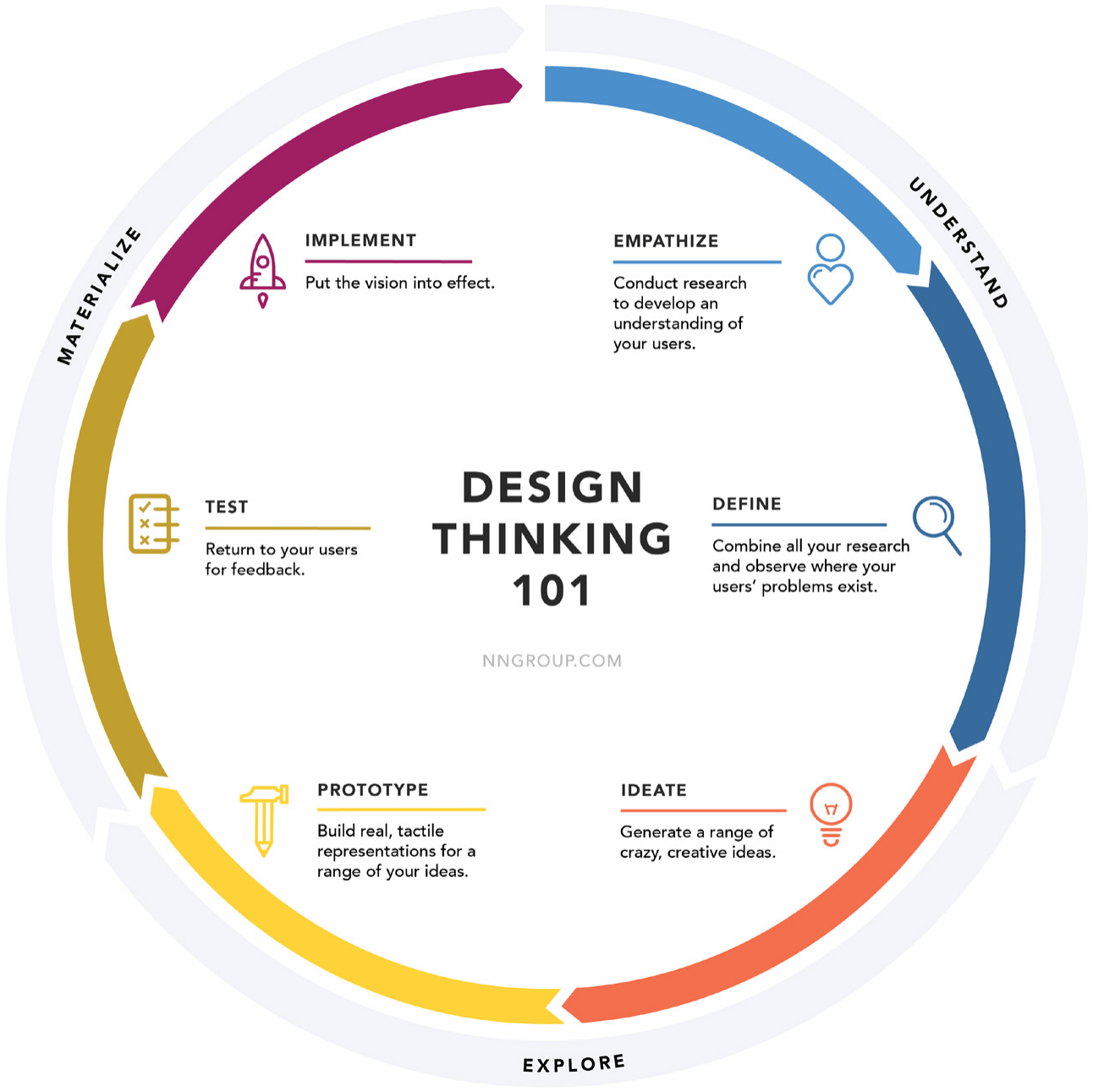
Before using the framework, a plan was traced considering the research’s time and resource constraints, making sure all phases would be executed and that all necessary preparations would be made upfront, informed by the literature review. Some steps were left with more flexibility so more time could be dedicated without compromising the agreed dates for finishing the research, especially important for the validation phase, where findings could send the explorations for the solution back to square one if unsuccessful. The Design Thinking variant chosen for the project is from Gibbons (2016), used by the Nielsen Norman Group, a worldwide renowned design and user experience consultancy. Briefly, the plan for the six phases was:
Empathise: An in-company research phase with designers from different product teams, using a series of semi-structured interviews to uncover potential pain points in the current process of contributing to the HDS.
Definition: Refining the project’s boundaries and scope based on the first phase’s learnings, using a company presentation framework to create a clear and shareable definition of the problem being solved so stakeholders can easily understand the project’s rationale and contribute comments and feedback.
Ideation: Designing a series of explorations for possible solutions, using sketches that move from low to high fidelity as confidence in a solution grows, to identify the iteration(s) with the most potential to use as a base for a prototype.
Prototyping: Two prototypes: the process diagram itself, prototyped in a way that supports easy iteration, and a simulation of how these processes would be integrated within the HDS documentation, both intended to support the validation phase.
Validation: Three rounds of validation, with the opportunity to iterate the prototypes between sessions so later sessions can benefit from the insights and learnings of the previous ones: a first co-validation session with the design team to validate and discuss the steps of the process diagram; a second co-validation session, run as a demo of how the process diagram would be integrated into the HDS documentation, followed by the opportunity for designers to leave annotations on possible improvements, to evaluate whether the placement and content in the documentation are precise and intuitive; and a third round of three individual interviews simulating the process’s use in a hypothetical situation, where designers are given a task brief and need to use the documentation to describe the steps they would take, to identify how confident they are using the solution and whether it can be implemented or needs further iteration.
Implementation: If the solution proves effective after validation, any pending insights get applied and the prototype gets converted into the final implementation. Once this new section of the HDS becomes available, containing the new contribution process diagrams and their guidelines, a company-wide announcement is made.
Once implemented, the focus shifts to identifying potential next steps. To help with this phase, two industry specialists were interviewed to evaluate the proposal and share their experience with DS’s, DS teams and contribution models: essential input to build a stronger case for the project, since the last step is a presentation of the results to the company leadership team.
Empathise
According to the Design Thinking framework, before jumping into ideas or sketches of possible solutions, it’s essential to observe and collect information about the problem being solved, to avoid bias towards solutions and prevent vital information from surfacing too late in the process, making the solution unfeasible or too costly to integrate.
Given the nature of the problem and the scope of the project, remote interviews were the method chosen for this phase. A semi-structured interview script allowed flexibility on which topics were worth pursuing during the conversation, and open questions let interviewees explain their thoughts more freely. The script covered topics that could help bring clarity to the problem, such as: the interviewees’ comprehension of and experience with the current methods for contributing to the HDS; clarity on the channels available to get in touch with the DS team about collaboration; their knowledge of the HDS and how the DS team works; and potential blockers to their current and future contributions to the HDS.
Summary of the research: Stimuli: semi-structured interview script. Method: remote interview (30 min). Participants: four participants, split between three product designers and one lead product designer.
The interviews with designers (Fig. 27) revealed valuable insights into their perception of tangible collaboration with the company’s DS. The objective was not only to identify issues, but also to understand what was already working well, so any change to the process could be made with those points in mind. The main insights and learnings were:

What is working well:
- The DS team offers a centralised communication channel, making it clear and easy to know where to go if support is needed.
- Before asking for help, designers will often check the HDS documentation to avoid raising topics that may have already been addressed, supported by the current weekly release of documentation changes.
- The DS team’s work is appreciated, and there is complete trust that it can make decisions about the future of the DS, even if that means changing how the team handles requests from other teams.
Potential improvement points:
- Because the DS team works in such a centralised way, designers from product teams tend to rely on it for almost all the work, often holding back or changing needs they assume the DS team won’t be able to handle given its workload.
- Some designers consider that contributing to a DS isn’t part of their skillset, though some admit this may come from rarely doing it, and that with proper guidance they could gain confidence to contribute.
- Designers say they lack resources to understand the process of building solutions for the company’s DS. The processes the DS team applies to create or change components and tokens aren’t documented anywhere.
- There is no explicit agreement or process for how contributions to the HDS work, so designers don’t feel responsible or accountable for any kind of contribution.
- There is a clear understanding that a contribution to a DS needs to be tangible, meaning a fundamental change in design and code, but this seems complex and time-consuming.
- The only collaboration-focused page in the documentation is aimed at developers, with no explanation of how designers can collaborate; when something comes up, they tend to reach out to the team via direct message.
These learnings clarified some of the potential causes and barriers to designers contributing to the HDS, and provided important insight into how they could be solved, such as improving guidance per role and expanding the collaboration and contribution sections of the documentation. But designers’ confidence in contributing to the HDS was low, so this needed special attention.
Definition
To start a project at the author’s workplace, the person or team responsible prepares a presentation with a clear and shareable definition of the problem to be solved: summarised, easy to digest, and covering the basics of intended audience, scope and deliverables. This gets made available in a shared repository for everyone in the company and used in presentations to different stakeholders to quickly explain its value. This research followed the same requirement, using an existing template of five questions that aligns well with what the Design Thinking framework requires for its definition phase. That the project started before this definition was written is not an issue. Without it, there would be no way to assess whether the research question was valid, so the early interviews were used as a base for the project’s definition and scope:
- What are we trying to improve? The DS team wants to improve and clarify how designers from product teams can create tangible contributions to the company DS, achieved by providing a new documentation section of diagrams and guidelines.
- Why is this important? As learned from the literature review and cases from other companies, the only way to scale a DS is to decentralise some of its responsibilities, achieved by allowing external, tangible contributions from other teams. This could also bring autonomy and empowerment to designers from product teams, since they would rely less on the DS team to get their projects done.
- How will it help the company? It will accelerate the creation of a unified design and brand experience, avoiding the product becoming inconsistent as it grows more complex, and by scaling the DS and its capabilities, benefits such as speed of implementation, consistency, usability and accessibility become more available to all product teams.
- How will we know if we are successful? The primary proxy is the number of tangible contributions made by designers from product teams, since the process results in a new token or component that is therefore countable. The number of issues identified by its users can also be used as an indirect proxy, meaning the process is being used but may need to cater to new scenarios.
- Who is this for? The primary audience is designers from product teams working in the Benelux region, so implementation will cover Marktplaats and 2dehands, though the learnings and results could be used to create similar processes for any other product in the company that shares the same characteristics.
With this phase complete, the project was shared with multiple stakeholders in the company, to identify potential partners and recruit people who could help with the validation phase.
Ideation
The early interviews made clear that a process diagram for the contribution process alone would not be enough: the lack of clarity about the DS team’s own processes could undermine the intentions of this research. So two more process diagrams were added to the scope of explorations, covering the creation of, or changes to, DS components and tokens. The ideation phase started with paper explorations. These early sketches weren’t meant to be presentable or detailed (Fig. 28); instead, they quickly conceptualised the research notes into a visual concept, and served as a first exercise in identifying the main steps of each process and the copy that could explain them.
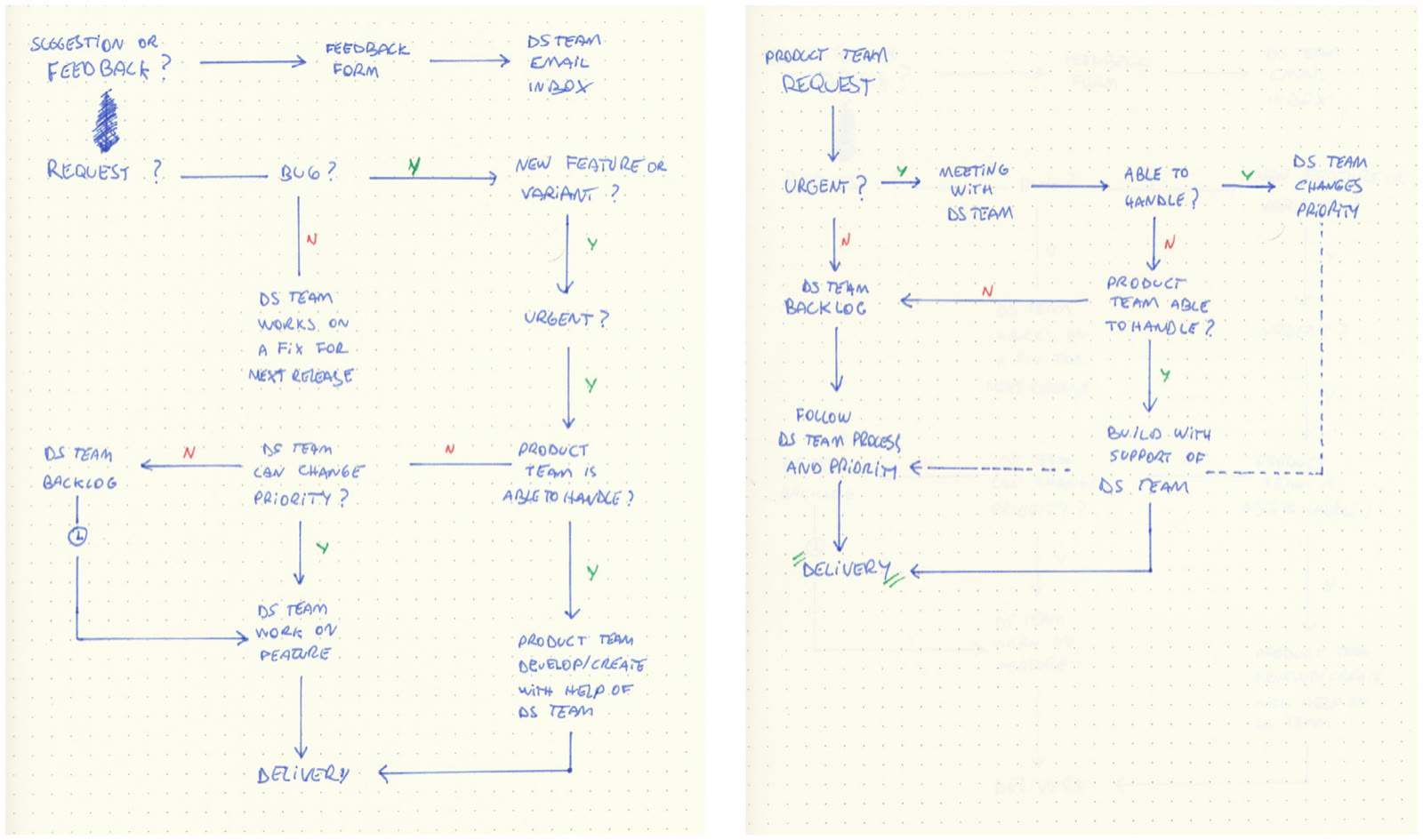
The three process diagrams were explored in parallel. Once the potential main steps for each were identified and a few different flows sketched, the explorations moved to a digital process using Miro, a collaborative artboard tool chosen for its embedded flowchart features and support for remote collaboration, which would help in the validation phase. The same iteration process was repeated at this stage, but with more detail and industry-standard diagram shapes for each process step (Fig. 29).
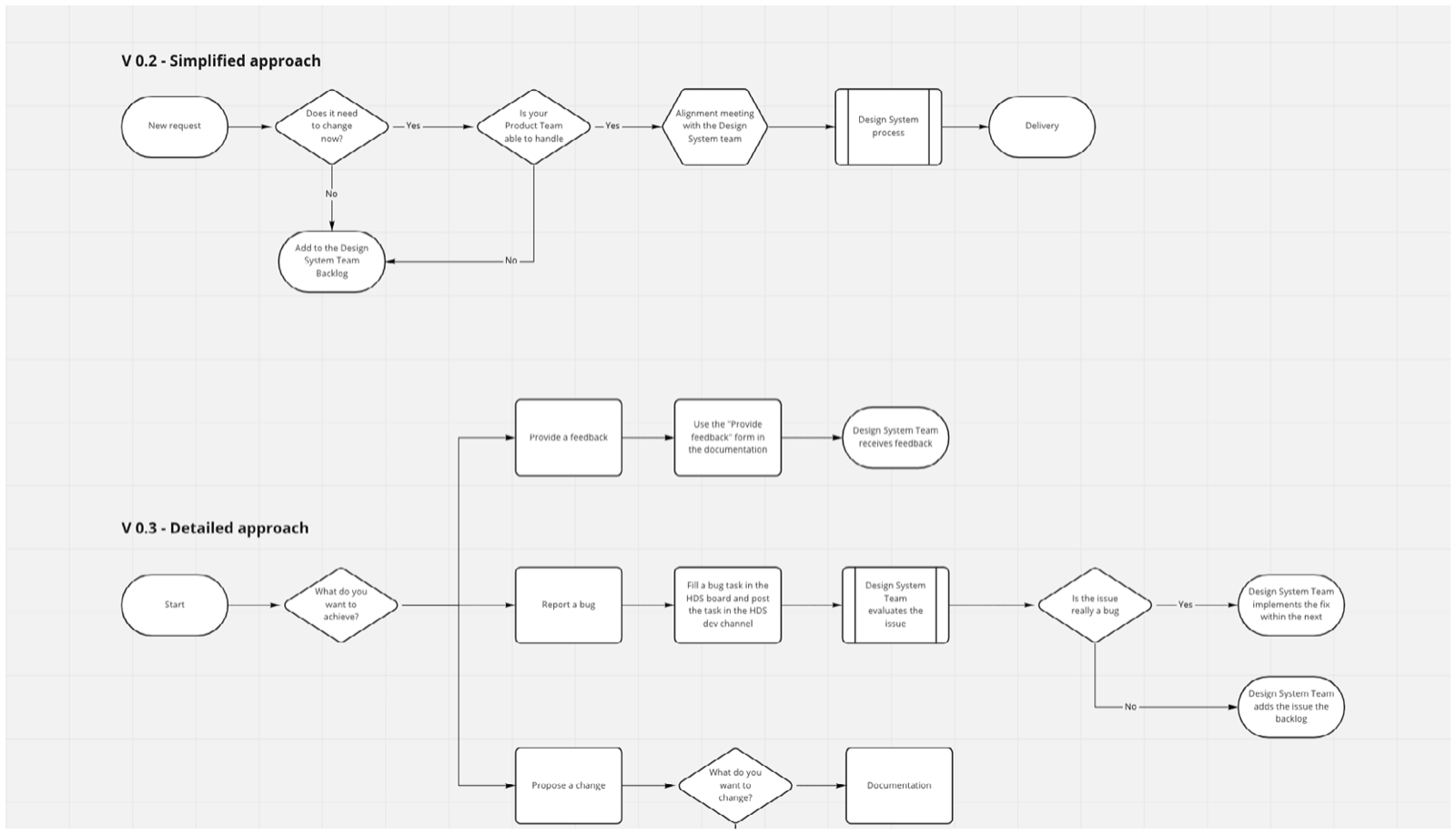
Once the explorations reached a more advanced stage, the DS team was invited to a one-hour co-creation session (Fig. 30) with two objectives: first, to align the team by validating whether the diagrams clearly represented the processes and responsibilities; second, to identify which version of each diagram had the most potential, so it could be prototyped and used in the validation phase. This session proved valuable, since the DS team’s input surfaced important points that were discussed and fixed as early as possible in the process.
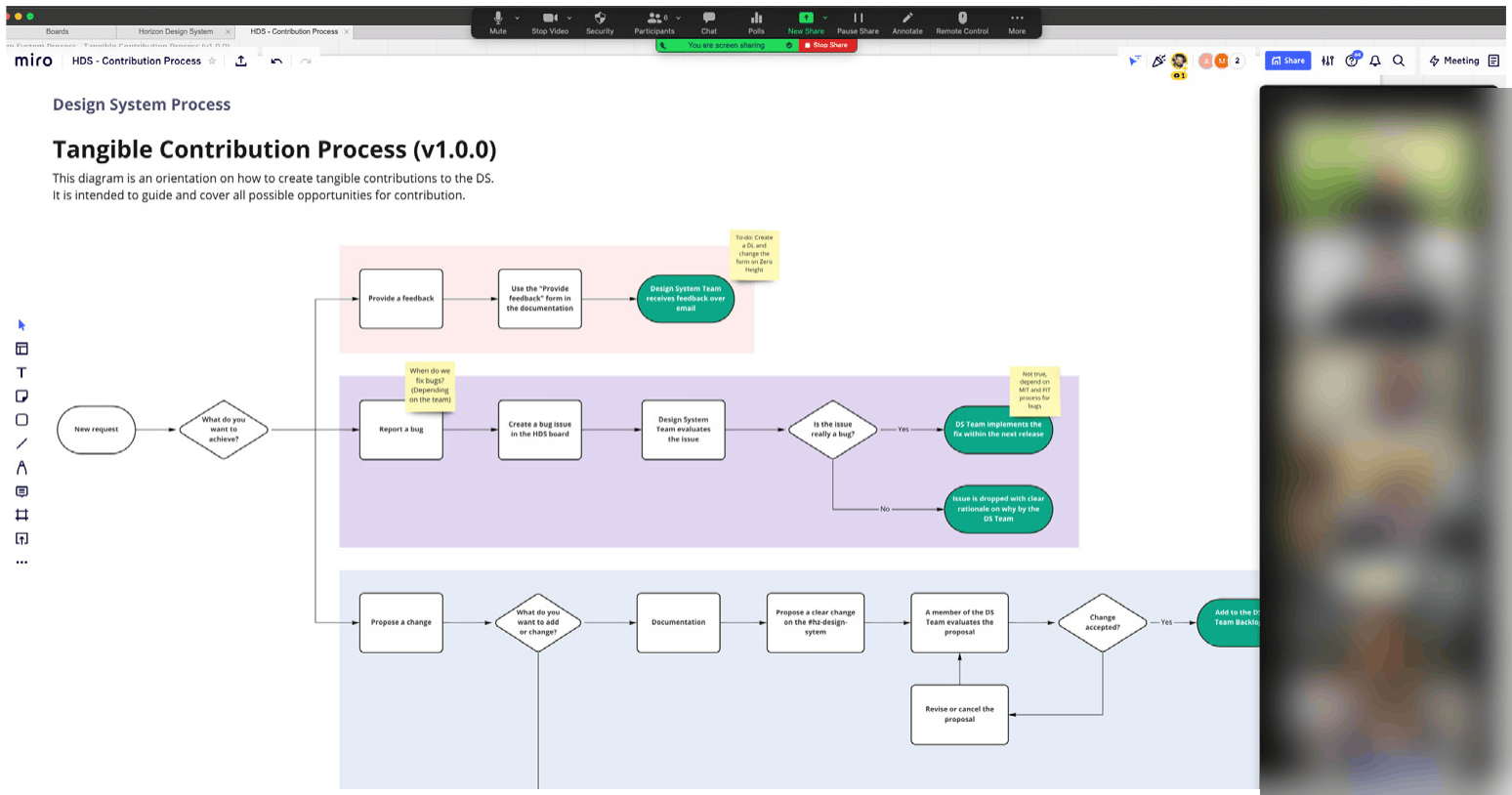
As a final activity in the session, the DS team discussed the intentions and methods for the prototyping phase. This debate confirmed that all three processes needed to be prototyped and validated, and that validating the content of the diagrams and validating where they’d sit in the documentation were two different things, so two prototypes and at least two validation sessions would be needed.
Prototyping
The decisions and possible paths discussed during ideation were used as the base for the prototyping phase. Prototypes offer a tactile representation of a solution without needing it implemented (Gibbons, 2016); even with limited coverage of use cases, they provide valuable insight by letting people observe users interacting with them, helping anticipate issues and identify points to improve. As decided with the DS team, two prototypes were built to validate the proposed solutions.
Prototype A was intended to validate the content, steps and general understanding of the processes, so the three process diagrams were added to a virtual artboard in preparation for the validation phase (Fig. 31).
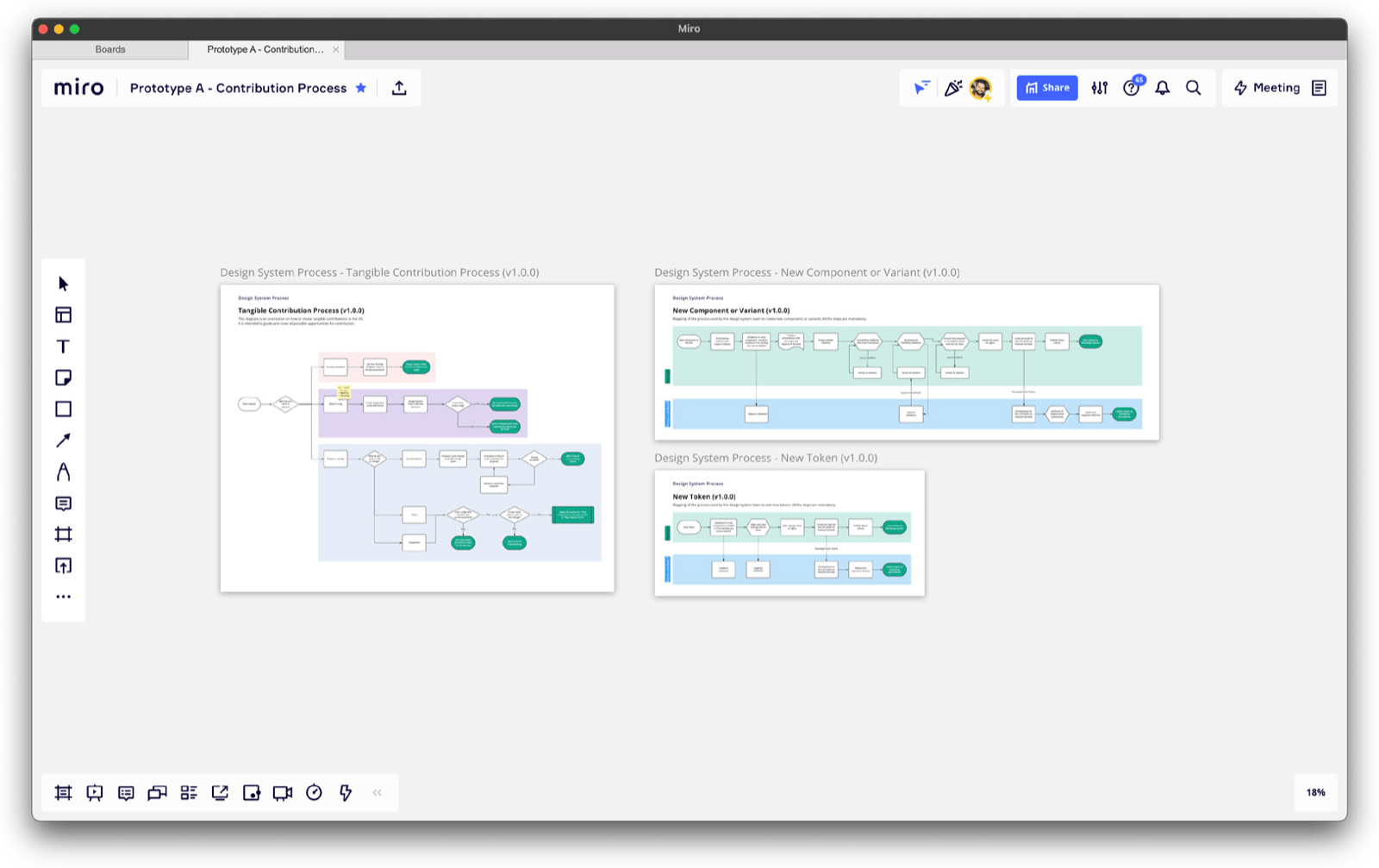
The decision was to use the same tool where the iterations took place, so the final solution could be exported as an image asset and added to the documentation once finished, an approach that also benefits future iteration by keeping a source that can be quickly updated with new findings. This prototype artboard contained three diagrams: a tangible contribution process, to help designers from product teams identify how they can tangibly contribute to the company DS; a new component or variant process, for the DS team to create or change components and variants; and a new token process, for the DS team to create or change tokens. Working on this prototype also revealed that the three diagrams could be connected, reducing the number of similar steps: depending on which terminator users landed on in the tangible contribution diagram, they would be directed to one of the other two to continue their process.
Prototype B: all the HDS documentation is hosted on a third-party platform called Zero Height, which allows DS knowledge sharing through documentation using different types of media. To avoid fragmenting access to DS-related content, the same tool was used to create the second prototype (Fig. 32), intended to validate the solution’s placement and content within the HDS documentation. Using this tool allowed a high-fidelity prototype that could provide valuable insight, and to avoid misunderstandings, the documentation area with the prototype was hidden behind a password so only validation participants could access it.
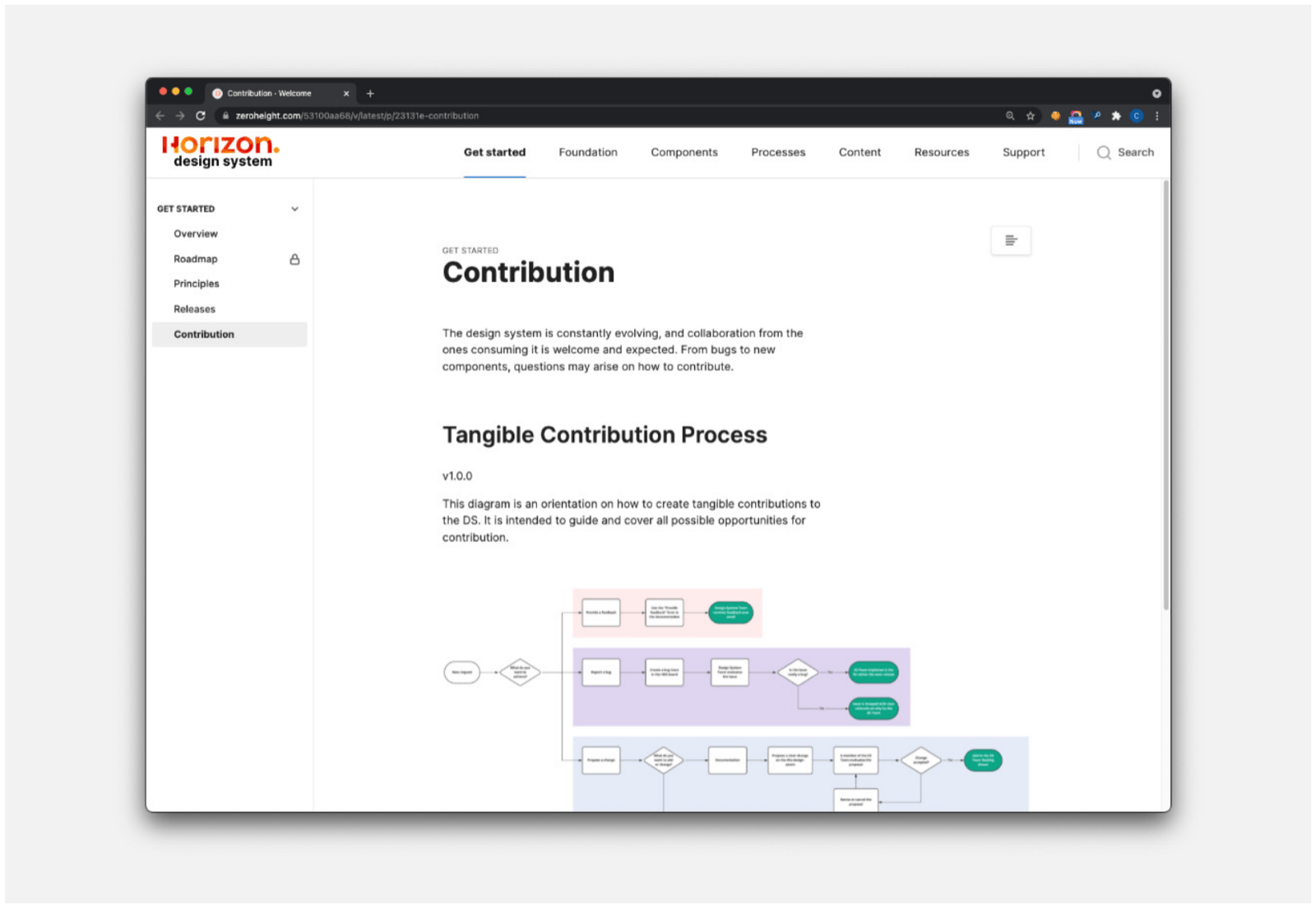
Luckily, no new tools or methods had to be adopted for prototyping, since they were already available in the company’s toolset, which accelerated its conception and let these tools be used at their maximum capabilities, based on knowledge gained from previous use. Finally, the two prototypes were reviewed again by the DS team and judged ready for the validation phase.
Validation
The validation phase took place over ten days, scheduled so learnings from one session could be applied before the next, allowing a new iteration to be created considering all insights gathered so far. This was important, since the validation phase was made up of three sessions.
First validation: Stimuli: Prototype A. Method: remote virtual workshop with facilitation (30 min). Participants: eight, split between four product designers, two researchers, one lead product designer and one head of design.
Participants were invited to evaluate each process one by one, starting with an individual evaluation of each, followed by adding post-its to the steps that were unclear or needed discussion (Fig. 33). Once complete, all these points were discussed as a team and action points created for each one. At the end of the session, participants were asked whether the solution could help them be less dependent on the DS team, and all agreed it heavily contributed to this objective.
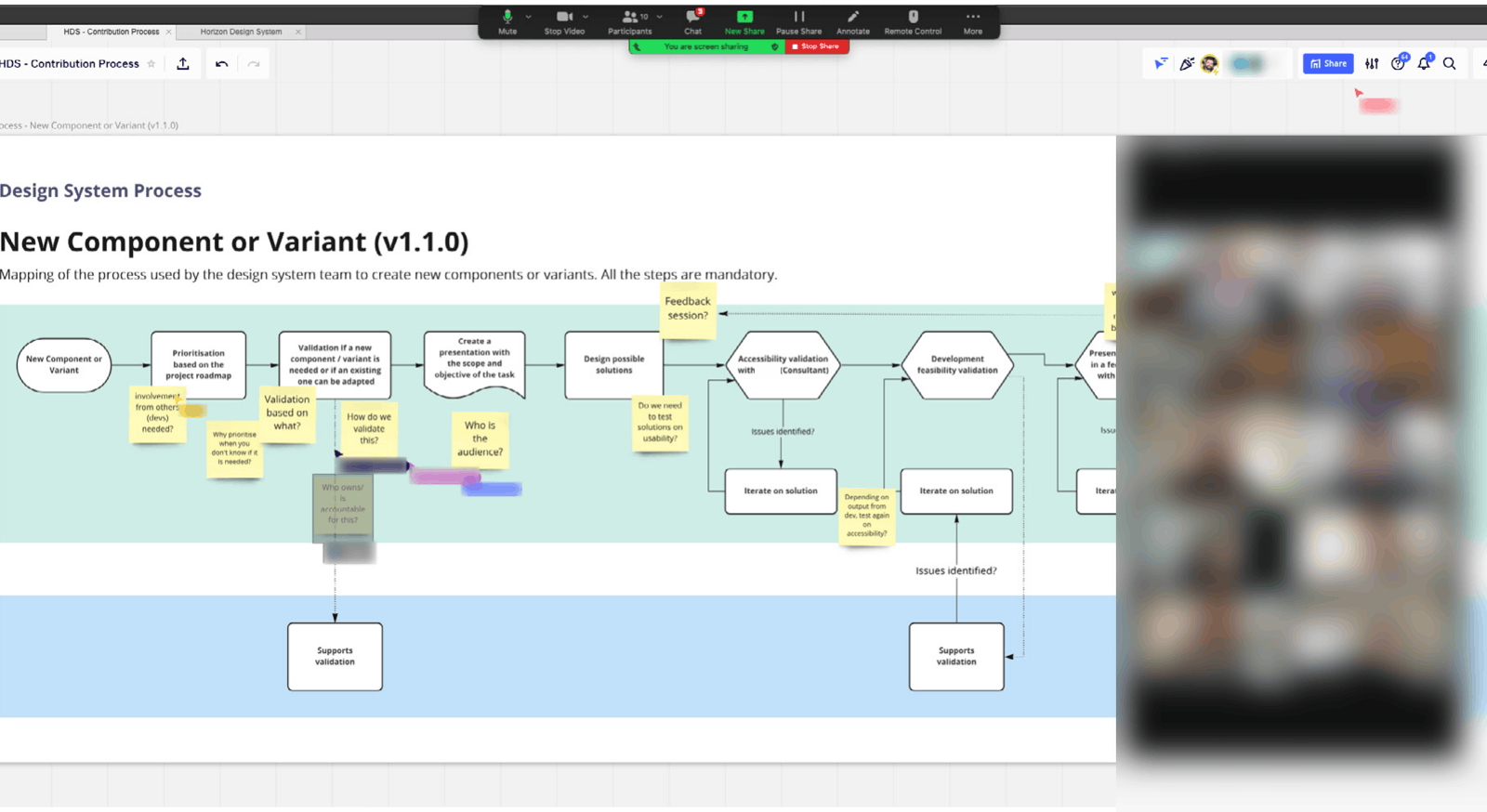
The session was very successful, generating multiple insights and more than 20 action points. The most critical issues were related to these processes using internal naming conventions that only the DS team could relate to. The main action points and learnings were: improve clarity about the audience of the process by adding the practice to its name, such as “Tangible contribution process for designers”; add a new lane showing the stages where designers share responsibility with other practices, such as development; remove the feedback flow, since it didn’t allow two-way collaboration, going against the intention of only offering actionable, tangible contributions; and improve the section related to bugs, since participants pointed out that the primary source of bugs wasn’t mentioned in the process diagram.
At the end of the session, participants confirmed the solution could help them be less dependent on the DS team, and agreed that fixing the identified issues would make it ready for the second validation. Participants were then invited to keep collaborating after the session, and a feedback channel was created so they could re-evaluate iterations even if not invited to the following sessions.
Second validation: Stimuli: Prototype B. Method: remote virtual workshop with facilitation (20 min). Participants: five, split between four product designers and one lead product designer.
The session started with a demo using the interactive prototype to show where the process diagrams would sit within the documentation. Participants were then able to check the content themselves, followed by the chance to add comments about possible improvements (Fig. 34).
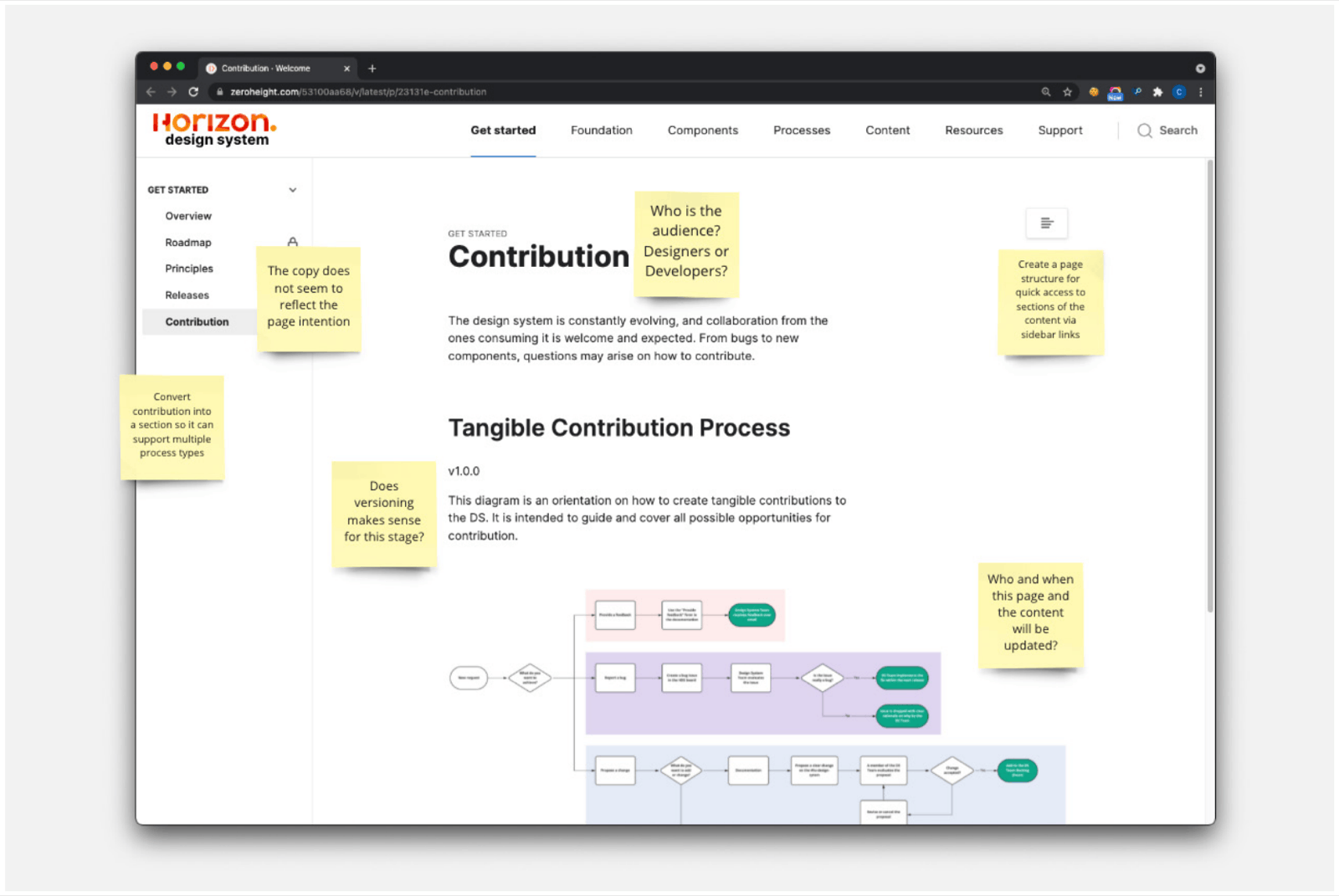
These comments led to a facilitated discussion and a compilation of 12 action points for improvement. The main ones were: the placement worked well within the documentation’s navigation structure, but the page name didn’t reflect its content well; the content should be treated as a section rather than a page, so future processes for other practices besides design could be added too; corner cases could be explained through text guidelines rather than added to the diagrams, to avoid them becoming too complex and extensive; and participants agreed the prototype would be ready for the last validation session once these action points were addressed.
Third validation: Stimuli: Prototype B. Method: remote/in-person interview and usability test (30 min). Participants: two, both product designers. Scenario: a hypothetical situation where the participant had to perform a specific change to a DS colour token.
The third and final round was planned as an in-depth validation of the process diagrams, simulating a hypothetical situation to evaluate how participants would navigate the possible flows. The task was designed to use two of the three diagram flows, also validating whether the connection between more than one diagram was clear (Fig. 35).
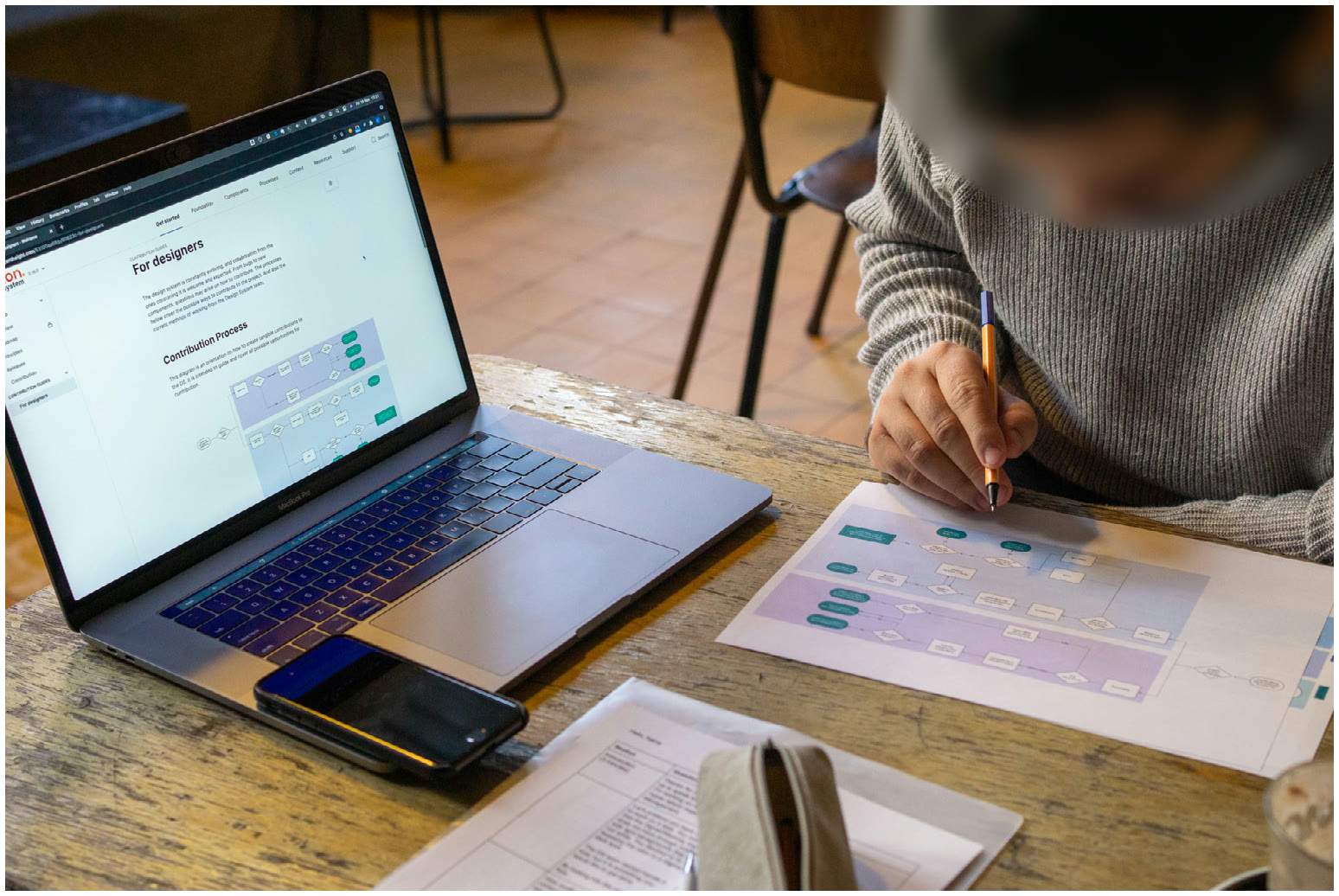
The two interviews revealed insights not captured before. Confidence in the process in the hypothetical situation was moderate to high, and to raise it further, more detailed information on how to perform each task should be added to the page’s text content; video tutorials could also help designers feel more confident for critical parts of the flow, such as publishing a new version of a DS library. Autonomy while using the process was perceived as high, but some of the copy needed improvement, such as mentioning a direct DS team contact for each lane of the flow. It was also sometimes challenging for designers to judge whether they should wait for the DS team or make changes themselves, and providing an indication of the average time for each step could help that decision.
No blockers were identified in this final validation. The issues that came up became action points to fix before implementation, though some needed further investigation and were flagged as potential changes for future iterations.
Implementation
The last phase of the Design Thinking framework materialises the solution by implementing the research results. The learnings and insights gathered across the previous phases indicated the proposed solution worked as intended and could be implemented, and since improvements were made as validation progressed, the effort to put a final version live within the HDS documentation was relatively low (Fig. 36).
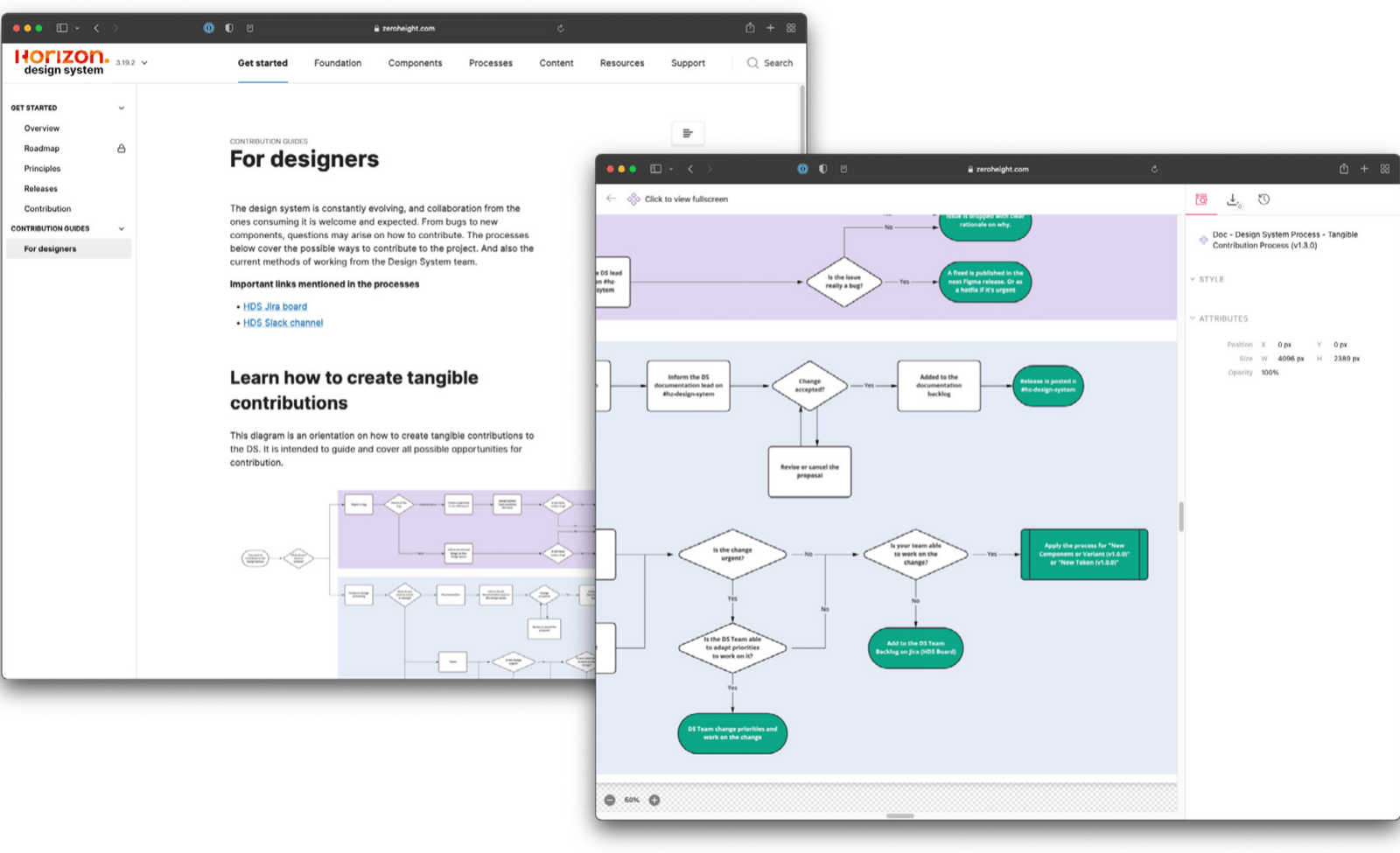
The process diagrams built in the digital artboard tool were converted into image assets, and the navigation prototype was updated with the latest findings and published as an official documentation release. Finally, an announcement was made in a company-wide Slack channel, letting participants interact by providing feedback or asking questions about the newly released documentation. The end of this last phase doesn’t mean the problem is completely solved. It means an iteration cycle has been completed, and there is an immense opportunity to expand and improve the implemented solution.
Interviews with experts in the field
Stimuli: semi-structured interview. Method: remote interview (45 min). Participants: two, an independent DS and accessibility consultant and a senior product designer from a global online retail company, both with years of experience with DS’s and related processes.
This section aimed to have the processes evaluated by experts in the field, not to scrutinise their details but to validate whether the approach as a whole would work. The conversations (Fig. 37) revealed that some essential components for the project’s success were missing, though the overall approach was correct, and those gaps could be addressed in future iterations.
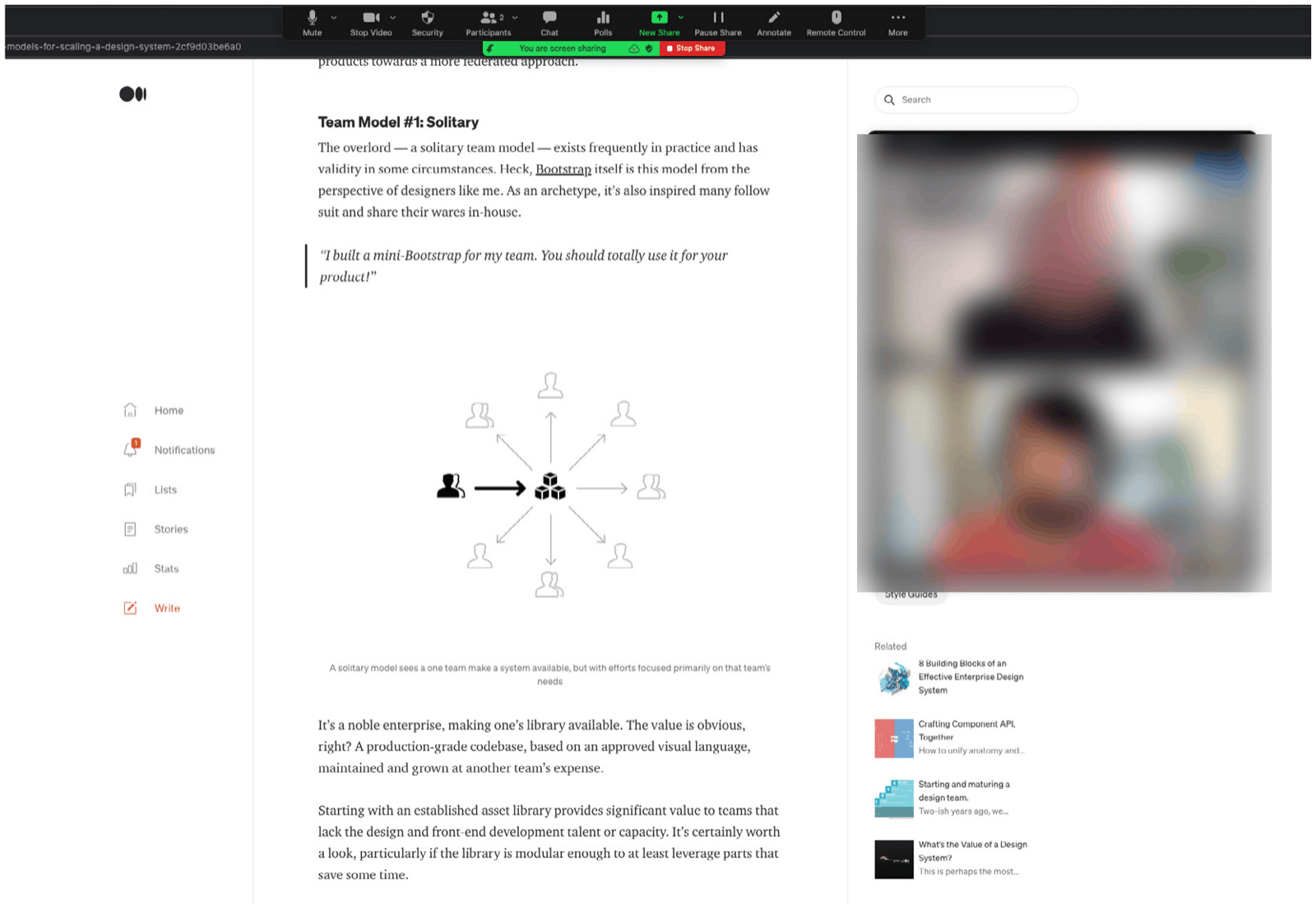
General insights:
- Decentralising a DS team with the help of a mapped process is common for large organisations, but a core team of DS individuals should be maintained to support contributors and plan the DS strategy.
- There should be clear agreements in place for the responsibility and accountability of applying these processes.
- Adoption of a solution like this only happens if designers feel they have ownership of it. The DS team shouldn’t act as police validating its use; instead, they should be seen as supporters and facilitators for the people applying it.
- This kind of documentation is beneficial for new joiners: the HDS and its content should be part of onboarding, so new people know how to use and contribute to it early on.
- A successful DS depends on multiple people building and using it, and benefits from diverse feedback and collaboration.
Insights regarding the solution:
- Accessibility shouldn’t be an isolated step, since it isn’t a feature: to be truly accessible, designers have to consider it in every design decision, including the prioritisation before deciding which DS component to build.
- The brand’s visual principles were left behind in all three process diagrams. They should be incorporated at the start of every process, helping decision-making around the visual aspects of new DS elements.
- A lack of confidence from designers is expected once a solution like this is in place, and tends to improve as they learn to navigate the processes. The DS team should enforce a series of learning-by-doing agreements, helping designers become more self-sufficient and confident with these tasks.
The learnings from interviewing these specialists were surprising, showing that exposing this kind of idea to external stakeholders can benefit the generation of insight. The identified opportunities were included in the recommendation for next steps.
Next steps
While the implemented solution is a solid take on the problem, it is just the start, and more stakeholders need to be included in the strategy of decentralising the DS team and mapping its processes. The chosen solution is also still relatively static, depending on user interest to happen, so new approaches to turn it into more actionable content need to be explored.
This research and its results will be presented to its principal sponsors, the company leadership team, in a meeting yet to be scheduled but expected to happen later in 2021. Alongside the results, a series of recommended actions for the following quarters will also be presented:
Q1 2022
- Implement the learnings identified from the interviews with specialists, especially those related to accessibility and brand principles.
- Keep a constant, continuous channel with early adopters of these processes, so unforeseen cases and circumstances can be mapped and integrated into the existing flows.
- Start evaluating potential new process diagrams. A strong candidate is one that covers the same processes, but for developers.
Q2 2022
- Keep checking in with stakeholders on the challenges of using the proposed process. The DS team should start moving to a more strategic, federated approach by doubling down on this type of initiative.
- As learned from the literature review, effective feedback needs to be in context. Solutions such as Figma plugins or automated Slack bots can reduce the friction of finding information by making its content more dynamic.
Conclusion
Contribution
Over the weeks that followed, the problem in the workspace continued, proving the identified issues were valid and that the prediction they would persist was correct. Luckily, this project had the company support and resources needed to explore possible solutions. The research, interviews, and constant validation with users demonstrated that the original strategy of not supporting external contribution was the leading cause of the problem.
Thanks to the framework applied, the team is confident that the implemented solution had its risks mitigated. This preliminary study concludes that the mapped process diagrams will serve their objective of guiding designers into creating tangible contributions to the HDS. The implemented solution can change how designers from product teams collaborate with the DS team by creating opportunities for them to work together, and while exploring solutions, the DS team was also able to map its own process, resulting in a more organised and transparent way of working.
As a commitment to this new, more decentralised way of working, a new principle focused on collaboration was added to the HDS principles. The “Open to collaboration” principle reinforces the need for tangible collaboration for the project’s success.
IRP reflection
To better structure this reflection, the author used the Gibbs Reflective Cycle (Gibbs, 1988), incorporating a routine of writing bi-weekly about the experience of this research project. The reflection below is the last iteration of that process, showing how the project changed the author over its course.
Description: The opportunity to work on the Industry Research Project came at a perfect time. There was a challenging problem in the workspace, but none of the previous modules provided the necessary time and depth. With the support and trust of the author’s manager, teammates and many other stakeholders, this work is now done. This project opened opportunities for collaboration and discussion on topics that had been on hold for too long, and its results will hopefully support a new way of working for the author and their team.
Feelings: The theme for this paper had been on the author’s mind since the course started, so when it was time to begin, there was a sense of being thrilled to dedicate real time to diving deep into a specific topic. Day-to-day work projects don’t usually take this long, and it was interesting to learn what would happen with that time available. Now that it’s finished, the feeling is one of fulfilment, of creating a piece of work that’s a source of pride and will help the author’s career progress.
Evaluation: The research showed that the very process that helped the author and their team succeed had become a blocker, which in turn indicates that the team is maturing and growing. It also showed that adaptation will be essential to keep scaling, so the team needs a way to keep improving how it works.
Analysis: The research, especially the literature review, provided valuable insight into ways to solve the problem. The problem in the workspace could have been solved earlier had more time been dedicated to looking for references, and even to empathising with users. There’s a need to diversify how insight gets collected for projects, looking not only at competitors but also at the knowledge offered by parallel fields and academia.
Conclusion: After this project, the author feels they have become not only a better professional but also a better person. The learnings about the topic and ways of working will support all future endeavours. Some cases cannot be rushed or solved within a week’s sprint. Otherwise, essential insight on moving fast may get lost. This project would have failed, or been shallow, had it been done in less time. Not every project needs to last six months or more, but there needs to be space for projects of different sizes.
Action Plan: From today onward, the author will keep two essential learnings from this experience in mind. First, to keep learning how to improve research and critical thinking. Second, to dedicate time and space to building trust with peers. Otherwise, goals become extremely hard to achieve.
References
- Adevinta (2021) Adevinta Brands, Adevinta. Available at: adevinta.com (Accessed: 1 October 2021).
- Alexander, C., Ishikawa, S. and Silverstein, M. (1977) A pattern language: towns, buildings, construction. New York: Oxford University Press.
- Aronowitz, K. (2018) Designers Finally Have A Seat At The Table. Now What?, Fast Company. Available at: fastcompany.com (Accessed: 28 October 2021).
- Bedingfield, W. (2019) 'The rise and fall of Flash, the annoying plugin that shaped the modern web', Wired UK, 18 September. Available at: wired.co.uk (Accessed: 8 November 2021).
- Benlian, A., Koufaris, M. and Hess, T. (2011) 'Service Quality in Software-as-a-Service: Developing the SaaS-Qual Measure and Examining Its Role in Usage Continuance', Journal of Management Information Systems, 28(3), pp. 85–126.
- Berkun, S. (2020) How Design Makes the World. Available at: overdrive.com (Accessed: 3 October 2021).
- Biswas, D. (2019) Architecture and UX Design: the obvious parallels, Medium. Available at: uxdesign.cc (Accessed: 9 November 2021).
- Buley, L. (2017) 'External consultancy recommendations for Design Maturity'. Unpublished.
- Buley, L. (2019) Design Maturity Model by InVision: The New Design Frontier. Available at: invisionapp.com (Accessed: 27 October 2020).
- Chen, M. (2020) The Zendesk Triple Diamond process, Medium. Available at: medium.com (Accessed: 1 November 2020).
- Collopy, F. (2019) 'Why the Failure of Systems Thinking Should Inform the Future of Design Thinking', Design Issues, 35(2), pp. 97–100. doi: 10.1162/desi_a_00538.
- Curtis, N. (2015) 'Team Models for Scaling a Design System', EightShapes, 13 October. Available at: medium.com (Accessed: 7 October 2021).
- Dawson, M. et al. (2010) 'Integrating Software Assurance into the Software Development Life Cycle (SDLC)', Journal of Information Systems Technology and Planning, 3, pp. 49–53.
- Donovan, R. (2020) Design Delight from Disability: 2020 Annual Report: The Global Economics of Disability, Return on Disability. Available at: rod-group.com (Accessed: 18 October 2021).
- European Commission (2019) European accessibility act. Available at: ec.europa.eu (Accessed: 6 November 2021).
- Ferreira, J., Noble, J. and Biddle, R. (2007) 'Agile Development Iterations and UI Design', in Agile 2007 (AGILE 2007), pp. 50–58. doi: 10.1109/AGILE.2007.8.
- Frost, B. (2016) Atomic design. Pittsburgh, Pennsylvania: Brad Frost.
- Garrett, J. J. (2011) The elements of user experience: user-centered design for the Web and beyond. 2nd ed. Berkeley, CA: New Riders.
- Gibbons, S. (2016) Design Thinking 101, Nielsen Norman Group. Available at: nngroup.com (Accessed: 12 November 2021).
- Gibbs, G. (1988) Learning by doing: a guide to teaching and learning methods. London: FEU.
- Gold, J. (2020) The Evolution of Tools, Airbnb.Design. Available at: airbnb.design (Accessed: 5 November 2021).
- Goswami, R. (2021) 'A better segmented control', Tap to Dismiss, 18 May. Available at: medium.com (Accessed: 10 November 2021).
- Gurusamy, K., Srinivasaraghavan, N. and Adikari, S. (2016) 'An Integrated Framework for Design Thinking and Agile Methods for Digital Transformation', in Marcus, A. (ed.) Design, User Experience, and Usability: Design Thinking and Methods. Cham: Springer International Publishing, pp. 34–42. doi: 10.1007/978-3-319-40409-7_4.
- Harvard Business Review (2014) Giving effective feedback: check in regularly, handle conversations, bring out the best. Boston, Massachusetts: Harvard Business Review Press.
- Hodson, B. (2017) Rediscovering Apple's Human Interface Guidelines from 1987, Medium. Available at: blog.prototypr.io (Accessed: 8 November 2021).
- Kalbag, L. (2017) Accessibility for everyone. New York: A Book Apart.
- Kholmatova, A. (2017) Design systems: a practical guide to creating design languages for digital products.
- Kuang, C. and Fabricant, R. (2019) User friendly: how the hidden rules of design are changing the way we live, work and play. London: WH Allen.
- Lee, J. (2020) Let's talk about that GPT-3 AI tweet that shook designers to the core, Medium. Available at: uxdesign.cc (Accessed: 24 October 2021).
- Lencioni, P. (2002) The five dysfunctions of a team: a leadership fable. 1st ed. San Francisco: Jossey-Bass.
- Malone, E. (2017) 'A History of Patterns in User Experience Design', Medium, 31 March. Available at: erinkmalone.medium.com (Accessed: 1 October 2021).
- Meadows, D. H. and Wright, D. (2008) Thinking in systems: a primer. White River Junction, VT: Chelsea Green Pub.
- Meyer, E. (2014) The culture map: breaking through the invisible boundaries of global business. New York: PublicAffairs.
- Murphy, A. (2021) The Global 2000 2021, Forbes. Available at: forbes.com (Accessed: 4 November 2021).
- Park, W. et al. (2011) 'A factor combination approach to developing style guides for mobile phone user interface', International Journal of Industrial Ergonomics, 41(5), pp. 536–545. doi: 10.1016/j.ergon.2011.04.002.
- Perez Cruz, Y. (2019) Expressive design systems. New York: A Book Apart.
- Santala, S. (2020) 'Optimising User Interface Layouts for Design System Compliance'. Available at: aaltodoc.aalto.fi (Accessed: 5 August 2021).
- Sparkbox (2020) The 2020 Design Systems Survey by Sparkbox. Available at: designsystemsurvey.seesparkbox.com (Accessed: 20 August 2021).
- Sutton, S. M. (2000) The role of process in software start-up.
- Tanrim, B. (2021) Design system: LEGO kits syndrome. Available at: uxdesign.cc (Accessed: 14 November 2021).
- Tidwell, J., Brewer, C. and Valencia, A. (2020) Designing interfaces: patterns for effective interaction design. 3rd edition. Sebastopol, CA: O'Reilly.
- Vesselov, S. and Davis, T. (2019) Building design systems: unify user experiences through a shared design language. New York: Apress.
- Wilkins, B. (2017) Sketching Interfaces, Airbnb.Design. Available at: airbnb.design (Accessed: 13 November 2021).