Abstract
In companies where the maturity of design practice is growing, a high level of collaboration between designers, developers and other stakeholders is expected. An established design framework appears like a strong ally in this process, and also the need to have new tools to help with it. This study aims to investigate how the fragmentation of screen sizes in phones, tablets, and desktops can impose extra challenges to the areas involved within the design process and development. Then, an overall assessment of the impact towards the business and final users is presented, done by examining the returns of investing in the design process and the possible accessibility implications. A real problem in the author's workplace is used as a case, with the objective of bridging these collaboration gaps with a customised design tool that can automate and scale the delivery of design solutions.
Introduction
One of the first papers exploring the integration of User-Centered Design (UCD) and Agile methods was published by Ferreira et al. (2007). The authors identified several themes that emerged in combining the two processes. One of them being that Agile methods change the relationship between designers and developers, by increasing their collaboration and bringing advantages to their process. Nowadays, some companies already understand the value of bringing these two areas together. Zendesk, one of the biggest providers of customer service software, has recently published its new design process (Chen, 2020). The result is what the company calls 'Triple Diamond' (Fig. 1), a reference to the well known 'Double Diamond' (Design Council, 2015). A new process that merges both practices in one phase, called Design & Development phase, an acknowledgement of the advantages of this partnership.
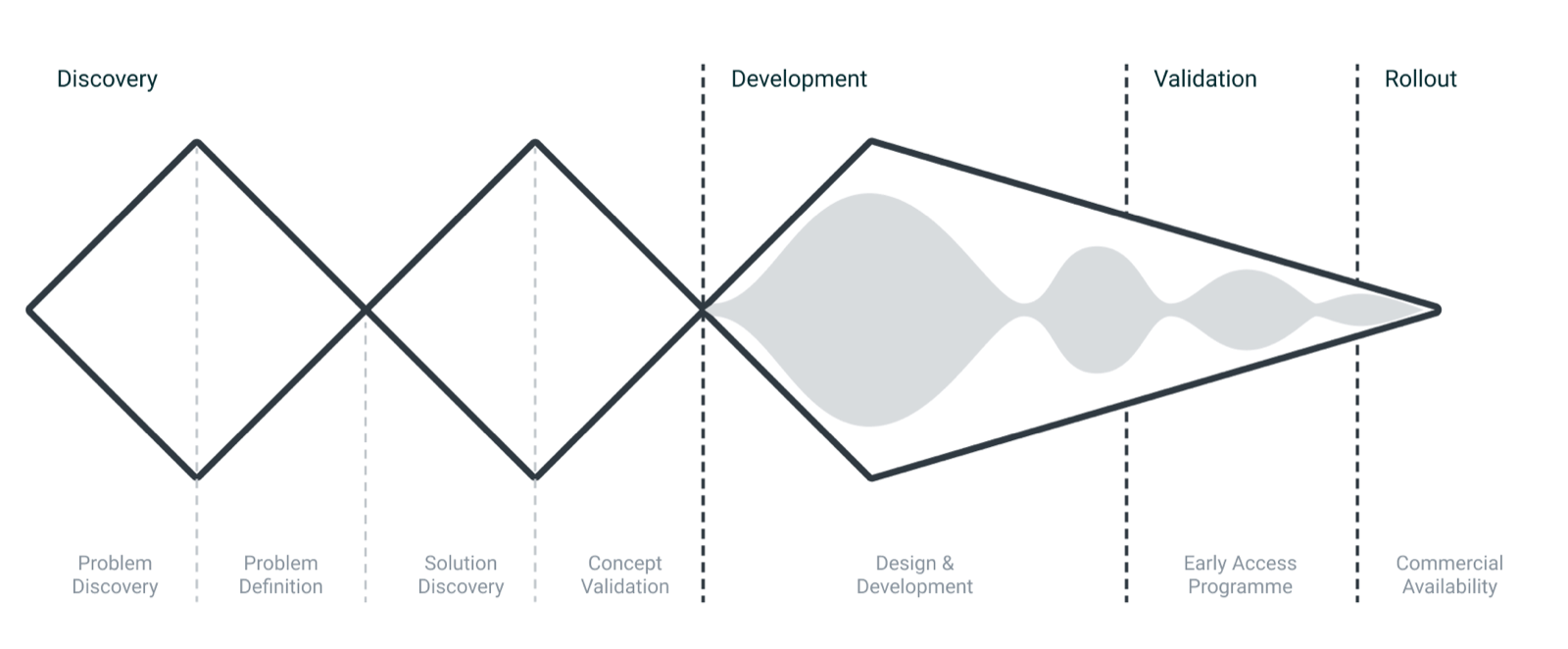
For most companies, this process integration may be far from being a priority, especially the ones with small design teams that are still learning how to benefit from the design practice. But as the importance of design in these companies grows, processes, collaboration, and advanced tools start to become a necessity. A report published in 2019 by the digital product design platform InVision shows that as the design practice matures, it faces a whole new set of challenges. But once these challenges are solved, design starts to evolve, up to the point that it becomes part of the business strategy, with a direct impact on the business revenue and valuation (Buley, 2019). What shows that investing in the design process does benefit not only the practice but also the business.
The adoption of a process like the one introduced by Zendesk may not be enough to guarantee that this partnership will work properly. The process by itself will not solve the problem, a company also needs to be structured in a way that its people and tools can benefit from the process. Otherwise, it can reduce the quality of the solutions delivered. As explained by Gurusamy et al. (2016), design frameworks, such as Design Thinking, tend to focus mostly on the problem space and discovery, while Agile methodologies focus on having working solutions as fast as possible. Led by this focus on quick delivery, many decisions are left to be made during the implementation phase, making designers sometimes wait for situations to arise, instead of planning for every possible scenario. What makes sense timewise, considering that this can be a time-consuming task, and most of these situations may not even become an issue. As the authors also affirm, this can work well for small flat organisations, where usually communication is easier, but it can become a problem in companies with a hierarchical structure.
A growing challenge
A possible cause of these unplanned situations can be attributed to the assortment of available phones, tablets and desktops. Within this range, there is an immense amount of screen sizes where solutions are expected to work correctly. At first, this should not be seen as a problem, but as an opportunity, where designers can plan and cater their solutions by adapting them to the user context. But this opportunity comes with a price: without the proper tooling, planning and designing for every possible screen size can become a bottleneck in the process. And if ignored, problems can arise upfront in the process, where it is not only more complicated to be solved, but also more expensive. Research shows that software bugs are five to thirty times more expensive to be solved once they happen after the design phase (IBM, 2008). As mentioned previously, there are technologies created to solve this problem, one of them being 'Responsive web design', a term coined in 2010 by Ethan Marcotte. This technology consists of adapting the content automatically to any screen size, based on predefined rules. It was first introduced in a period where global mobile browser usage started to rise, increasing the interest and demand of the technology, as an alternative to replace fixed size websites (Frain, 2020).
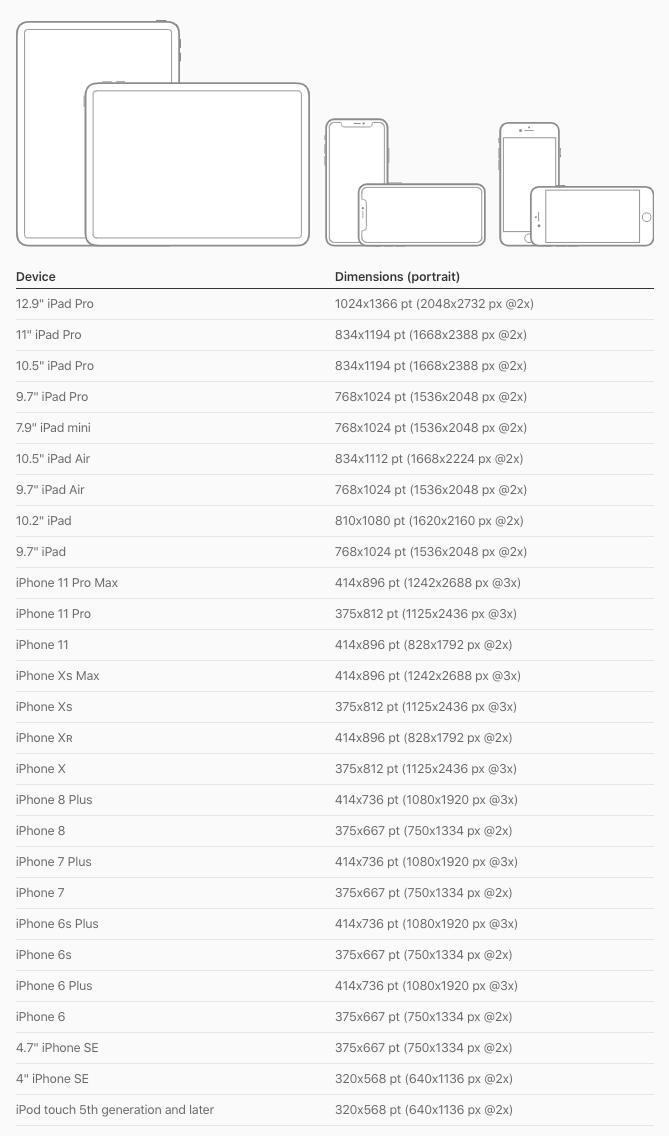
The assortment of available devices and screen sizes doesn't seem to be diminishing anytime soon. There are signals that it will become even more fragmented, as new devices are launched while older ones are still on the market. By the end of 2016, smartphones were already common in advanced economies. In the US alone, 77% of adult Americans claimed to own a smartphone (Poushter, 2017). Apple is an excellent example of this growing fragmentation. An assessment of the current version of the Apple Human Interface Guidelines (Fig. 2) reveals that there are currently twenty-seven devices and thirteen screen sizes supported on their platform. Another related topic may also impose a new challenge soon, and it consists of a new generation of phones and tablets with mouse and keyboard support. These hybrid screen devices will also require further planning from designers, bringing usual demands from desktop, such as hover states, to mobile devices, needs that will fall on designers who will have to consider these potential usages within their solutions.
Ethical considerations regarding accessibility
Figures from the World Health Organization (2018) estimate that 15% of the world's population has some form of disability. Elderly people, a group that is increasing in developed nations, account for a big part of this percentage. This group has disabilities that make it difficult for them to use computers. Instead of helping, design practices often isolate elderly and disabled people during the design phase. If an issue related to these user groups arises later in the process, it is usually solved by adding a few accessibility features, instead of adequately designing a solution (Biswas et al., 2012). The authors affirm that there are ethical and social reasons for designing a solution that considers the needs of people with disabilities, inviting designers to assess their needs early in the design process, so it can be integrated into the way they work, resulting in a solution that can be used by everyone, instead of just a group of people. Besides people with disabilities, there are also general usability concerns related to poor design adaptations to different screen sizes. Some issues can be easily solved, like increasing the font size to improve readability, while others can make access to critical information more difficult. A study conducted in the US revealed that the lack of responsive technology was causing a government website not being able to work correctly on phones (Cosgrove, 2018).
Problem situation in the workspace
The author of this study works at eBay Classifieds Group, a global collection of marketplace brands that allow millions of people to buy and sell through connected commerce. The company already benefits from a structured design team, with fifteen members that work on specialities ranging from research to user experience design. The author's job is to oversee the team's design process and its tools, therefore is interested in any opportunities to improve how the team operates. The following study will evaluate how the company can benefit from the findings and learnings identified from the secondary research. It runs alongside other process work happening on the same design team, covered in more depth in a related report on design systems for innovative digital products.
Methodology
The main objective of this study is to understand how, from a process and tooling perspective, designers can overcome the challenges of dealing with device and screen size fragmentation. The process below highlights the stages and activities performed:
- Discovery: Research about the topic on the existing company documentation, semi-structured interviews with stakeholders and a virtual workshop to map current process issues.
- Problem definition: Scope of the problem and expected output.
- Ideation: Exploration of possible solutions for the problem.
- Prototyping: Creation of interactive prototypes, based on the most relevant explorations from the ideation phase.
- Validation: Usability test to identify the user's ability to perform the main tasks, and pros and cons of each prototype.
The study ends with the validation stage, followed by an evaluation of the possible next steps, where a plan to integrate the solution into the workplace is described.
Discovery
The discovery phase started with a review of the company's existing documentation, such as past meeting notes, research findings and process documentation diagrams, from a repository maintained by the design team. This initial research revealed the problem was already known, and actions had been taken to reduce its impact. Some of these initiatives include the creation of a library of reusable visual patterns and workshops with designers and developers, focused on improving the way they collaborate. But these efforts were not enough to solve the problem.
As a next step, the author conducted five semi-structured interviews with designers and developers, with the purpose of identifying the reasons for the problem not being fully solved before. These interviews exposed that the previous and current tools used by the design team, for instance Sketch and Figma, were not able to cope with the task, and for this reason designers have to design their solutions for each screen size manually, a process that is not only susceptible to errors but also too time-consuming, as mentioned by the interviewees.
The collected information was used as a base for a virtual workshop using Miro, an online visual collaboration platform (Fig. 3), with the participation of the design team. The objective was to discuss and map how exactly the tools and process were affecting their way of working. The main findings were:
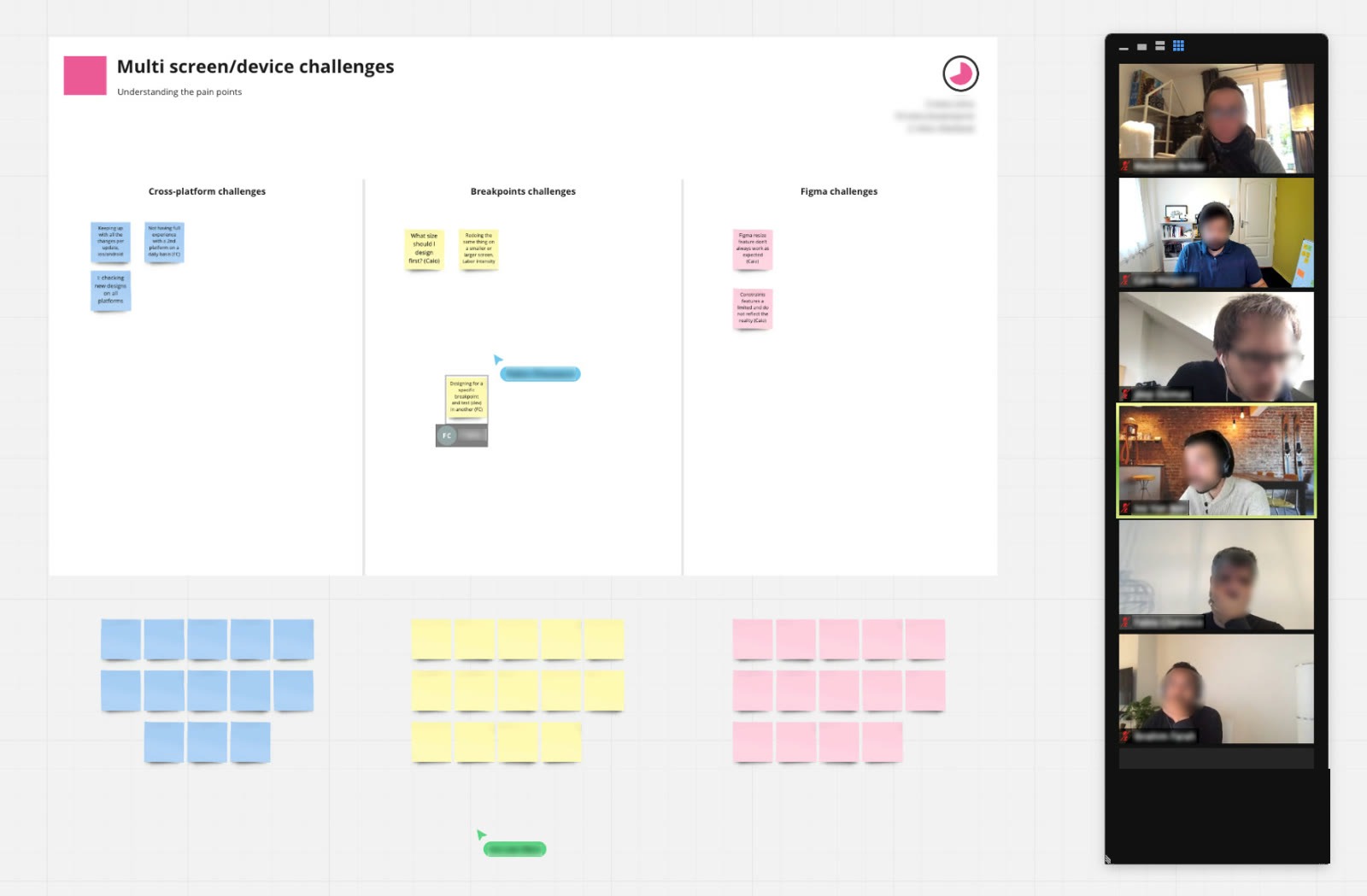
- Designers don't know on which devices or screen sizes they should start their designs.
- It is not clear on which or how many devices and screen sizes they should deliver their designs to developers.
- There is no clarity on what are the most popular sizes; these metrics could help the team to prioritise their work in a better way.
Problem and scope definition
Based on the findings of the discovery phase, the author interpreted that an optimal solution should be something that integrates into their current process and tools, helping scale their work by replacing the current manual tasks with some level of automation. A clear problem statement was created to share the project scope with the main stakeholders efficiently: help designers anticipate needs, use cases and interface issues, by efficiently simulating their solution in different devices and screen sizes.
Ideation
With a defined problem and scope, the author focused on exploring ways to integrate a solution into the existing tool used by designers, for instance Figma, which allows anyone with proper technical knowledge to create extra features via plugins. There are hundreds of community available plugins on the platform, published by a variety of sources, from big companies like Microsoft to individuals with the intent of helping their design peers. To better understand the possibilities and constraints of these plugins, an assessment of the current Figma developer documentation website was made. Luckily, no blockers were identified.
Benchmark
Considering that this is the first Figma plugin built in the author's workplace, a benchmark of available plugins was made. Different from the documentation assessment, the objective was to evaluate the visual and interaction characteristics of this type of solution. Ten Figma plugins were analysed, five of the most downloaded ones and five that had features related to resizing elements and pages (Fig. 4). The main findings were:
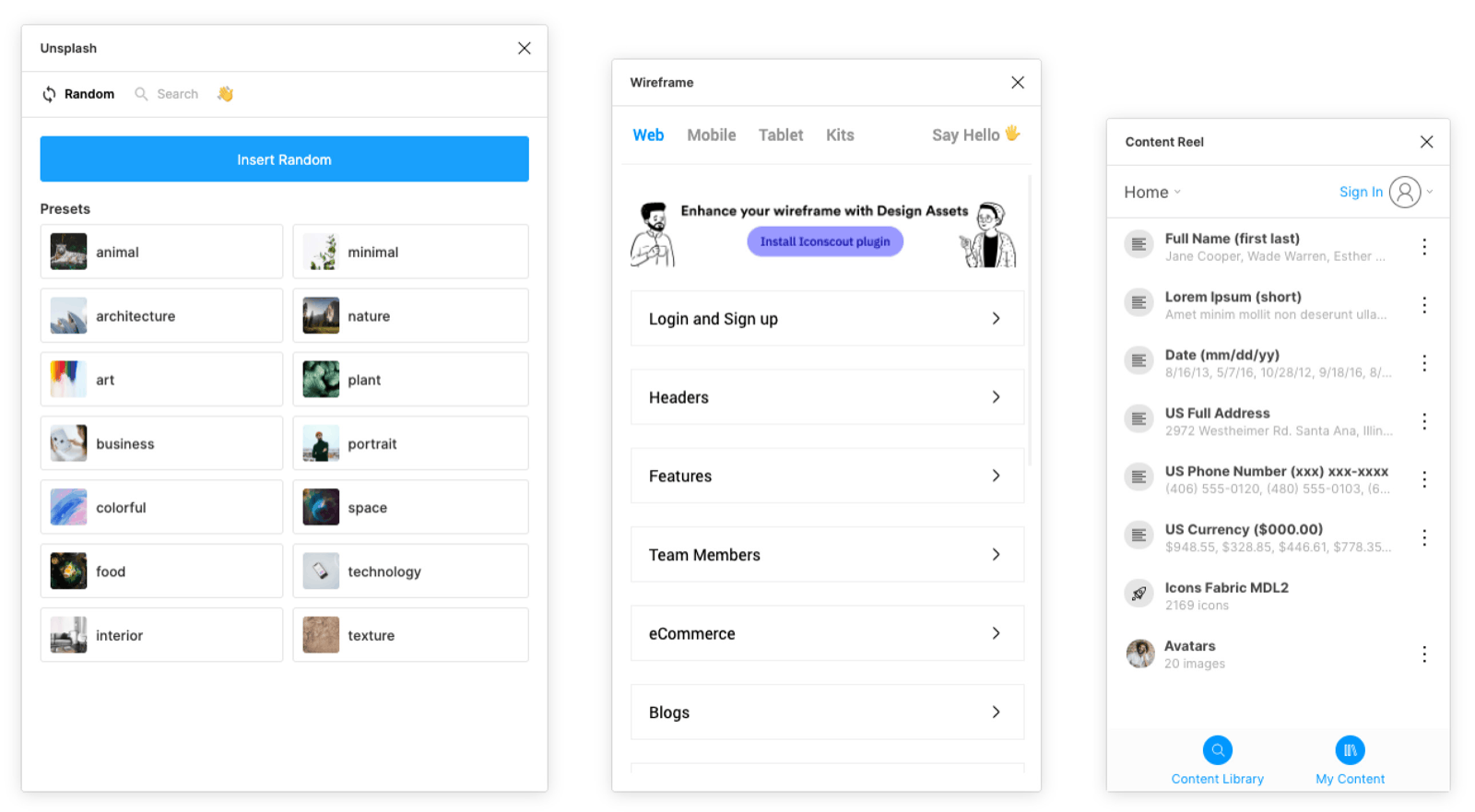
- Figma allows fully customised interfaces for plugins, but most opt to emulate the main software user interface, helping their solution to be perceived as an integrated feature instead of a third-party solution.
- A plugin can support not only one but multiple features and use cases.
- Other companies can benefit from the same solution, so all plugins are available to the community. The main gain is to not only help others but to collect feedback from a bigger group of people.
Adopting one of the available plugins instead of building one from scratch could also be a viable option. But none of the evaluated plugins was able to solve the problem entirely during the benchmark. Besides the fact that adopting a ready-to-use solution would make the company dependent on external parties for a crucial phase of the process, there is one more reason to build it from scratch: the differentiator of acquiring the know-how to create its own design tools, an investment that can help future process problems be easier to solve.
Sketches
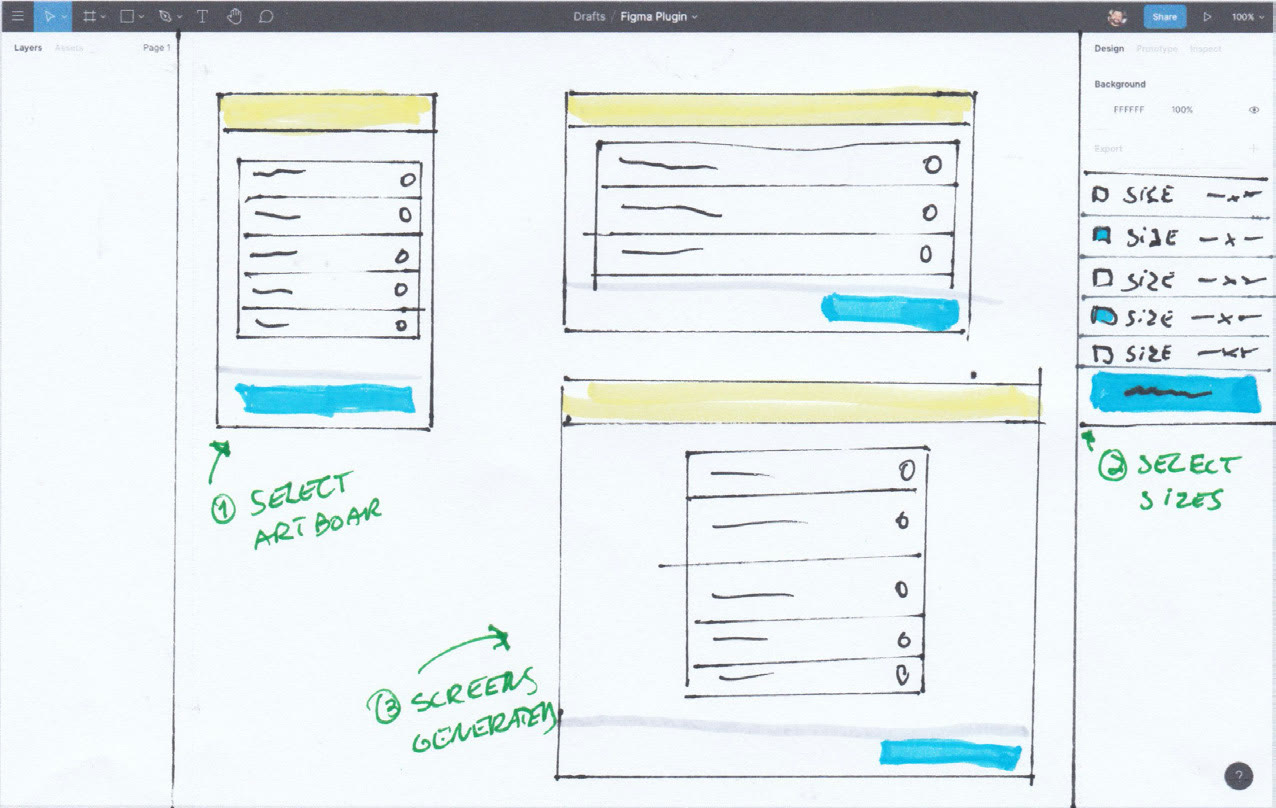
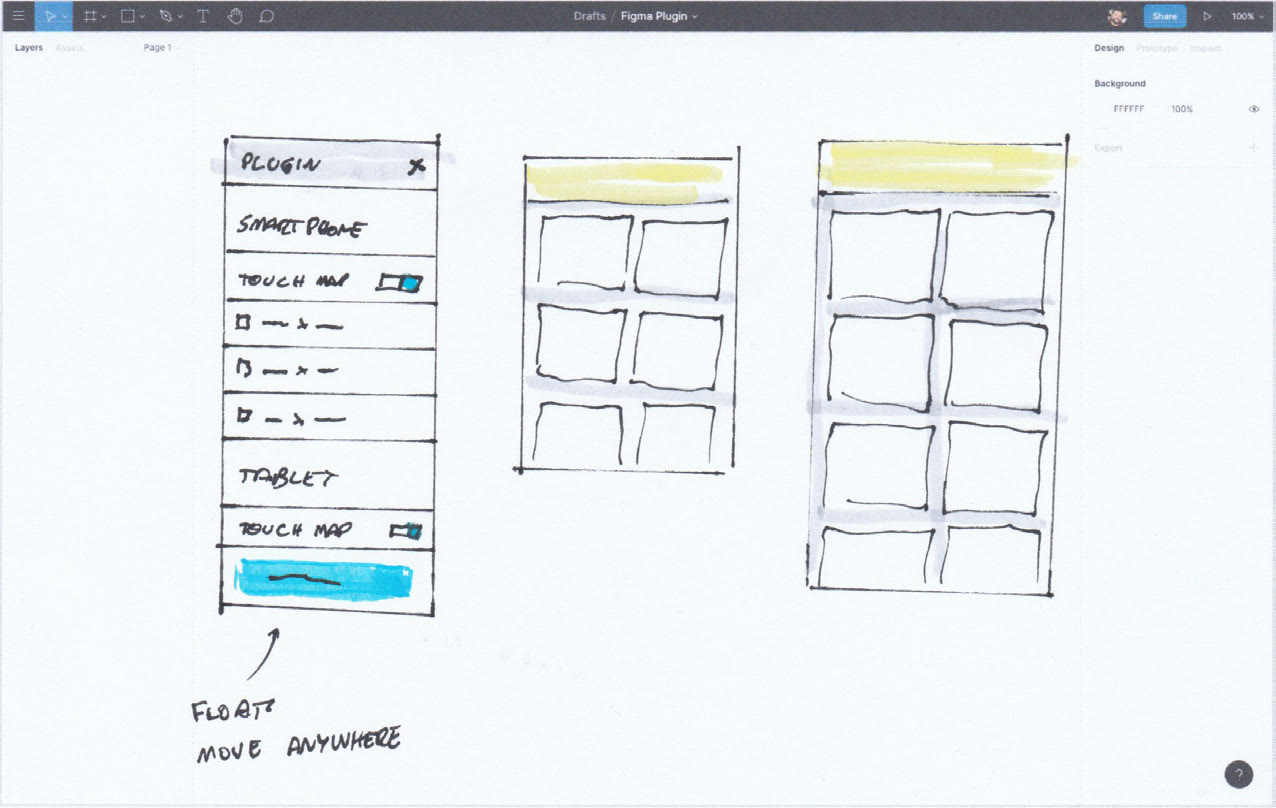
To explore multiple ideas within a short timeframe, the author created a printed template containing the main Figma interface elements, that were printed and used as a base for the sketches (Fig. 5). This process allowed for easy iteration and dozens of ideas to be quickly validated, while also helping to understand how much content the interface would support, considering that multiple other features are also visible at the same time. The two most relevant ideas were selected to become interactive prototypes.
Prototyping
The next step towards the solution was to generate two interactive prototypes, based on sketches that best translated the requirements identified in the discovery phase. This type of prototype was chosen since it allows more immersive usability tests, where not only the visual but also a complete task flow can be evaluated.
Prototype A
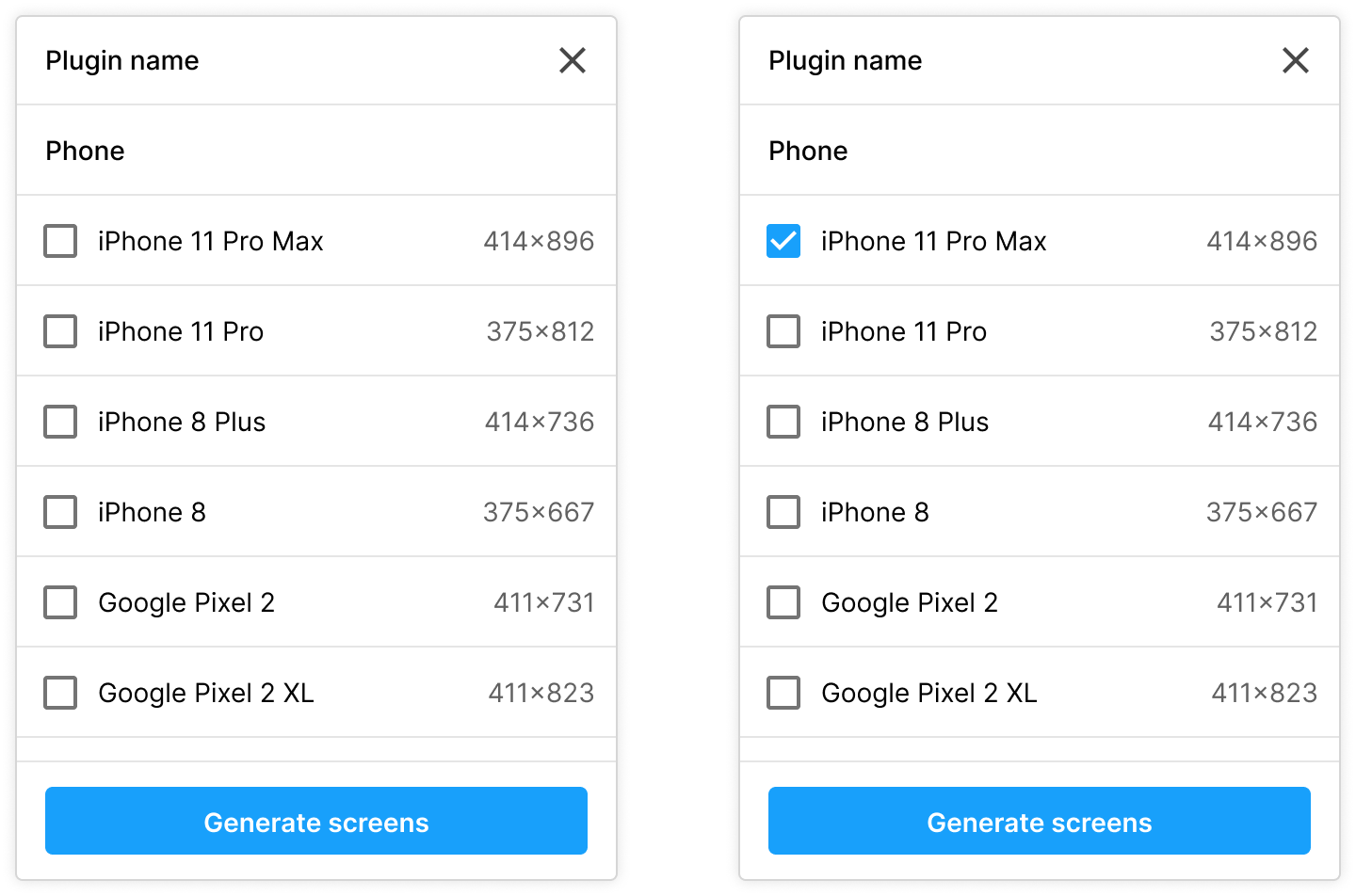
This version consists of one single list of options, where users can choose the desired devices and click on the main call-to-action to generate the new designs.
Prototype B
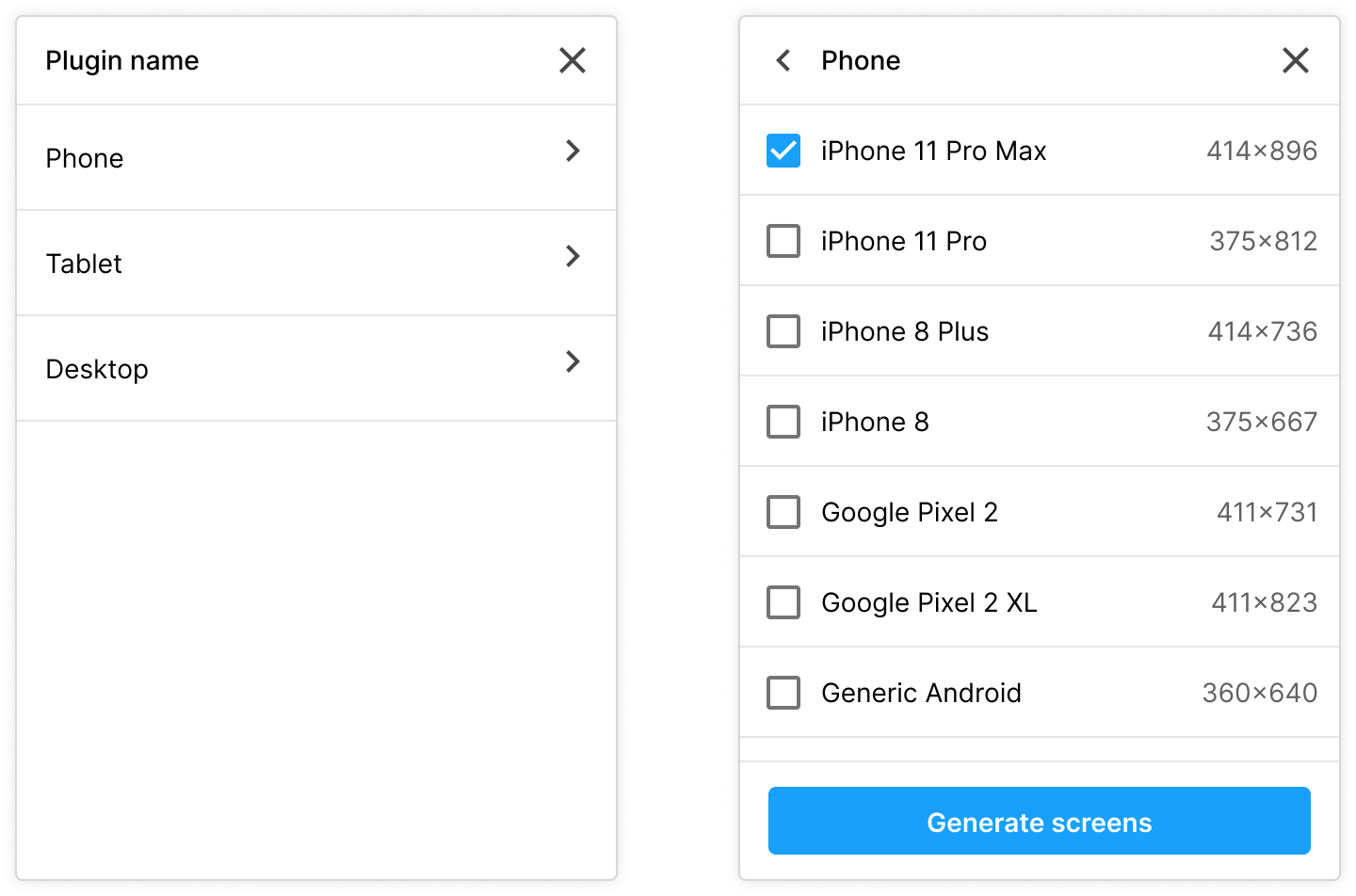
The second prototype has the same features as Prototype A, but the navigation is different: the options are presented in groups based on device types.
Validation
- Stimuli: Semi-structured interview script and prototypes.
- Method: Remote interview and usability test (30 min).
- Participants: Four participants, split between 2 user experience designers, 1 design lead and 1 frontend developer.
- Scenario: Imagine that you just finished designing a solution to a problem you've been working on. You now need to simulate how this solution would look on a bigger phone (iPhone 11 Pro Max) and in a tablet (iPad mini).
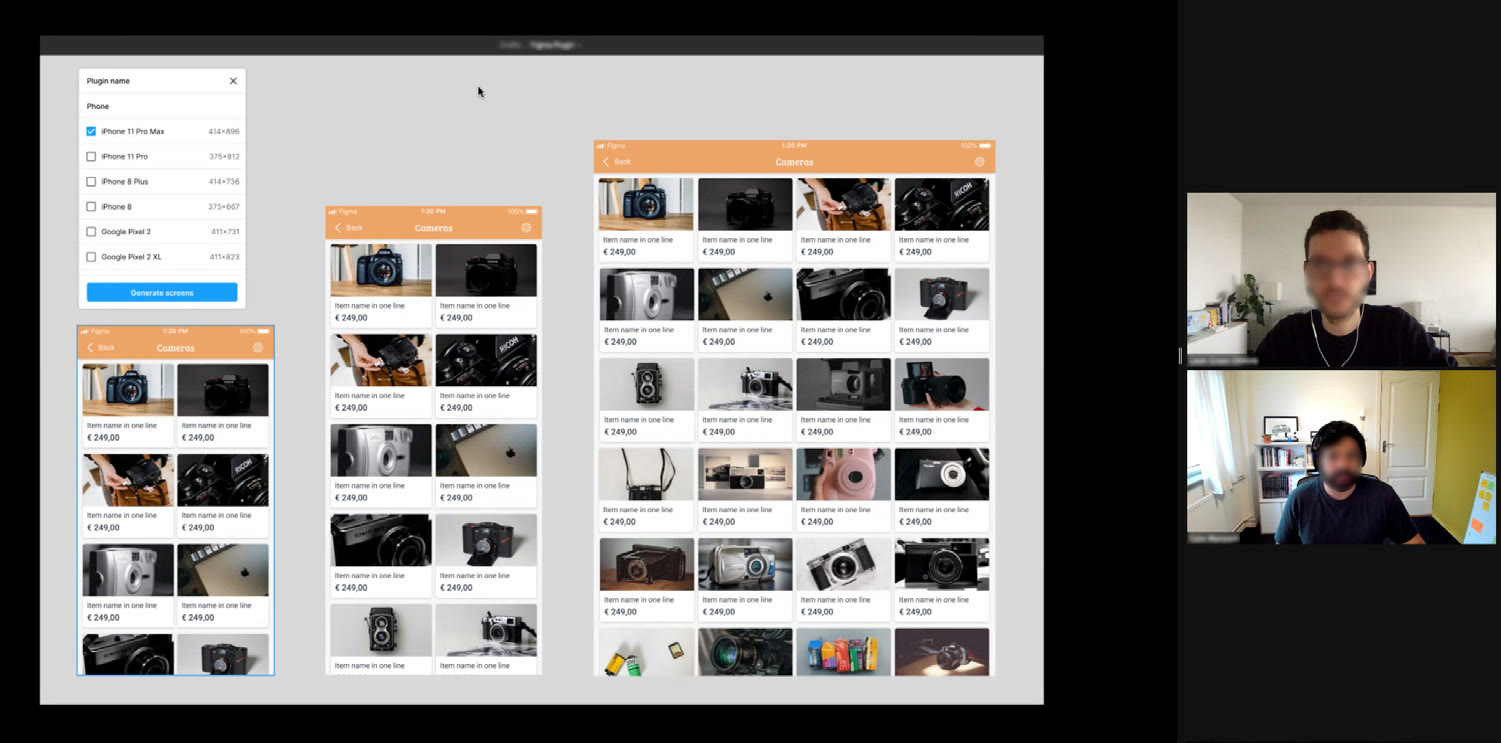
For the validation phase, both prototypes were tested with the main stakeholders of the project (Fig. 6). Each participant received a fictional scenario and tasks to be performed. To best capture their perception, participants were oriented to verbalise anything that came to their mind, so the author, as facilitator and observer, could take notes on the most pertinent observations. Also, to avoid bias towards the first prototype presented, the order of the prototypes was randomised.
Validation findings
All participants expressed that they had a positive experience with the prototypes, but there are a series of potential improvements to be done. Based on the observer notes, these are the identified pros and cons of each prototype:
Prototype A
Pros
- Easy to compare device sizes since they are all in the same list.
- All the desired devices can be selected on the same screen.
- Device names are easily recognizable.
Cons
- There is no indication that the list content is scrollable.
- There is no mention of our current breakpoints, only the device name is mentioned.
Prototype B
Pros
- The split of a page for each device helps the designer to focus on validating one device type per time.
- This design is similar to the options Figma provides when a new artboard is being created.
Cons
- Requires more steps to simulate different types of devices.
- On the phone and tablet pages, there is no mention if the sizes relate to the device portrait or landscape orientation.
Regarding the requested tasks, most were able to complete them quickly. But in some situations, participants demonstrated hesitation before continuing. The reasons, and also which prototype each participant prefers, are listed in the table below:
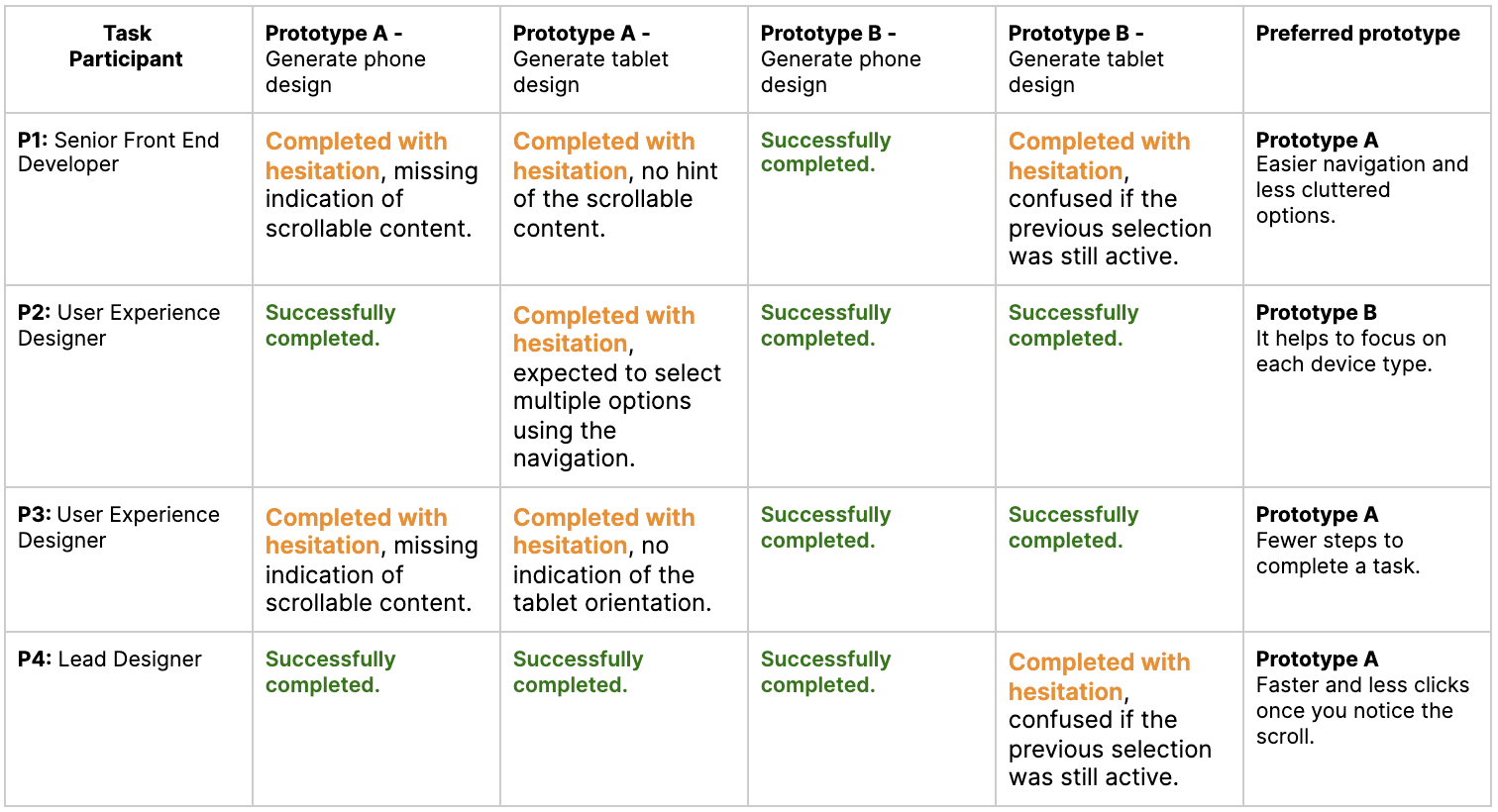
Based on the results of this validation, the recommendation is to continue to iterate on a second version, where the identified improvements can be worked on. These issues are not a blocker for the development of the solution, but if they can be addressed before the development phase, the chances of success will be higher.
Next steps
The problem in the workplace resulted in a solution and way of working never explored by the company before. The development of custom tools for designers needs to be further discussed, and resources for development need to be gathered. Therefore, the next step will consist of a meeting with the lead members of the Product & Technology department. In this session, the content of this research report will be presented, and if approved, a feasibility and estimation assessment will be done by a team of developers. Also, as the validation phase stated, the current solution can potentially solve the problem but needs further iteration; this can be done in parallel, allowing a more accurate estimation. If the stakeholders consider that the effort is low to medium, there is a high chance that the solution will be developed within the next months.
Conclusion
This research report contributed to the understanding of the possible gaps in the way designers and developers collaborate. The secondary research enlightened the problem and provided clarity on the cause and possible solutions. These findings were fundamental when working on the problem in the workplace. The initial validation results show that the current proposed solution can improve the way designers work, drastically reducing the time they spend dealing with device screen size fragmentation. If implemented as designed, designers will potentially be able to anticipate risks related to these size differences, allowing the time saved to be applied in other phases of the process, such as research and validation. Alongside solving the problem, this tool can also benefit others, by increasing the collaboration between designers and developers and bringing accessibility earlier into the design phase. On the business side, it contributes not only to faster iterations but also to the evolution and maturity of the design practice within the company.
Bibliography
- Biswas, P., Robinson, P. and Langdon, P. (2012) 'Designing Inclusive Interfaces Through User Modeling and Simulation', International Journal of Human–Computer Interaction, 28(1), pp. 1–33. doi: 10.1080/10447318.2011.565718.
- Buley, L. (2019) Design Maturity Model by InVision: The New Design Frontier. Available at: invisionapp.com.
- Chen, M. (2020) The Zendesk Triple Diamond process, Medium. Available at: medium.com.
- Cosgrove, S. (2018) 'Exploring usability and user-centered design through emergency management websites: advocating responsive web design', Communication Design Quarterly, 6(2), pp. 93–102. doi: 10.1145/3282665.3282674.
- Design Council (2015) What is the framework for innovation? Design Council's evolved Double Diamond. Available at: designcouncil.org.uk.
- Ferreira, J., Noble, J. and Biddle, R. (2007) 'Agile Development Iterations and UI Design', in Agile 2007 (AGILE 2007). Agile 2007 (AGILE 2007), pp. 50–58. doi: 10.1109/AGILE.2007.8.
- Frain, B. (2020) Responsive web design with HTML5 and CSS: develop future-proof responsive websites using the latest HTML5 and CSS techniques. ISBN 9781839211560.
- Gurusamy, K., Srinivasaraghavan, N. and Adikari, S. (2016) 'An Integrated Framework for Design Thinking and Agile Methods for Digital Transformation', in Marcus, A. (ed.) Design, User Experience, and Usability: Design Thinking and Methods. Cham: Springer International Publishing (Lecture Notes in Computer Science), pp. 34–42. doi: 10.1007/978-3-319-40409-7_4.
- IBM (2008) Minimizing Code Defects to Improve Software Quality and Lower Development Costs. Available at: ibm.com.
- Poushter, J. (2017) 'Smartphones are common in advanced economies, but digital divides remain', Pew Research Center. Available at: pewresearch.org.